I migrated this blog to GitHub and Netlify back in September 2022. Three years later, I decided to move my (small) number of GitHub repositories to Codeberg as I was impressed by their approach to open source software, transparent communications and I always like to support the underdog.
I'm not a developer and my GitHub repositories were mainly historical versions of my blog over the years placed under version control and as a backup.
My GitHub repos were all basic; single user and didn't include any issues, pull requests and hardly any branches. Consequently, I simply followed the Codeberg documentation and the transition was quick and seamless, preserving all the commit history.
As the test migration went smoothly, I then considered simplifying my blog workflow by removing the dependency on GitHub pages and Netlify. Six months ago, Codeberg provided Codeberg pages which looked to be very similar to GitHub pages.
The blog publishing process previously performed by Netlify's integration with GitHub pages would now be implemented using Codeberg's Woodpecker Continuous Integration (CI) and Codeberg pages.
You had to apply for privileges to use Woodpecker but my request was approved very promptly.
Codeberg helpfully provided examples of Woodpecker files for popular tasks which included a YAML template to publish a Hugo blog from a Codeberg repository to Codeberg pages.
Once I had configured my Codeberg secrets for the Codeberg token and email address and a few iterations, it was working !
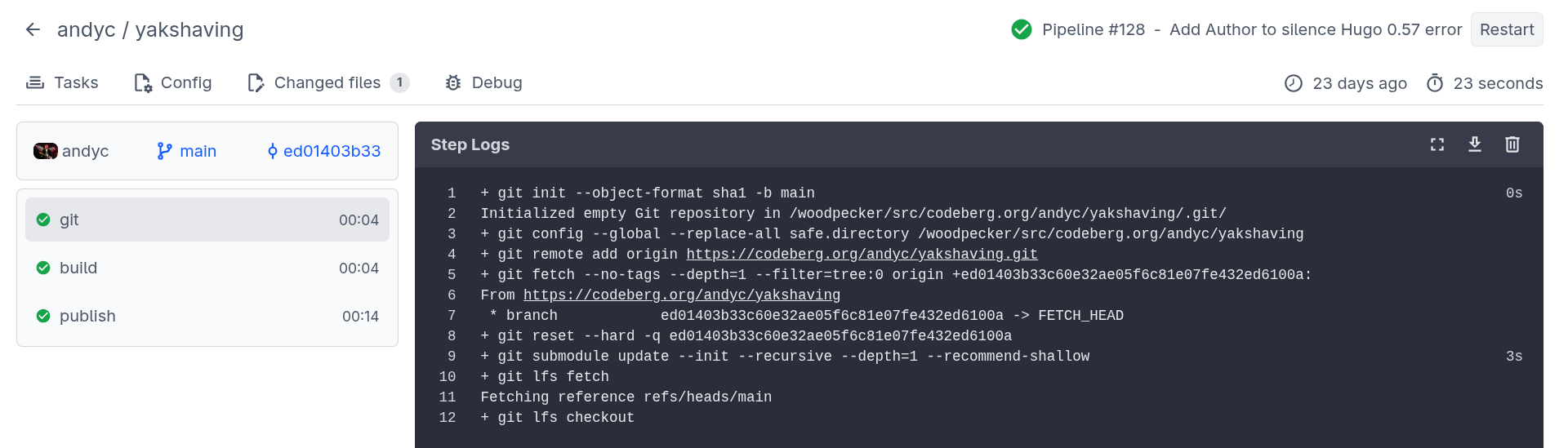
I liked the Codeberg CI dashboard summary with traffic light icons indicating the success (failure) of each stage together with timing information and the ability to get detailed log information for each stage of the process.
The Codeberg publish process has three stages:
git
The initial 'git' stage fetches the latest changes from the Codeberg repository.
+ git init --object-format sha1 -b main
Initialized empty Git repository in /woodpecker/src/codeberg.org/andyc/yakshaving/.git/
+ git config --global --replace-all safe.directory /woodpecker/src/codeberg.org/andyc/yakshaving
+ git remote add origin https://codeberg.org/andyc/yakshaving.git
+ git fetch --no-tags --depth=1 --filter=tree:0 origin +ed01403b33c60e32ae05f6c81e07fe432ed6100a:
From https://codeberg.org/andyc/yakshaving
 * branch            ed01403b33c60e32ae05f6c81e07fe432ed6100a -> FETCH_HEAD
+ git reset --hard -q ed01403b33c60e32ae05f6c81e07fe432ed6100a
+ git submodule update --init --recursive --depth=1 --recommend-shallow
+ git lfs fetch
Fetching reference refs/heads/main
+ git lfs checkout
build
The 'build' stage builds the site using Hugo and includes the version of Hugo used by Codeberg (useful for debugging issues) and timing information.
+ hugo --minify
Start building sites …
hugo v0.154.5-a6f99+extended linux/amd64 BuildDate=2026-01-11T20:53:23Z
                  |  EN
------------------|-------
 Pages            | 1156
 Paginator pages  |  297
 Non-page files   |    0
 Static files     |  132
 Processed images |    0
 Aliases          |   61
 Cleaned          |    0
 Total in 2612 ms
publish
The 'publish' phase deploys the generated site to Codeberg pages into the 'pages' branch.
+ git config --global user.email $MAIL
+ git config --global user.name "Woodpecker CI"
+ git clone -b pages https://$CODEBERG_TOKEN@codeberg.org/$CI_REPO.git $CI_REPO_NAME
Cloning into 'yakshaving'...
+ cp -ar $HUGO_OUTPUT/. $CI_REPO_NAME/
+ cp .domains $CI_REPO_NAME || true
+ cd $CI_REPO_NAME
+ git add .
+ git commit -m "Woodpecker CI ed01403b33c60e32ae05f6c81e07fe432ed6100a"
[pages 292c34d1] Woodpecker CI ed01403b33c60e32ae05f6c81e07fe432ed6100a
 1388 files changed, 6483 insertions(+), 6483 deletions(-)
+ git push
remote:
remote: Create a new pull request for 'pages':
remote:   https://codeberg.org/andyc/yakshaving/compare/main...pages
remote:
To https://codeberg.org/andyc/yakshaving.git
   7c95fab3..292c34d1  pages -> pages
The final stage was to redirect my domain name from Namecheap to the Codeberg URL. Although, I was aware that the answer is always 'DNS', this configuration change was explained clearly in the Codeberg documentation and worked fine.