Posts in category "blogging"

converting JPEG and PNG images to WebP format

People tell me the 'WebP' format is the recommended format for images displayed on a Web site as WebP files are smaller than PNG and JPEG formats. My site uses JPEG and PNG image formats. The advent of WebP is hardly news but I'm always late to the party.

There is a WebP converter available in the Arch Linux AUR repository.

This looks promising so I immediately go to install it.

$ yay -S webp-converter-git
Sync Make Dependency (7): gendesk-1.0.10-1, gn-0.2324.304bbef6-2,
    rust-bindgen-0.72.1-2, gperf-3.3-2, python-httplib2-0.31.2-1,
    python-pyparsing-3.3.2-1, patchutils-0.4.5-1
Sync Dependency (1): libvips-8.18.2-1
AUR Explicit (1): webp-converter-git-1.0.0.r2.gce5d96c-1
AUR Dependency (1): electron33-33.4.11-2
:: PKGBUILD up to date, skipping download: webp-converter-git
:: PKGBUILD up to date, skipping download: electron33
  2 webp-converter-git                       (Build Files Exist)
  1 electron33                               (Build Files Exist)
==> Packages to cleanBuild?
==> [N]one [A]ll [Ab]ort [I]nstalled [No]tInstalled or (1 2 3, 1-3, ^4)

Oh no, hang on, wait. it's a bloated Electron application with a lot of dependent Rust and Python packages. Forget that.

However, I recall that Emacs uses the 'imagemagick' package which is already installed and includes a utility (mogrify) that can perform the same conversion (from JPEG/PNG to WebP).

$ mogrify -format webp -quality 80 2026-04-14-BlogMore-DraftPost.png
$ ls -lh 2026*
100k     2026-04-14-BlogMore-DraftPost.png
44k      2026-04-14-BlogMore-DraftPost.webp

Half the size. Compare the PNG versus the WebP image. Copy the WebP file to the images directory. Update the image link in the blog post. Job done (apart from the existing 135 images).

blogging more with BlogMore

This is my experience of migrating this blog from Hugo to BlogMore (prompted by various reasons that initiated yet another blog migration).

The aim of the exercise was to streamline the process of publishing a blog post to encourage me to post more frequently than once a year.

My small, personal blog is hosted on Codeberg pages and I use Arch Linux (BTW).

This post is not a substitute for the the excellent, comprehensive documentation which fully describes the installation, configuration and usage of BlogMore.

Installation

Install uv

uv is a modern, powerful Python development tool which includes the virtualenv, pyenv and pip functionality (and much more besides).

The 'uv' package is available in the Arch Linux repository.

$ yay -S uv
Sync Explicit (1): uv-0.11.3-1
resolving dependencies...
looking for conflicting packages...

Packages (1) uv-0.11.3-1

Total Download Size:   15.41 MiB
Total Installed Size:  57.14 MiB

:: Proceed with installation? [Y/n]
:: Retrieving packages...
 uv-0.11.3-1-x86_64     15.4 MiB  14.0 MiB/s 00:01 [######################] 100%
(1/1) checking keys in keyring                     [######################] 100%
(1/1) checking package integrity                   [######################] 100%
(1/1) loading package files                        [######################] 100%
(1/1) checking for file conflicts                  [######################] 100%
(1/1) checking available disk space                [######################] 100%
:: Processing package changes...
(1/1) installing uv                                [######################] 100%
:: Running post-transaction hooks...
(1/1) Arming ConditionNeedsUpdate...

Check the version of the newly installed 'uv' package.

$ uv --version
uv 0.11.3 (45da18ac3 2026-04-01 x86_64-unknown-linux-gnu)

Install BlogMore

Once 'uv' is available, installation of BlogMore is trivial as 'uv' automatically takes care of installing all the dependencies and required Python packages.

$ uv tool install blogmore
Resolved 16 packages in 145ms
Installed 16 packages in 101ms
 + blogmore==2.9.0
 + feedgen==1.0.0
 + jinja2==3.1.6
 + lxml==6.0.2
 + markdown==3.10.2
 + markupsafe==3.0.3
 + minify-html==0.18.1
 + pillow==12.2.0
 + pygments==2.20.0
 + python-dateutil==2.9.0.post0
 + python-frontmatter==1.1.0
 + pyyaml==6.0.3
 + rcssmin==1.2.2
 + rjsmin==1.2.5
 + six==1.17.0
 + watchdog==6.0.0

Add the ~/.local directory to $PATH to make the blogmore command available.

$ export PATH="$HOME/.local/bin:$PATH"

Updating BlogMore

BlogMore releases can be frequent (new functionality, bug fixes) and the 'uv' package is also used to update BlogMore. Any updates to dependent packages are automatically handled.

$ uv tool update blogmore
Updated blogmore v2.11.1 -> v2.13.0
 - blogmore==2.11.1
 + blogmore==2.13.0
 - lxml==6.0.2
 + lxml==6.0.3

Site structure

As part of the migration, I reviewed the existing structure of my Hugo site.

./archetypes
./content
./content/about                           # 'About' page
./content/archive.md                      # 'Archive' tab on Home page
./content/search.md                       # 'Search' tab on Home page
./content/posts                           # 1,000 posts in single directory
./content/posts/aboriginal-culture.md
./content/posts/a-brief-history-of-inane-drivel.md
./content/posts/absolute-disgrace.md
./content/posts/a-cause-for-concern.md
./content/posts/a-day-in-the-life.md
# <snip>
./content/posts/writing-style.md
./content/posts/yak-shaving.md
./content/posts/your-papers-please.md
./content/posts/you-were-kindness.md
./content/posts/zohowriter.md
./orgposts                                # Orgmode posts
./orgposts/fun-with-static-site-generators.org
./orgposts/improving_fwp_apex_app.org
./orgposts/oracle-sql-config.org
./static
./static/images                           # Images
./themes
./themes/PaperMod                         # Papermod theme
./public                                  # Generated site

There were a couple of things that irritated me about this setup:

  • Orgmode posts are stored separately from Markdown content.
  • Markdown files derived from Orgmode posts are essentially (but understandably) duplicated.
  • All 1,000 posts are stored in a single directory.

The decision to store every single post in the 'content/posts' directory was purely historical. I started that way and never changed. This flat structure had its advantages. Looking for patterns (posts without any tags defined) in the front matter was easy using 'grep'.

However, grep (and ripgrep) can search recursively and so I decided to move 1,000 blog posts spanning 20 years to sub directories for each year so this year's posts now reside under 'content/posts/2026'.

Bizarrely, I found this simple change was very helpful. Previously, it was hard to identify draft posts and find recent content. Having less than 10 posts in the 2026 directory was more manageable.

Front Matter

Any blog migration will necessitate conversion of the front matter.

Hugo front matter (TOML)

+++
title = "fun with static site generators"
date = 2025-10-16T09:46:10
lastmod = 2025-10-22T12:52:18+01:00
categories = ["software"]
tags = ["Hugo", "11ty", "BSSG", "Zola", "Nikola", "Pelican", "Jekyll"]
draft = false
+++

BlogMore front matter (YAML)

---
title: fun with static site generators
date: 2025-10-16 09:46:10
modified: 2025-10-22 12:52:09
category: software
tags: Hugo, 11ty, BSSG, Zola, Nikola, Pelican, Jekyll
---

The conversion of the front matter was relatively straightforward as I already had a bunch of sed scripts as a result of previous migrations.

I like BlogMore's use of a single 'Category' with multiple 'Tags' as that's how my brain works and it helps me categorise content better.

BlogMore is flexible and supports three formats to specify the 'Tags' meta-data

  1. YAML list ('tags: [football, united]')
  2. Comma separated list ('tags: football, united')
  3. Multi-line list
tags:
  - football
  - united

I prefer the CSV option as the square brackets in the YAML list is just noise and visual clutter. The single line format is also easier for any subsequent conversions to the next shiny blog platform.

Similarly, the fact that ox-hugo enclosed tags in double quotes was undoubtedly sensible from a purist, developer standpoint but was just more irritating, visual clutter when reviewing the generated Markdown files.

BlogMore is more forgiving on the precise date and timestamp format which has always been another source of irritation. I don't want to know or need to learn the 'ISO 8601 with timezone' standard simply to quickly create a blog post.

Creating a post

You can easily create a new post in BlogMore using your preferred text editor. You can either create the post manually, copy the previous post or use a shell script or templates. For Emacs, YASnippet and tempo are useful.

Here is my sample template for a new post.

---
title:
date: 2026-04-13 12:20:46+0100
category:
tags:
draft: true
---

Dave Pearson has created a marvellous Emacs package (blogmore.el) that is invaluable in managing content, timestamps and meta-data (categories and tags). However, this package merits a separate post in due course.

Code blocks

BlogMore is Python based and uses Pygments for syntax highlighting. Pygments supports many different languages and styles.

BlogMore allows you to select your preferred style (for light and dark themes) using the light/dark_mode_code_style configuration file parameters.

To use the popular 'monokai' theme for all code blocks, add the following lines to the BlogMore configuration file config.yaml.

light_mode_code_style: monokai
dark_mode_code_style: monokai

Building

When I work on a blog post, I tend to take my time. Write, edit, review, write, edit, preview and iterate. Rinse and repeat.

I normally build the BlogMore site to check for any errors in the front matter.

By default, the BlogMore build command only considers published posts so use the --include-drafts parameter to see work currently in progress.

$ blogmore build --include-drafts
Parsing posts from content...
Found 1033 posts
Found 1 pages
Optimizing FontAwesome CSS...
Generating post pages...
Generating static pages...
Generating custom 404 page...
Generating index page...
Generating archive page...
Generating date-based archive pages...
Generating tag pages...
Generating tags overview page...
Generating category pages...
Generating categories overview page...
Generating RSS and Atom feeds...
Generating search index and search page...
Generating blog statistics page...
Copied bundled static assets
Generated minified CSS as styles.min.css
Generated minified CSS as search.min.css
Generated minified CSS as stats.min.css
Generated minified CSS as archive.min.css
Generated minified CSS as tag-cloud.min.css
Generated minified CSS as calendar.min.css
Generated minified code CSS as code.min.css
Generated minified JS as theme.min.js
Generated minified JS as codeblocks.min.js
Generated minified JS as search.min.js
Generated minified FontAwesome CSS as fontawesome.min.css
Copied 134 extra file(s) from content/extras
Generating XML sitemap...
Site generation complete! Output: <site>/blogmore/site

The build command identifies any problems, typically in the front matter. For example

Warning: Skipping content/posts/2026/blogging-more-with-blogmore.md:
Post missing required 'title' in frontmatter:
    content/posts/2026/blogging-more-with-blogmore.md

Previewing

Once the site has been generated without errors, you can then preview the site using blogmore serve which makes your local site available at http://localhost:8000/.

$ blogmore serve --include-drafts
Generating site from /home/andy/software/codeberg-repos/blogmore/content...
Removing output directory: /home/andy/software/codeberg-repos/blogmore/site
Parsing posts from /home/andy/software/codeberg-repos/blogmore/content...
Found 1033 posts
Found 1 pages
Optimizing FontAwesome CSS...
Generating post pages...
Generating static pages...
Generating custom 404 page...
Generating index page...
Generating archive page...
Generating date-based archive pages...
Generating tag pages...
Generating tags overview page...
Generating category pages...
Generating categories overview page...
Generating RSS and Atom feeds...
Generating search index and search page...
Generating blog statistics page...
Copied bundled static assets
Generated minified CSS as styles.min.css
Generated minified CSS as search.min.css
Generated minified CSS as stats.min.css
Generated minified CSS as archive.min.css
Generated minified CSS as tag-cloud.min.css
Generated minified CSS as calendar.min.css
Generated minified code CSS as code.min.css
Generated minified JS as theme.min.js
Generated minified JS as codeblocks.min.js
Generated minified JS as search.min.js
Generated minified FontAwesome CSS as fontawesome.min.css
Copied 134 extra file(s) from /home/andy/software/codeberg-repos/blogmore/content/extras
Generating XML sitemap...
Site generation complete! Output: /home/andy/software/codeberg-repos/blogmore/site
Watching for changes in /home/andy/software/codeberg-repos/blogmore/content...
Watching for changes in config file: blogmore.yaml
Serving site at http://localhost:8000/
Press Ctrl+C to stop the server
127.0.0.1 - - [14/Apr/2026 11:19:24] "GET /posts/blogging-more-with-blogmore/ HTTP/1.1" 200 -
127.0.0.1 - - [14/Apr/2026 11:19:24] "GET /static/fontawesome.min.css?v=1776161935 HTTP/1.1" 200 -
127.0.0.1 - - [14/Apr/2026 11:19:24] "GET /static/styles.min.css?v=1776161935 HTTP/1.1" 200 -
127.0.0.1 - - [14/Apr/2026 11:19:24] "GET /static/code.min.css?v=1776161935 HTTP/1.1" 200 -
127.0.0.1 - - [14/Apr/2026 11:19:24] "GET /static/theme.min.js HTTP/1.1" 200 -
127.0.0.1 - - [14/Apr/2026 11:19:24] "GET /static/codeblocks.min.js HTTP/1.1" 200 -

The 'blogmore serve' command will also generate the site (implies a 'blogmore build') so include the --include-drafts parameter to see all content.

BlogMore provides a helpful, visual indicator to distinguish drafts from published posts.
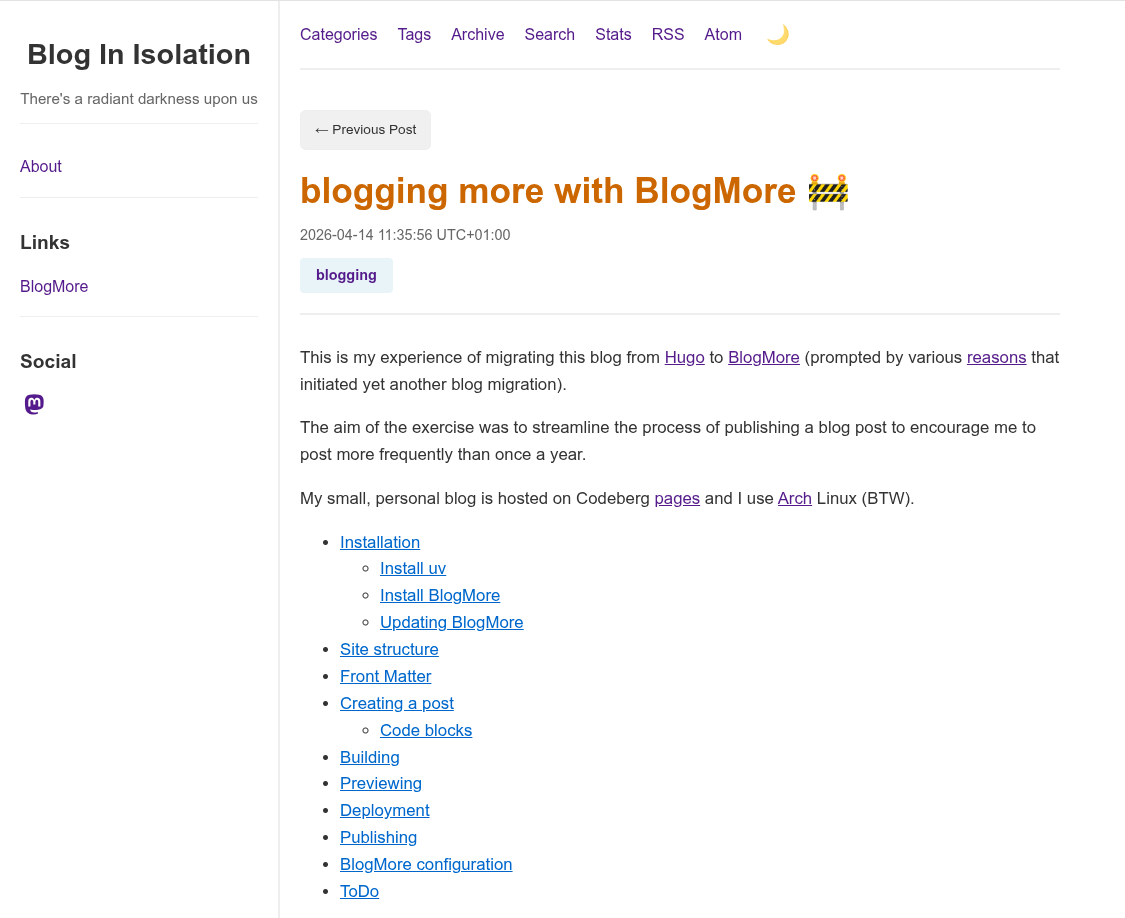
BlogMore draft post

The 'blogmore serve' command is a live preview that automatically detects any changes to content and dynamically regenerates the site which accelerates the iterative 'write-preview-fix' process.

Detected change in <site>/content/posts/2026/blogging-more-with-blogmore.md, regenerating site...
Removing output directory: <site>/blogmore/site
Parsing posts from <site>/blogmore/content...
Found 1027 posts
Found 1 pages
Optimizing FontAwesome CSS...
Generating post pages...
<snip>
Generating XML sitemap...
Site generation complete! Output: <site>//blogmore/site
Regeneration complete!

Deployment

Codeberg pages is currently in a state of flux but you can deploy the BlogMore site to a Codeberg 'pages' repository. Previously, I used a branch and CI actions but I actually prefer this method as it's simpler, less risky and more portable.

$ cat ~/bin/deploy_codeberg.sh
#!/bin/bash

# Deploy the Blogmore site to Codeberg
CODEBERG=$HOME/software/codeberg-repos
BLOGMORE=$CODEBERG/blogmore
PAGES=$CODEBERG/pages

cd $BLOGMORE

blogmore build

# Copy the contents of the Blogmore 'site' folder to the Codeberg
# 'pages' repository
rsync --archive $BLOGMORE/site/ $PAGES/

cd $PAGES

git add --all

NOW=`date '+%Y-%m-%d-%H:%M:%S'`
git commit -m "Published Blogmore site on $NOW"

git push

I tried to tune this script by only sync'ing files with different sizes (not timestamps) as there is no point in pushing 950 static, unchanged blog posts to the Codeberg repository.

rsync --archive --size-only $BLOGMORE/site/ $PAGES/

This seemed like a good idea but doesn't always update the Blogmore version which is included in the footer on every single post.

I normally check the the newly published blog post has appeared on the site. Occasionally Codeberg pages seems to cache data but this normally resolves after a few minutes.

Publishing

BlogMore also includes a 'publish' command that supports publishing the generated site to a GitHub branch for GitHub pages. This command also works fine on Codeberg.

Add the following entries to the 'blogmore.yaml' configuration file.

# Publish options
branch: cb-pages
remote: origin

Publishing the site on Codeberg

$ blogmore publish
Building site before publishing...
Removing output directory: <site>/blogmore/site
Parsing posts from content...
Found 1026 posts
Found 1 pages
Optimizing FontAwesome CSS...
Generating post pages...
Generating static pages...
Generating custom 404 page...
Generating index page...
Generating archive page...
Generating date-based archive pages...
Generating tag pages...
Generating tags overview page...
Generating category pages...
Generating categories overview page...
Generating RSS and Atom feeds...
Generating search index and search page...
Generating blog statistics page...
Copied bundled static assets
<snip>
Generated minified FontAwesome CSS as fontawesome.min.css
Copied 134 extra file(s) from content/extras
Generating XML sitemap...
Site generation complete! Output: <site>/blogmore/site
Site built successfully
Publishing site to branch 'cb-pages' on remote 'origin'...
Created worktree with new orphan branch 'cb-pages'
Created .nojekyll file
Changes committed
Successfully pushed to origin/cb-pages

BlogMore configuration

For reference, here is my BlogMore configuration file.

$ cat blogmore.yaml
# BlogMore configuration
#
# Heavily based on
# https://github.com/davep/davep.github.com/blob/main/blogmore.yaml

# Locations.
content_dir: content
output: site

# Main site details.
site_title: "Blog In Isolation"
site_subtitle: "There's a radiant darkness upon us"
site_url: "https://www.yakshaving.co.uk/"
site_description: "Personal blog of Roman Totale XVII"
site_keywords:
  - Emacs
  - Oracle
  - APEX
  - UK
default_author: andyc
include_drafts: false

# Building
clean_first: true
# icon_source: davep.jpeg
minify_css: true
minify_js: true
minify_html: true
clean_urls: true
post_path: "posts/{slug}/index.html"
page_path: "pages/{slug}/index.html"
archive_path: /archive/index.html
categories_path: /categories/index.html
search_path: /search/index.html
stats_path: /stats/index.html
tags_path: /tags/index.html

# Content and styling.
with_search: true
with_sitemap: true
with_stats: true
with_read_time: false
light_mode_code_style: default

# The links section in the sidebar.
links:
  - title: BlogMore
    url: https://blogmore.davep.dev/

# The "socials" in the sidebar.
socials:
  - site: mastodon
    url: https://mastodon.me.uk/@andyc

# Publish options
branch: cb-pages
remote: origin
from GitHub to Codeberg

I migrated this blog to GitHub and Netlify back in September 2022. Three years later, I decided to move my (small) number of GitHub repositories to Codeberg as I was impressed by their approach to open source software, transparent communications and I always like to support the underdog.

I'm not a developer and my GitHub repositories were mainly historical versions of my blog over the years placed under version control and as a backup.

My GitHub repos were all basic; single user and didn't include any issues, pull requests and hardly any branches. Consequently, I simply followed the Codeberg documentation and the transition was quick and seamless, preserving all the commit history.

As the test migration went smoothly, I then considered simplifying my blog workflow by removing the dependency on GitHub pages and Netlify. Six months ago, Codeberg provided Codeberg pages which looked to be very similar to GitHub pages.

The blog publishing process previously performed by Netlify's integration with GitHub pages would now be implemented using Codeberg's Woodpecker Continuous Integration (CI) and Codeberg pages.

You had to apply for privileges to use Woodpecker but my request was approved very promptly.

Codeberg helpfully provided examples of Woodpecker files for popular tasks which included a YAML template to publish a Hugo blog from a Codeberg repository to Codeberg pages.

Once I had configured my Codeberg secrets for the Codeberg token and email address and a few iterations, it was working !

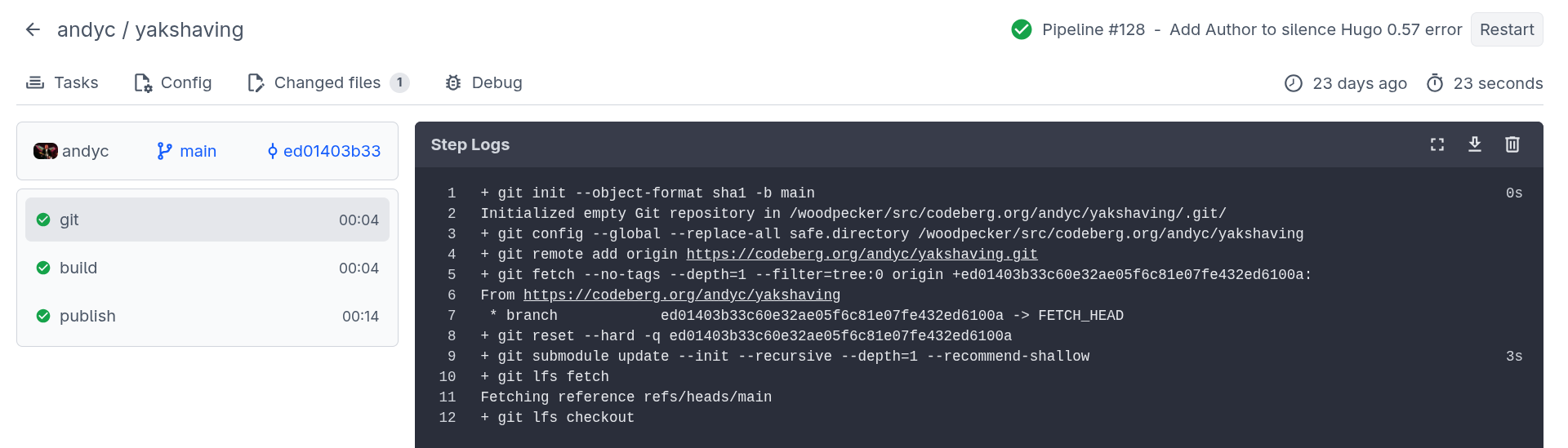
Code CI Blog Publish

I liked the Codeberg CI dashboard summary with traffic light icons indicating the success (failure) of each stage together with timing information and the ability to get detailed log information for each stage of the process.

The Codeberg publish process has three stages:

git

The initial 'git' stage fetches the latest changes from the Codeberg repository.

+ git init --object-format sha1 -b main
Initialized empty Git repository in /woodpecker/src/codeberg.org/andyc/yakshaving/.git/
+ git config --global --replace-all safe.directory /woodpecker/src/codeberg.org/andyc/yakshaving
+ git remote add origin https://codeberg.org/andyc/yakshaving.git
+ git fetch --no-tags --depth=1 --filter=tree:0 origin +ed01403b33c60e32ae05f6c81e07fe432ed6100a:
From https://codeberg.org/andyc/yakshaving
 * branch            ed01403b33c60e32ae05f6c81e07fe432ed6100a -> FETCH_HEAD
+ git reset --hard -q ed01403b33c60e32ae05f6c81e07fe432ed6100a
+ git submodule update --init --recursive --depth=1 --recommend-shallow
+ git lfs fetch
Fetching reference refs/heads/main
+ git lfs checkout

build

The 'build' stage builds the site using Hugo and includes the version of Hugo used by Codeberg (useful for debugging issues) and timing information.

+ hugo --minify
Start building sites …
hugo v0.154.5-a6f99+extended linux/amd64 BuildDate=2026-01-11T20:53:23Z
                  |  EN
------------------|-------
 Pages            | 1156
 Paginator pages  |  297
 Non-page files   |    0
 Static files     |  132
 Processed images |    0
 Aliases          |   61
 Cleaned          |    0
 Total in 2612 ms

publish

The 'publish' phase deploys the generated site to Codeberg pages into the 'pages' branch.

+ git config --global user.email $MAIL
+ git config --global user.name "Woodpecker CI"
+ git clone -b pages https://$CODEBERG_TOKEN@codeberg.org/$CI_REPO.git $CI_REPO_NAME
Cloning into 'yakshaving'...
+ cp -ar $HUGO_OUTPUT/. $CI_REPO_NAME/
+ cp .domains $CI_REPO_NAME || true
+ cd $CI_REPO_NAME
+ git add .
+ git commit -m "Woodpecker CI ed01403b33c60e32ae05f6c81e07fe432ed6100a"
[pages 292c34d1] Woodpecker CI ed01403b33c60e32ae05f6c81e07fe432ed6100a
 1388 files changed, 6483 insertions(+), 6483 deletions(-)
+ git push
remote:
remote: Create a new pull request for 'pages':
remote:   https://codeberg.org/andyc/yakshaving/compare/main...pages
remote:
To https://codeberg.org/andyc/yakshaving.git
   7c95fab3..292c34d1  pages -> pages

The final stage was to redirect my domain name from Namecheap to the Codeberg URL. Although, I was aware that the answer is always 'DNS', this configuration change was explained clearly in the Codeberg documentation and worked fine.

in praise of BlogMore

When Dave Pearson quietly announced a Python static site generator, I felt obliged to check it out.

I was immediately impressed by the default theme of BlogMore which was minimalist and not dissimilar from the Hugo PaperMod theme and the simplicity of write.as.

Blogmore also had many features built-in which are requirements (or wishlist items) on my blog migration checklist. For example, support for categories and tags with archives and search functionality (which works perfectly and is very quick).

My obsession with static site build time wasn't an issue either. Blogmore generated my site with over 1,000 posts in less than 4 seconds. That is for a full generation of the site (not incremental).

The documentation was also excellent, well written, clear and concise with sample code snippets and aimed at the end user (not experienced Python developers).

The source code to Blogmore and Dave's own site were published on GitHub which was helpful.

Now, as Dave himself freely admitted, Blogmore was an experiment to try to develop an SSG using Copilot. He was clearly aiming to satisfy his own requirements and had no plans to create a general purpose SSG to rival Pelican.

Dave did invite feedback though so I submitted a few issues (mainly enhancement requests). This was partly selfish as the issues mainly addressed gaps in my potential migration from Hugo but hopefully I tried to consider proposing enhancements that would be generally useful to make Blogmore a more attractive proposition for other potential users.

Dave was incredibly responsive and normally actioned requests within 24 hours. Plus the documentation and test suite was always updated to reflect the latest release.

It's probably common in software development but BlogMore's Release Notes even contained a 'BREAKING CHANGES' alert for changes that were not backwards compatible. A useful lesson for Hugo perhaps.

Things I like about Blogmore:

  • Single category, multiple tags.
  • Theme tightly integrated with the site generator.
  • Word cloud for tags and categories.
  • Archive pages broken down by date with counts.
  • Support for clean URL's.
  • Responsive UI- renders beautifully and fast on desktop, tablet and phone.
  • Timestamp formats are just intuitive and easy to understand.
  • Support for 'last modified' field in front-matter.
  • Support for Drafts.
  • Support for footnotes.
  • Support for Table of Contents.
  • Configurable side bar.
  • RSS and Atom feeds available out of the box.
  • Live preview of new and modified posts.
  • Markdown based
  • Flexible code highlighting styles (Pygments).
  • Fast build speed.
  • Python based.
  • Excellent, well written end user documentation (including release notes).
  • Packaged with uv. Easy to upgrade.
  • Handy statistics page.
  • Sitemap support out of the box.
  • Optional minification of HTML, JavaScript and CSS.
  • The quality of the software and pace of development. Dave only created BlogMore in February 2026 and has made 40 releases since then.
  • Number of breakages in the period - zero.
  • Dave's useful Emacs snippets to create posts.
  • Potential for additional CSS customisation and user defined themes.
  • Blogmore publish command. I use Codeberg (not GitHub) but once the overhaul to Codeberg pages is complete this command should work.

If you're contemplating migrating your site to a static site generator, I'd certainly recommend considering BlogMore and trying it out.

reflections on Hugo, GitHub and Netlify

Three years ago I moved my Hugo blog to GitHub Pages and Netlify.

When this end to end process worked successfully, this was brilliant. However, at times, the automated deployment did feel like the game of Mousetrap where a silver ball was released and then proceeded to traverse helter skelters, ride up and down on see-saws, descend zig-zag staircases, cross bridges, trigger catapults, release levers and conquer various hazards before finally launching a bucket to capture a little plastic mouse.

By using GitHub pages and Netlify, I had introduced yet more complexity into the blog publishing process.

Then I decided to add yet another layer of complexity by composing posts in Emacs using Org Mode and using ox-hugo to convert posts to Markdown format.

For the most part, this worked fine which was satisfying and I congratulated myself on my technical wizardry.

However, Hugo occasionally broke after yet another update. Locating and resolving the root cause of these errors was problematic (for me) as the Hugo release notes are very technical and IMHO primarily aimed at Go and/or theme developers. There is hardly ever any section describing breaking (i.e. non backwards compatible) changes or user visible changes.

A random example from the most recent Hugo release (v0.159.0)

This release greatly improves and simplifies management of Node.js/npm dependencies in a multi-module setup.
Replace deprecated site.Data with hugo.Data in tests.
Replace deprecated excludeFiles and includeFiles with files in tests.
Replace deprecated :filename with :contentbasename in the permalinks test.

Failure could be caused by a variety of multiple potential issues.

  1. Was there an error generating the Markdown from the Org Mode source ?
  2. Did Hugo work locally and generate the HTML for the site successfully ? This was normally the most frequent reason for the failure. An Arch update would often update the Hugo package and Hugo updates were quite frequent.
  3. Did the PaperMod theme need updating to reflect the most recent changes in Hugo ?
  4. Do other popular Hugo themes (Ananke) function without any issues ?
  5. Assuming the local Hugo site works, did the push to GitHub work ? Check the recent updates to the GitHub repository.
  6. Did Netlify then get triggered correctly by the GitHub updates?
  7. Did the Hugo build process complete successfully on Netlify ? What version of Hugo is Netlify using ? Is this identical (or compatible) with the locally installed version of Hugo ?

After yet another issue following a Hugo upgrade, I got increasingly frustrated with this frictionless blogging process that was anything but. I was now spending more time fixing my static (sic), unchanged blog instead of writing any new posts.

Once again, I started to consider using an alternative static site generator. After all, I already had migrated my content to each of the popular SSG's I evaluated last year.

My mind was made up. I was going to do it. Just a question of selecting an SSG and actually doing it.

And then Dave Pearson came along and spoiled everything by creating BlogMore...

blog questions challenge

I was interested by Kev Quirk's Blog Questions Challenge, so here's my answers.

To recap, the questions are:

  1. Why did you start blogging in the first place ?
  2. What platform are you using to manage your blog and why did you choose it ?
  3. Have you blogged on other platforms before ?
  4. How do you write your posts? For example, in a local editing tool, or in a panel/dashboard that's part of your blog ?
  5. When do you feel most inspired to write ?
  6. Do you publish immediately after writing, or do you let it simmer a bit as a draft ?
  7. What's your favourite post on your blog ?
  8. Any future plans for your blog ? Maybe a redesign, a move to another platform, or adding a new feature ?

Why did you start blogging in the first place ?

I had a web site from 1999 but this was essentially a set of static HTML pages.

I'm an Oracle DBA/developer and there was an active Oracle blogging community who first piqued my interest in back in 2005. I am a serial experimenter and curious about new technologies so initially I chose Blogger and subsequently switched to Wordpress.

What platform are you using to manage your blog and why did you choose it ?

This blog currently uses Emacs, Hugo, GitHub and Netlify as I wanted to use as many moving parts as possible. This stack is also essentially a 'free' solution.

Have you blogged on other platforms before ?

Err, yes. I've used many blogging platforms (Blogger, Wordpress, Joomla, Drupal, Tumblr, Posterous, Serendipity, Jekyll, Pelican, Octopress, Habari, Nikola, Eleventy, write.as, Hugo).

How do you write your posts ?

Now I write in Emacs and orgmode. This was a recent, conscious decision as I wanted to standardise on orgmode markup. Trying to remember the subtle differences between Markdown and orgmode formats was irritating.

When do you feel most inspired to write ?

Unfortunately not very often.

Years ago, I tended to be prompted to post by other bloggers but, with the advent of the immediacy of social media, sadly the blogging community and the number of feeds in my RSS client has shrunk considerably.

Plus I'm lazy. Incredibly lazy.

Do you publish immediately or have Draft posts ?

Normally, I publish immediately. I really don't like content sitting in 'Drafts' which is akin to a dripping water tap, taunting me, nagging me.

However, I am slightly pedantic about presentation and typos, in particular, so will always preview the post locally in Hugo before publishing.

What's your favourite post on your blog ?

Easy. Two. Both involve hamsters.

Any future plans for your blog ?

Possibly. I'm quite happy with my existing setup but sometimes I think self hosting using WriteFreely would be easier and offer better integration with the Fediverse.

why Hashnode, why now ?

a brief history of blogging

I have maintained a blog, on and off, for a long time (since 2005). During that time I have used a wide variety of blogging platforms (Blogger, WordPress, Typepad, Drupal, Tumblr, Django, Posterous, Jekyll, Ghost, Nikola, Hugo)

My blog was a personal blog. Looking back, some posts were essentially micro-blogging (trite one-liners), link blogging (interesting, amusing BBC news stories), endless analysis of Manchester United together with some longer form articles.

Hardly any of my content was technical despite the fact I was an IT consultant. With hindsight, there were a few reasons for this:

  • I worked all day staring at a screen working on technical issues. I also travelled a lot in the UK and Europe so when I finally arrived home, my immediate thought wasn't always 'I really need get my laptop out and blog about that database performance issue'.
  • 'Imposter syndrome' - whatever topic I thought of, someone, somewhere at some time would have already blogged about the same topic (normally Tim Hall) - better and more intelligently than I ever could. So who would ever read my post and, moreover, what was the point ?
  • 'Laziness' - I am inherently lazy. I freely admit it. It's not necessarily a bad thing. In fact, I think most developers should be lazy (think scripting, think VM's). A technical post takes time because, to have any value, it has to be accurate. Also, it probably needs to include screenshots. Taking a series of screenshots and posting images to a blog is a very time consuming and tiresome exercise. It will also pose a significant issue for the imminent migration to the next blogging platform. A technical post requires much more time and effort than posting about Manchester United's latest victory or the film I saw at the weekend.
  • Work. To be honest, this was a minor issue but often I had a nagging doubt that if I had some useful technical knowledge to share, then perhaps I should share this with my colleagues who worked on similar technical issues rather than chasing page views on the Internet. There was also the issue of anonymity; obviously I could mask my identity, my employer's name and the customer name but was this ethical ? Did it breach the corporate social media policy' ?
  • Separation - I did occasionally conquer these various self-imposed mental barriers and post a vaguely technical post about Siebel CRM or Oracle. However, while the minuscule element of my readership who were interested might have commented 'At last, a technical post !', I imagined the wider audience (the other six readers) scratching their heads saying 'Well, where's the joke here ? What did he have for breakfast ? Screw that, I'm unsubscribing'.

Hashnode

Clearly, I could have overcome all of these issues by maintaining two separate blogs; a personal blog and a technical blog but, like I said, I'm lazy.

I have a love hate relationship with Twitter. I really dislike the adverts and inserted content and for me, it represents a very dangerous distraction and potential time-sink.

However, a lot of the wonderful APEX community use this platform so I was forced to sign up for the 17th time purely to follow the APEX folks who post valuable content (tagged #orclapex) and freely share their knowledge and expertise.

One of my favourite APEX bloggers, Jon Dixon, indirectly drew my attention to Hashnode.

My private email message to Jon (reproduced here without permission) sums up my initial thoughts on Hashnode

Thanks for inadvertently pointing me at hashnode. I was completely unaware of this platform but I like it as it's Markdown, hooks into GitHub and has a community.

This was useful as I always wanted a technical blog that was separate from my inane stream of consciousness that I post elsewhere.

However, a technical post does take a good deal of time (checking, testing, screenshots, iterating) but ultimately is satisfying I think.

I decided to dip my toe in the water with a post I originally posted on an internal Confluence Wiki.

This was an interesting exercise in itself. My original article was rather rushed and missed out crucial steps (grants on a package).

As I was forced to revisit the original post and review each step from scratch in a clean, vanilla environment, guess what, things didn't work as I described.

Another benefit was that Jon posted a comment saying 'Thanks' which was appreciated and also privately emailed me with a couple of suggestions for minor improvements.

That, to me, is the whole point of a development blog - to hopefully share useful technical knowledge with others but also to have a peer review and learn something new yourself.

Hugo blog now hosted on Netlify

This blog uses Hugo and was previously hosted on Amazon S3 storage. The traffic and hence the costs were minimal (zero).

After recently having to completely re-install Arch Linux after an idiotic mistake, I realised that Hugo was out of date, my Hugo theme was out of date and I'd forgotten precisely how the deployment to S3 actually worked.

I was toying with taking my ball home in a mindless fit of pique, migrating 1,000 posts to Eleventy and I also looked at the Publii static site CMS with interest.

However, that would have been foolish as I already had a Hugo blog that worked fine. The problem was I never actually used it. It's frictionless blogging but you have to actually produce content occasionally. The friction (for me at least) is typing the words in - not building, previewing and publishing the site.

So, in the great blog unification process, I resurrected all my historical blog posts, my very limited content on write.as and deposited the lot into Hugo.

I changed the theme to PaperMod as it was a modern, clean, minimal, single column theme reminiscent of write.as.

The migration was pretty straightforward as all the existing posts were already in Markdown format and the YAML front matter just needed tweaking.

As I had used Hugo and Netlify for a friend's conventional Web site, I took the opportunity to switch the blog from S3 to Netlify which gives me SSL support and is generally a 'one click' operation to push the content to GitHub and then publish on Netlify.

rendezvous with strange man in mask

I anxiously coaxed my wife out of the door to her work trying not to raise her suspicions. My stomach was fluttering as I had an important early morning meeting.

To fully prepare, first, I chose my mask. I had two options; a flesh coloured creation that resembled a one bosom bra or a more sinister black model. I tried the pale pink mask but as it, err, masked my nose, mouth and chin, it made me resemble a burns victim who had endured time consuming and expensive reconstructive surgery which had either failed or was still ongoing.

The black one was much better; when I looked in the mirror I saw Kendo Nagasaki. I felt strong. I felt powerful.

The door-bell chimed. I opened it and was greeted by a middle aged, balding man wearing a pale blue mask and surgical gloves carrying a toolbox.

'Good morning. it's John isn't it ? I know I shouldn't really but would you like a cup of tea from a sterilised mug ?'

'No - thanks. I'd rather just get straight down to business'.

Ah now that what's I was hoping for; firm, dominant and to the point.

'Do most people watch or just leave you to it ?'

'Not bothered. You can watch as long as you're eight feet away ?'

John got down on all fours and got on the job straightaway. There was a lot of puffing and panting.

'Christ - this is a tight fit. Dunno how the last fella managed to fit it in this small gap'.

I said nothing. There was no answer to that.

'Bloody hell, if you had another 2 inches on your red hot pipe, that'd help'.

Slightly rude and I was supposed to be the dominatrix here. After all, I am Kendo Nagasaki clad in the black mask.

More puffing and panting.

'Ere, can you pass me that vaseline ? I may as well lubricate this joint while I'd down here'.

'Here you go. I thought you looked like a doctor in the blue face mask but I didn't think you'd have time to treat my arthritic knee'.

'I must say - your waste outlet is pretty good considering but your cold water pipe has a kink in it'.

Was I paying £60 call-out and £30 per hour to be insulted like this ?

More puffing and expletives

'Ere - pass us a tea towel, will you ? There's something dripping out the end of your pipe'.

'Ooh - sorry about that. Here you go'.

'Nah - it's OK. I've had a lot worse spilled on me in my line of work. Sort of an occupational hazard'.

'Oh - I see'.

There was a strange vibration. Initially, I assumed the batteries in John's sex toy, that he'd surreptitiously taken out of his toolbox, needed replacing.

'Ere - pass me that wrench, will you ? Your front extendable leg needs adjusting slightly'.

Weird as I don't actually have a prosthetic limb. Anywhere.

'Right - that's done. Now, have you got a small load you'd like to give me ?'

Another insult about the size of my manhood. I don't understand it. This chap had excellent reviews on the Web site.

'Do you want me to flush your U-bend while I'm down 'ere ?'

Hmm - colonic irrigation was never mentioned at any point. Would this be extra ?

There's a stilted silence while we stare at each other, waiting for my small load to finish.

We looked at each other in an embarrassed silence. I place £60 on the table which John silently picked up. He grabbed his toolbox and went to leave.

'OK. Thanks for coming so promptly, John'.

'No problem. If you or the missus ever need anything doing again, just give us a ring'.

Although she didn't know it yet, the wife had a new washing machine.

think of the grandchildren

Mum, mum. Please calm...

You don't understand. I just want to be able to see the grandchildren. I just want to hug them, to hold them, to cuddle them.

'Yes, Mum. I realise that but this won't...'

'Is it too much to ask to sit out on the patio, drawing and colouring with them ? Is it too much to want to spoil them with toys and treats ? Like any proud Grandma ?'

'Yes, Mum. I know it's a difficult time but...'

'That's all we're asking. It's tearing us up inside. We're cooped up here and they are down there - poor little things. They need to see their Nana and Grandad. They need to know they are loved'.

'Yes, Mum but with the lockdown slowly being lifted...'

'Why can I invite a cleaner into my house (not that I have a cleaner, no-one cleans as well as me) or meet Rita in the park (not that I'd want to mind, she hasn't called me once since this all started) and yet I can't see the two people in the world who mean the most to me. It just isn't fair'.

'Yes, Mum but in the next few weeks...'

'I had bought some them lovely Easter eggs, I'd bought presents for little Alice's birthday and baked a cake. We left them untouched in the vain hope but Dad finally gave in and ate the mini-eggs one afternoon. This pain is unbearable'.

'Yes, Mum but please remember, as soon as this is over...'

'And then there's your Dad, he's a broken man. This is really dragging him down. He never talks. He just sits around all day staring into space like a zombie. All he wants to do is take little Harry fishing. He wants to be a grandfather again. Just for one day. Your Dad did National Service and this is the thanks he gets from this Government. He just wants to take him fishing. He's got maggots in the fridge ready. They were next to the mini-eggs. He loves his fishing...'

'Yes, Mum but there are other grandparents in...'

'Don't talk to me about other grandparents. I saw a car pull up at Rita's house last Wednesday at 11:17 and two little kiddies happily ran up to her door. Who were they then - her landscape gardeners, her cleaners ?'

'Yes, Mum but remember...'

'Stop telling me 'Yes, Mum' and just get in your car and drive up here here right now with my lovely grandchildren !'

'But, Mum. Please remember that David hasn't even got a girlfriend and Emma is quite happy with her partner and her job at the moment.'

'What ? What did you say ?'

'Mum, you haven't got any grandchildren'.