Publish your metrics as a colourful chart in Google Spreadsheets or upgrade to Thunderbird 2.
Posts in category "software"
goodbye pMetrics
goodbye last.fm
You are supposed to be unobtrusive software.
On two computers, you have spontaneously stopped working.
No changes to Windows Media player.
Plonk.
Yahoo! Mail versus Gmail
I was staggered to read on TechCrunch that Yahoo! Mail has 250 million users while the much younger and rapidly growing Google Mail (beta) service currently has a paltry 51 million users in comparison.
I wonder what proportion of these users, in these impressive headline (marketing) numbers, actively use the respective services on a daily basis.
However, I was not surprised at Yahoo's offer of 'unlimited' email storage which gets a cheap headline and was pretty inevitable. A tiny minority will gleefully claim they really need infinite storage and think of inventive ways to upload the entire contents of their PC to a server. Yahoo! will then ban them for uploading copyrighted material.
While I have a longstanding but rarely used Yahoo! Mail account (which I was scanning tonight funnily enough searching for my Flickr credentials), this announcement won't be tempting me back to Yahoo! just yet. I await with interest Google's response though.
I think the Yahoo! Mail screen is incredibly cluttered and the adverts on the right hand side are incredibly intrusive and consume valuable screen estate. As you scroll through Yahoo! emails, the banner ads actually change which is slow and very distracting !
I know this type of thing is very subjective and, in many cases, ones preference simply reflects what you are used to and familiar with but I honestly don't know how Doug tolerates it. Also, Google's spam filter is far more effective which is important.
Also, Yahoo! have a irritating tendency to overuse the exclamation mark as part of the corporate branding. Look at any personalised Yahoo! page and shriek as you count the shrieks. I suspect you will be unpleasantly surprised.
Unfortunately, I appear to have mislaid (or Yahoo have inactivated) my Yahoo! credentials for my world famous Flickr stream so let's try some inline thumbnails. Apologies for the quality.
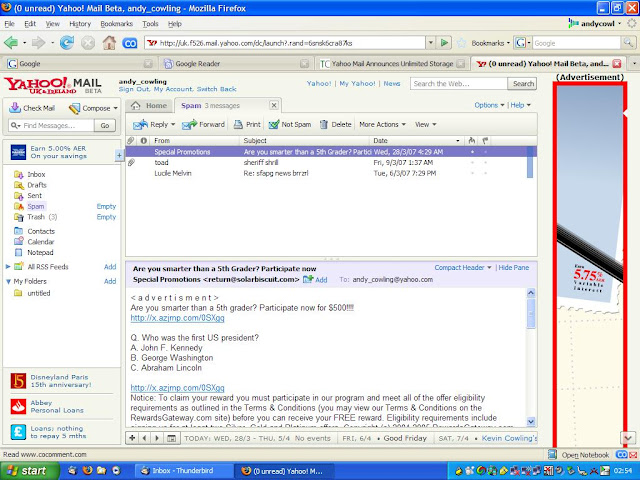
Note the MASSIVE banner ad on RHS (no I didn't photoshop the red border) and the more subtle ads bottom left.
I continue to use my ISP email account for personal stuff but am starting a gradual migration to Gmail which started around a year ago. Apart from spam, I hardly ever delete a Google email. Consequently, I am barely scratching the surface of my 3GB allocation (35 MB - 1% - of the allocated 2833 MB).
I also like the security of having messages and email address stored on a server (and not my PC).
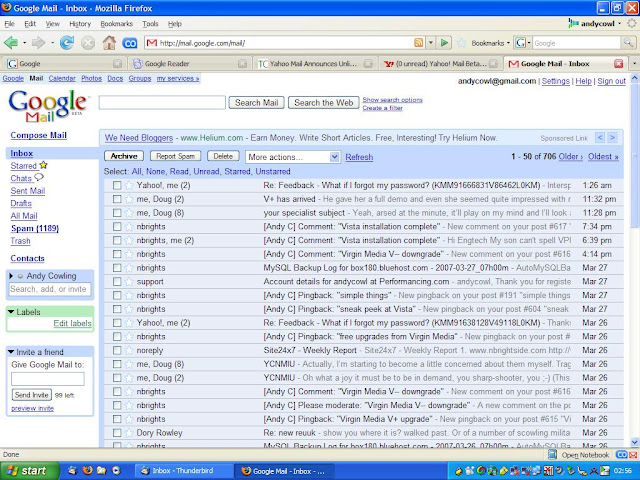
The ads on Google Mail seem much less noticeable and intrusive to me (yeah I know I'm a Google whore). I can honestly say that I barely notice them. I think this is because of the text (not banner) ads coupled with the white background although I am not sure what advertising men in new media glasses would make of this.
Vista installation complete
Extracted the shiny new Dell PC from the tall cupboard yesterday. Pretended this PC was for homework only, would solely use Google Docs and wouldnt connect to the Interweb.
Lasted two minutes before yielding and plugged in Linksys USB wireless card. Briefly marvelled at the quality of the flat screen, then downloaded drivers for Windows Vista, followed the instructions on the Linksys technical support site and successfully connected to the burgeoning wireless network first time.
Finally, Norman Junior III has his own PC, so now I will actually be able to use my own computer whenever I please.
Expect a barrage of varied, humorous, exciting and detailed technical blog articles and, yes, the frequency will be doubled, Kenneth.
Or maybe not.
Sharpcast versus Picasa
Curiously, after reading about the Picasa upgrade, a related article about photo management software popped up in Google Reader, courtesy of Robert Scoble's excellent link blog.
Robert Scoble had published a couple of podcasts featuring a product demo and an interview with Gibu Thomas, CEO of Sharpcast. Sharpcast is yet another photo management software tool and appears to offer a number of advantages over Picasa:
- Unlimited free storage
- Automatic synchronisation between PC and Web albums
- Original images are preserved
The unlimited storage seems too good to be true and is very useful because, at some point in the near future, I am likely to exceed Picasa's storage limit unless Google follow suit. Secondly, if I ever edit an image or perform any housekeeping, I will have to manually replicate those changes to Picasa Web Albums. As I am very lazy, that is unlikely to happen.
Finally, I have always presumed that Flickr and Picasa are compressing the images to degrade the quality of my professional photographs to save space and bandwidth. However, that is fine as you get what you pay for and I am paying nothing. Obviously, it is preferable to have the original, unmodified image available without having to continually burn another CD/DVD.
So I signed up for Sharpcast, downloaded the desktop software and quickly synchronised the 'My Pictures' folder to the server.
Sharpcast was very fast and easy to use. I was able to synchronise and upload 1,062 photos with a single click. This took less time than uploading the same content from Picasa. Although you can upload multiple albums in Picasa, one album is uploaded at at time and the remainder are queued.
Sharpcast is a genuine competitor to Flickr and Picasa and in the podcast, Gibu talks about extending the range of files to include documents. Sharpcast also includes support for Mac users and mobile phones.
My only reservation is that Sharpcast really does seem too good to be true. I am also a little hazy about the business model. It is not clear if this is Web 2.0 beta software which will subsequently charge or whether Sharpcast will attempt to make money from additional services. Currently the only paid service is photo printing.
Picasa Web Albums upgraded to 1GB
Google have increased the amount of free storage to 1GB (previously 250MB) available at Picasa Web Albums.
This means I can now backup all of my photos comfortably (854MB) in one place.
If you have lots of photos of your cat, $500 upgrades the capacity to 250GB.
in praise of Google Desktop
Like most people, I store information in many different places. Lots of data is stored directly on my work laptop while yet more data is stored on my computer at home.
- Mail folders
- Address book
- Text files
- Corporate blogs
- Presentations
- Word documents
- Intranet resources
- Whitepapers
- Web history
- RSS feeds
- Photos
- Music
Even more data is stored on external servers
- Gmail
- Blinklist
- Web site, blogs and mySQL databases at Bluehost
- Post-it on fridge
- Mobile phone
- Palm PDA
- My head (last resort)
I first used Google Desktop a couple of years ago when it was first launched. Back then, the ongoing indexing process seemed to add a unreasonable load on my laptop, so I decided to uninstall the program and revert to old-fashioned searching in Windows Explorer and Outlook (and now Thunderbird).
However, recently I decided to give Google Desktop another go because I am a Google whore. The initial index of the entire computer took a few hours to index a grand total of 131,854 items (44,118 emails, 5,059 Web history and 82,677 files).
After the initial index was complete, the overhead of the ongoing index process barely seemed noticeable (although my laptop has also been upgraded to a higher specification in the interim).
Google Desktop scans email folders, text files, PDF, Powerpoint, Word documents, Gmail and Web history. As you might expect, the search is lightning fast, much faster than searching within Thunderbird although the range of options isn't as comprehensive.
I find myself using Google Desktop a lot. Often I am not looking for a specific email, article or document but researching a topic, trying to locate all possible relevant information from the different sources available. Google Desktop makes this type of searching across multiple, disparate data sources very easy and quick.
Google Desktop caches data locally so you can search Gmail folders and even Web pages while offline. There is also a Preview option available.
I can also increase the accuracy and quality of my search results and save some disk space by deleting dated, obsolete or irrelevant information as I find it.
Another neat feature which worries the men in white (or black) hats is a positive bonus to me. Google Desktop can be configured to search documents and Web history from my home PC. This feature would be even better if my domestic email folders could be included as this would potentially enable me to reply to Dave's email message about drinks next Thursday or Friday from a hotel room in Prague.
Currently, I would have to call the wife, ask her to log on to the computer, educate her how to search in Thunderbird, locate the correct information and mail me the results. All of this is too much trouble given she moans at being asked to perform the simple task of setting the video to record 'Lost'.
The only minor issue I have encountered thus far is that Google Desktop does not search within WinZip archives despite claiming to 'search the full text of Zip files'. This is less than ideal as most of my formal reports are Word documents zipped up to save space. Just as well then, that there is precious little of technical value buried deep within those archives.
Coincidentally, Google Desktop has just been updated to 5.1 (beta) with a dark, transparent sidebar, improved gadget support and enhanced security. Although I have experimented with the sidebar, I don't actually use this feature as I find it too invasive (i.e addictive and time wasting).
not dead, just resting
Darren Prowse kicked off an interesting discussion asking what makes you unsubscribe from a feed.
This prompted me to revisit my list of my inactive blogs in Google Reader. Normally, I tend to leave most blogs intact because I don't religiously unsubscribe purely because an author hasn't posted in a while. However, I find it useful to occasionally check the status of sleeping blogs to see whether the feed has actually died or migrated elsewhere and prune my subscription list accordingly.
The blog on my reading list, showing the longest period of inactivity is Andrew Campbell's Oracle Stuff I Should Have Known. The last post to this blog was made way back on 24 September 2006.
Now, this is an interesting, technical Oracle blog so I will remain subscribed because the next post could be a gem and might even be imminent. In any case, the beauty of RSS means I will be notified whenever the blog is updated so I don't have to waste any time checking the site for updates.
However, what interested me more was the StatCounter statistics for Andy's blog. Despite not being updated in five whole months, the blog still attracts in excess of 3,000 unique visitors per month.
So that's the secret then. I'm hibernating. See you all in July.
how to display Google shared items on WordPress
This post put me in a quandry. I found the video very amusing so I was torn between leaving a grateful comment on Donnchas blog and awarding the article a (Gold) Star in Google Reader.
But if I only did that, my friend and a couple of (ex-) colleagues who might appreciate the joke may miss it. That would be very selfish. Forgive me Father, but briefly, I toyed with reverting to Web 0.1 (beta) and sending an mass email to 'Friends/Ex Colleagues'.
I compromised by posting an article on my blog referring to Donncha's article so he sees the pingback and gets the credit for spotting the video. So Donncha's happy, I'm happy, everyone's happy.
Well - not exactly because I had to write some additional words on my article to justify its existence. This is exactly the situation that Google Shared Items is for.
These items might be interesting or useful snippets of information quickly noted in passing which I wouldn't necessarily blog about.
I just want to display a RSS feed on my blog for articles like this that I find interesting, amusing or thought provoking. This is trivial to implement in WordPress so I simply grab the feed URL for 'Shared Items' from Google Reader and create an RSS widget to display 'What I am currently reading' on the sidebar in this blog.
Unfortunately, that didn't work. The feed and article names were displayed but the formatting of the links was broken on WordPress 2.1. Curiously, I tried the same configuration on a test blog on hosted Wordpress and it worked fine.
A little research revealed that the WordPress RSS widget does not appear to support Atom 1.0 format (which is precisely the format used by Google Shared Items).
No problem. Just create a Feedburner feed and see if that works. This should automatically, dynamically and intelligently convert the feed format into a format the recipient can digest. Unfortunately, it doesn't. Sigh. Give up in disgust and make a note to ask in the WordPress/Reader forums.
Only you can't give up. You want this to work and this is now a challenge.
Read the Feedburner FAQ which implies that SmartBurner is what you need. This automatically, converts the original feed format for the consumer on the fly. However, SmartBurner is enabled by default so I wonder why it isn't working.
Examine the configuration of SmartBurner. By default, the output feed preserves the format of the original feed (Atom 1.0 in this case). However, it is easy to force conversion to different format (RSS 2.0) by setting the 'Content-Type'.
Revisit the WordPress RSS widget. Success !
So, after all that time and effort, I sincerely hope you both enjoy my 'Google Shared Items' feed.