Posts in category "software"

Dovecot 2.4.2 upgrade

Dovecot recently released version 2.4.2 which required some changes to the configuration file (from version 2.3.x).

I use Dovecot as a personal, local IMAP server which pulls from the corporate Outlook server so I can maintain a local archive not subject to any quota constraints.

As I use Arch Linux and mindlessly update weekly, I was puzzled when Thunderbird suddenly stopped working.

My Dovecot server is local for me only, insecure and hence my configuration file is relatively simple.

Here is my modified Dovecot configuration for 2.4.2.

dovecot_config_version = 2.4.2
dovecot_storage_version = 2.4.2

mail_driver = maildir
mail_path = ~/Maildir
mailbox_list_layout = fs
protocols = imap
listen = 127.0.0.1
auth_allow_cleartext = yes
auth_mechanisms = plain login
userdb passwd {
   driver = passwd
}
passdb pam {
    driver = pam
}

fun with static site generators

Table of Contents

  • Introduction
  • Test Environment
    • Hardware
    • Test Data
  • Hugo
  • Eleventy
  • BSSG
  • Zola
  • Nikola
  • Pelican
  • Jekyll
  • Useful SSG performance resources

Introduction

Static site generators (SSG's) are often used for blogs. SSG's typically process Markdown files into static HTML files. The use of static HTML files (rather than dynamically generating the site using a database) offers benefits for performance and security.

I use Hugo for my blog and have used (or experimented with) the following static site generators (SSG's).

  • Hugo (Go)
  • Eleventy (Javascript)
  • BSSG (Bash)
  • Zola (Rust)
  • Nikola (Python)
  • Pelican (Python)
  • Jekyll (Ruby)

A throwaway post from Neil Brown on Mastodon prompted me to investigate the build performance of different static site generators with a significant volume of posts (1,000).

Neil reduced the build time for his Hugo blog simply by adding more hardware resources. A decent strategy involving minimal effort producing an immediate improvement.

'I have upped the RAM in the VM running my Web server to a heady 1GB, and added a second CPU core'.

'That has halved the Hugo build time for my blog [from 4 minutes to 2 minutes]'.

This comment surprised me as I also use Hugo which builds my entire blog, containing 1,000 pages, in less than two seconds on a 10 year old desktop computer.

Neil's blog is self-hosted and uses Hugo. A 'View Source' reveals the version of Hugo in use. Neil is using v0.131.0 (released in August 2024).

<meta name="generator" content="Hugo 0.131.0">

The latest version of Hugo is 0.151.1 (released in October 2025). However, Neil is using the Hugo version included in the Debian (Trixie) repositories.

Reviewing the 'Archives' page, Neil's blog contains 457 posts.

Neil moved his blog from HTMLy to Hugo in 2023 and was using Hugo v.0.111.3 (from the Debian repos) back then and used the Etch theme.

Looking at the Etch theme, it is clear Neil has stuck with this attractive, minimal Hugo theme since then.

Given the disparity between Neil's build time and mine, I thought it would be fun to compare the performance of Hugo with different themes as well as other popular static site generators.

Test Environment

Hardware

  • Lenovo M900 Tower Desktop (SFF)
  • CPU: Intel i7-6700 CPU @ 3.40GHz (4 cores, 8 threads)
  • Memory: 48GB
  • Disk: 1TB
  • O/S: Linux 6.17.2

Test Data

I used my personal blog as the data set for the performance tests.

  • 1028 articles (Markdown)
  • Content spanning twenty years (2005 to 2025)
  • 116 code blocks
  • 74 static images
  • 29 categories
  • 46 tags

Hugo

Hugo: https://gohugo.io/

Hugo is a popular static site generator written in Go with a reputation for speed and performance.

$ hugo version
hugo v0.151.1+extended+withdeploy linux/amd64 BuildDate=unknown
$ go version
go version go1.25.3 X:nodwarf5 linux/amd64

The tests ran the standard 'hugo build' command three times and took the average elapsed time.

Theme Time (secs)
Ananke 0.615
PaperMod (Base) 1.067
PaperMod (Custom) 1.633
Etch (Base) 1.911
Etch (Related) 1.958
BearBlog 0.425
Simple 0.377
Beautiful Hugo 1.541

Most Hugo themes used the default, out of the box settings with no customisation.

The 'PaperMod (Custom)' test used my personal blog which includes additional 'Archive', 'Categories', 'Posts' pages and search functionality.

The timings for 'Etch' surprised me as it is a relatively simple theme that displays a list of all posts.

I added support for up to 15 'Related Posts' using Neil's code but saw no noticeable increase in build time (which is less than two seconds).

Hugo supports 'Related Posts' functionality and the list of articles is built during the build (regardless of whether it is used or not).

Ananke: https://github.com/theNewDynamic/gohugo-theme-ananke

PaperMod: https://github.com/adityatelange/hugo-PaperMod

Etch: https://github.com/LukasJoswiak/etch

BearBlog: https://github.com/janraasch/hugo-bearblog

Simple: https://github.com/maolonglong/hugo-simple/

Beautiful Hugo: https://github.com/halogenica/beautifulhugo

Hugo provides useful diagnostics about potential performance bottlenecks.

Here is the template metrics report for the Etch theme (with related posts). There are three candidate templates that could be cached (header, footer and posts).

$ hugo --templateMetrics --templateMetricsHints
Template Metrics:
     cumulative       average       maximum      cache  percent  cached  total
       duration      duration      duration  potential   cached   count  count  template
     ----------      --------      --------  ---------  -------  ------  -----  --------
   2.691672237s   53.833444ms   83.570806ms          0        0       0     50  rss.xml
   1.409607939s    1.345045ms   11.568865ms          0        0       0   1048  single.html
   322.542988ms      307.77µs    2.927895ms         28        0       0   1048  _partials/related.html
   126.863653ms      115.54µs    1.183336ms         44        0       0   1098  _partials/head.html
    81.827628ms   40.913814ms   41.042982ms        100        0       0      2  _partials/posts.html
    79.788949ms      25.193µs     363.218µs          0        0       0   3167  li.html
    55.705094ms    1.160522ms    7.457174ms          0        0       0     48  _default/taxonomy.html
    44.028022ms   44.028022ms   44.028022ms          0        0       0      1  index.html
    43.649693ms   43.649693ms   43.649693ms          0        0       0      1  list.html
    32.992786ms   32.992786ms   32.992786ms          0        0       0      1  sitemap.xml
     24.19536ms      22.035µs     948.957µs        100        0       0   1098  _partials/header.html
     7.410874ms       6.749µs     143.528µs        100        0       0   1098  _partials/footer.html
      961.219µs     106.802µs     278.188µs          0        0       0      9  _shortcodes/figure.html
      708.877µs     141.775µs     299.575µs          0        0       0      5  _markup/render-table.html.html
      551.337µs     110.267µs     208.377µs          0        0       0      5  _markup/render-table.rss.xml
      105.423µs      52.711µs      88.545µs          0        0       0      2  alias.html
       15.147µs      15.147µs      15.147µs          0        0       0      1  /css/dark.css
         1.76µs        1.76µs        1.76µs          0        0       0      1  404.html

Total in 2002 ms

Eleventy

Eleventy: https://www.11ty.dev/

Eleventy is a popular SSG written in Javascript.

Eleventy Base Blog (v9): https://github.com/11ty/eleventy-base-blog

The Eleventy Base Blog theme is minimal and not dissimilar in appearance from the Hugo PaperMod theme.

$ node --version
v20.19.5
$ npx @11ty/eleventy --version
3.1.2

Building the Eleventy blog. Eleventy doesn't have separate 'build' and 'serve' commands.

The Eleventy build summary for my blog.

$ npx @11ty/eleventy --serve
[11ty/eleventy-img] 143 images optimized (143 deferred)
[11ty] Benchmark   1664ms  11%  1052× (Configuration) "@11ty/eleventy/html-transformer" Transform
[11ty] Copied 5 Wrote 1043 files in 14.53 seconds (13.9ms each, v3.1.2)
[11ty] Server at http://localhost:8080/

Eleventy supports incremental builds using the '--incremental' parameter which only processes content modified since the last build.

Initially, I saw no difference using '--incremental' but the Eleventy documentation suggested adding the '--ignore-initial' option. This reduced the build time significantly from 14 seconds to sub-second.

$ npx @11ty/eleventy --serve --incremental --ignore-initial
[11ty] Copied 5 Wrote 0 files in 0.77 seconds (v3.1.2)
[11ty] Watching…
# Add a new post with tags
[11ty/eleventy-img] 3 images optimized (3 deferred)
[11ty] Wrote 32 files (skipped 1012) in 0.51 seconds (v3.1.2)
# Add more text to existing post
[11ty/eleventy-img] 3 images optimized (3 deferred)
[11ty] Wrote 32 files (skipped 1012) in 0.46 seconds (v3.1.2)

Summary of timings for Eleventy

Theme Time (secs)
Eleventy (Full) 14.42
Eleventy (Incremental) 0.46

BSSG

BSSG - https://bssg.dragas.net/

Bash Static Site Generator (BSSG) is an SSG created by Stefano Marinelli. BSSG is written in the Bash shell

BSSG is a relatively new SSG. The first public release of BSSG was in March 2025 but there have been 14 subsequent releases.

BSSG includes a broad range of themes, support for incremental builds, parallel processing and a post article editor to manage content

BSSG doesn't currently support 'Categories' so all existing 'Categories' were migrated to 'Tags'.

It is possible this skewed the data set slightly and adversely affected performance as it resulted in four tags having a lot of associated posts. BSSG can list all tags with article counts using the 'bssg.sh tags' command.

Tag Count
blogging 236
football 112
software 122
UK 260
$ bssg.sh
BSSG - Bash Static Site Generator (v0.32)
$ bash --version
GNU bash, version 5.3.3(1)-release (x86_64-pc-linux-gnu)

Initial BSSG build from scratch.

$ bssg.sh build

BBSG uses incremental builds and only rebuilds what has changed.

Theme Time (secs) Notes
Default 2,389 Full (2,389 secs = 39 mins)
Default 23 Unchanged.
Default 61 Add new post (no tags).
Default 100 Add new post (existing tag).
Default 62 Modify existing post.
Default 107 Add existing tag to existing post.
Default 83 Add new tag to existing post.

By default, BSSG generates related posts based on the 'Tags' in each post. The default number of related posts displayed is 3. If this feature is disabled, then the build time is reduced significantly.

Theme Time (secs) Notes
Default 169 Full
Default 12 Unchanged.
Default 63 Add new post (no tags).
Default 62 Add new post (existing tag).
Default 64 Modify existing post.
Default 62 Add existing tag to existing post.
Default 70 Add new tag to existing post.

BSSG also supports parallel processing using the GNU parallel shell tool. The GNU parallel package is very lightweight (< 1MB).

BSSG detects the presence of GNU parallel automatically and spawns N processes in parallel where N is the number of threads available.

Checked dependencies. Parallel available: true
GNU parallel found! Using parallel processing.

On my computer, this resulted in BSSG spawning 8 Bash processes which may have been too many as the load average climbed to between 10 and 15.

However, the elapsed time for the initial build of a blog with 1,000 posts reduces from 39 minutes to under 10 minutes.

Before you exclaim '10 minutes when Hugo and Eleventy are sub-second', think about how often you completely rebuild every single post on your blog. Not very often.

The typical use case is writing a new blog post. There may be occasions when you change theme or spend two weeks consolidating all your tags and categories but, hopefully, those should be relatively rare.

Theme Time (secs) Notes
Default 559 Full. Parallel.
Default 32 Unchanged.
Default 60 Add new post (no tags).
Default 75 Add new post (existing tag).
Default 67 Modify existing post.
Default 73 Add existing tag to existing post.
Default 67 Add new tag to existing post.

Removing 'Related Posts' and running in parallel reduces the time for a full build to 1 minute and an incremental build to 45 seconds.

Theme Time (secs) Notes
Default 59 Full. Parallel.
Default 30 Unchanged.
Default 44 Add new post (no tags).
Default 44 Add new post (existing tag).

One big advantage of BSSG is the ability to quickly and easily change themes. You simply select a theme, modify the THEME entry in the configuration file and it just works. This is because BSSG themes use a single CSS style sheet. This may limit the functionality available but it just works.

Zola

Zola - https://www.getzola.org/

Zola is a SSG written in Rust. Like Hugo, Zola is a single executable. Like Hugo, Zola is fast. Like Hugo, changing themes in Zola is not simply a case of modifying the THEME entry in 'config.toml'. Each theme seems to have additional, custom configuration options that need to be set.

$ zola --version
zola 0.21.0
$ rustc --version
rustc 1.90.0 (1159e78c4 2025-09-14) (Arch Linux rust 1:1.90.0-3)

Serene Theme - https://github.com/isunjn/serene

Building the blog

$ zola build

The Zola build time for 1,000 posts was so lightning fast, I had to check it actually worked !

$ zola build
Building site...
Checking all internal links with anchors.
> Successfully checked 0 internal link(s) with anchors.
-> Creating 1030 pages (0 orphan) and 1 sections
Done in 351ms.

Like Hugo, Zola also has a live development server that watches for changes to the site in real-time. This is also fast.

Building site...
Checking all internal links with anchors.
> Successfully checked 0 internal link(s) with anchors.
-> Creating 1031 pages (0 orphan) and 1 sections
Done in 309ms.

Listening for changes in zola-blog/{config.toml,content,sass,static,templates,themes}

Web server is available at http://127.0.0.1:1111 (bound to 127.0.0.1:1111)

Change detected @ 2025-10-14 13:17:09
-> Content changed zola-blog/content/posts/zola-new-post.md
Checking all internal links with anchors.
> Successfully checked 0 internal link(s) with anchors.
-> Creating 1031 pages (0 orphan) and 1 sections
Done in 283ms.

Finally I experimented with a couple more themes.

Linkita - https://www.getzola.org/themes/linkita/

BearBlog - https://www.getzola.org/themes/bearblog/

PaperMod - https://www.getzola.org/themes/papermod/

Theme Time (secs) Notes
Serene 0.35 Full
Serene 0.28 Incremental
Linkita 1.77 Full
Linkita 1.70 Incremental
Bearblog 0.26 Full
Bearblog 0.25 Incremental
PaperMod 20.70 Full
PaperMod 20.51 Incremental

Nikola

Nikola - https://getnikola.com/blog/

$ python -V
Python 3.13.7
$ nikola version
Nikola v8.3.3

Useful Nikola commands.

nikola build
nikola serve --browser
nikola auto

To force a full rebuild in Nikola, you need to remove the 'output' directory.

You also need to use the Linux time command to get the elapsed timings for the 'nikola build' command.

Nikola includes the wonderful blog.txt theme (originally written for Wordpress by Scott Wallick) so kudos to Nikola's author Roberto Alsina for that.

Theme Time (secs) Notes
Default 44.86 Full
Default 4.72 Unchanged
Default 5.86 Add new post (no tags).
Default 5.75 Add new post (existing tag).
Default 5.98 Modify existing post.
Default 5.87 Add existing tag to existing post.
Default 5.70 Add new tag to existing post.
blogtxt 47.34 Full
blogtxt 4.93 Unchanged
blogtxt 4.78 Add new post (no tags).
blogtxt 4.82 Add new post (existing tag).

Pelican

Pelican - https://getpelican.com/

Create a dedicated virtual environment for Pelican.

$ workon Pelican
(Pelican) $ python -V
Python 3.13.7
(Pelican) $ pelican --version
4.11.0

Pelican doesn't have separate build and server commands. You simply run the development server which builds the site and watches for any changes.

(Pelican) $ pelican --autoreload --listen
Serving site at: http://127.0.0.1:8000 - Tap CTRL-C to stop
Done: Processed 1034 articles, 0 drafts, 0 hidden articles, 0 pages,
0 hidden pages and 0 draft pages in 3.65 seconds.

Add a new post (incremental build).

-> Modified: pelican-blog/content/my-pelican-post.md.
re-generating...
Done: Processed 1035 articles, 0 drafts, 0 hidden articles, 0 pages,
0 hidden pages and 0 draft pages in 2.96 seconds.

Summary

Theme Time (secs) Notes
Default 3.65 Full
Default 2.96 Incremental

Jekyll

Ruby based blog.

$ ruby -v
ruby 3.4.6 (2025-09-16 revision dbd83256b1) +PRISM [x86_64-linux]
$ bundle exec jekyll -v
jekyll 4.4.1

Jekyll base theme (minima) - https://github.com/jekyll/minima

Build the blog

$ bundle exec jekyll serve
<snip>
Run in verbose mode to see all warnings.
                  done in 2.788 seconds.
Auto-regeneration: enabled for '/home/andy/devel/my-jekyll-blog'
Server address: http://127.0.0.1:4000/

Live reload uses a different command and port

Run in verbose mode to see all warnings.
                    done in 4.7 seconds.
 Auto-regeneration: enabled for 'devel/my-jekyll-blog'
LiveReload address: http://127.0.0.1:35729
    Server address: http://127.0.0.1:4000/
  Server running... press ctrl-c to stop.

Jekyll also produces a lot of warnings (deprecation) that clutter up the display. This is surprising (and irritating) for the latest version of Jekyll and the standard, bundled theme.

There is a '--quiet' option for 'jekyll build' but this doesn't appear to silence the warnings.

Attempting to access the live development server on port 35729 fails. However, the live reload is actually available on port 4000.

This port only serves livereload.js over HTTP.

Given Jekyll was first released back in 2008, Jekyll feels rather neglected and outdated to me. Tags didn't work properly. All tags were processed and listed but the click through from an individual article as '404 - Not Found' error.

Also Jekyll insists on blog posts following a naming convention ('yyyy-mm-dd-title.md').

Theme Time (secs) Notes
Default 5.091 Full
Default 1.029 Incremental
Default 8.561 Live reload

Useful SSG performance resources

Zach Leatherman (Eleventy lead developer) performed some performance benchmarks (in 2022) which are a useful benchmark comparing SSG's for pure Markdown conversion throughput for large sites.

However, Zach's tests don't include meta-data (tags, categories, dates) so aren't necessarily representative of a real-life blog or site.

https://www.zachleat.com/web/build-benchmark/

Generating representative test data is difficult but this Bash script scrapes a random Wikipedia page and generates Markdown (including tags and categories).

https://gist.github.com/jgreely/2338c72c825d2a93713e4f0fc0025985

Each SSG has its own format for front-matter. There are even two different formats for front matter; TOML and YAML.

Hugo has a very useful builtin conversion function to convert the Hugo front matter an all posts between the formats (including JSON).

$ hugo convert --help
Usage:
  hugo convert [command]

Available Commands:
  toJSON      Convert front matter to JSON
  toTOML      Convert front matter to TOML
  toYAML      Convert front matter to YAML
Oracle SQLcl configuration

I use SQLcl a lot and install it on every environment I work on. Its fully compatible with SQL*Plus and has useful extensions to interact with OCI, Autonomous Databases and Data Pump.

My SQLcl configuration file is named 'login.sql' and located in the '~/work' directory. I also keep my 'tnsnames.ora' file here.

The location of these two Oracle configuration files is configured in '~/.bashrc'.

# Oracle TNS location
export TNS_ADMIN=$HOME/work

# SQLCL login file
export SQLPATH=$HOME/work

This is my SQLcl configuration file.

set editor emacs
set statusbar on
set statusbar add timing
set sqlformat ansiconsole
set highlighting on
set highlighting keyword foreground green
set highlighting identifier foreground magenta
set highlighting string foreground yellow
set highlighting number foreground cyan
set hig
comment background white
set highlighting comment foreground black

Sample output

SQL> select count(*) from dba_objects;

COUNT(*)
___________
358710

emacs ¦ 1:0 ¦ BILLY ¦ EDA_DEMO ¦ 00:00:00.953

self-hosting a GoToSocial instance

I like experimenting with software and technology.

Many years ago, I built a Laconica instance. Not because I needed a Laconica instance but because I was curious and any knowledge gleaned would be useful. Standard LAMP stack. Same as the WordPress blogging software which I had already built.

Plus Laconica releases were named after R.E.M songs by Evan.

Similarly, I got an account on mastodon.sdf.org in preference to Twitter because I favour OpenSource software and the underdog.

When I discovered there were self-hosted alternatives to Mastodon, I simply couldn't resist and acquired a domain name, commodity hosting with Digital Ocean and built a single-user Pleroma instance.

This was an interesting exercise as Pleroma is supposedly less resource heavy than Mastodon and is implemented in Elixir (a programming language unfamiliar to me).

I followed the documentation, installed and configured Pleroma. Then I occasionally monitored the system load and the Postgres database size. Pleroma was rock solid for 18 months. Much to my surprise, I even managed to upgrade the software with no issues.

However, when I discovered that Pleroma was unable to follow my old friend David Marsden's micro.blog using the standard ActivityPub protocol, serious action needed to be taken.

I work for Oracle who offer an AlwaysFree tier which includes an ARM instance (1 CPU, 6GB) running Ubuntu 22.1. I was curious to explore this avenue as, again, knowledge is useful.

Originally, I had lofty ambitions to host a Federated instance aimed at a community of folk interested in football so we could have endless, tedious discussions and banter without pestering everyone else.

The various stories about the moderation commitment and performance and scalability issues for large (or even medium sized) sites slightly made me pause for thought. If you make a commitment, you should honour it.

I use Hugo for this blog which is written in Go and a single executable so GoToSocial piqued my interest as this is a similar architecture. Single Go executable with decent documentation, helpful community and fairly straightforward configuration.

After a few glitches with the Nginx integration and failing to read the documentation carefully enough, I had a GoToSocial instance up and running !

GoToSocial doesn't include a front-end GUI but I soon got used to the Pinafore (clean, single column) interface.

It was a pity that GoToSocial doesn't currently support import of 'Friends'. However, as I was only following 100 people, it was an opportunity to manually review and trim that list.

Please remember that GoToSocial is 'Alpha' software and the current limitations are well documented but the pace of development is rapid.

It's early days but I'm enjoying my first experience of GoToSocial and I like the fact that GoToSocial supports both Postgres and sqlite for the database.

in praise of MiniDLNA

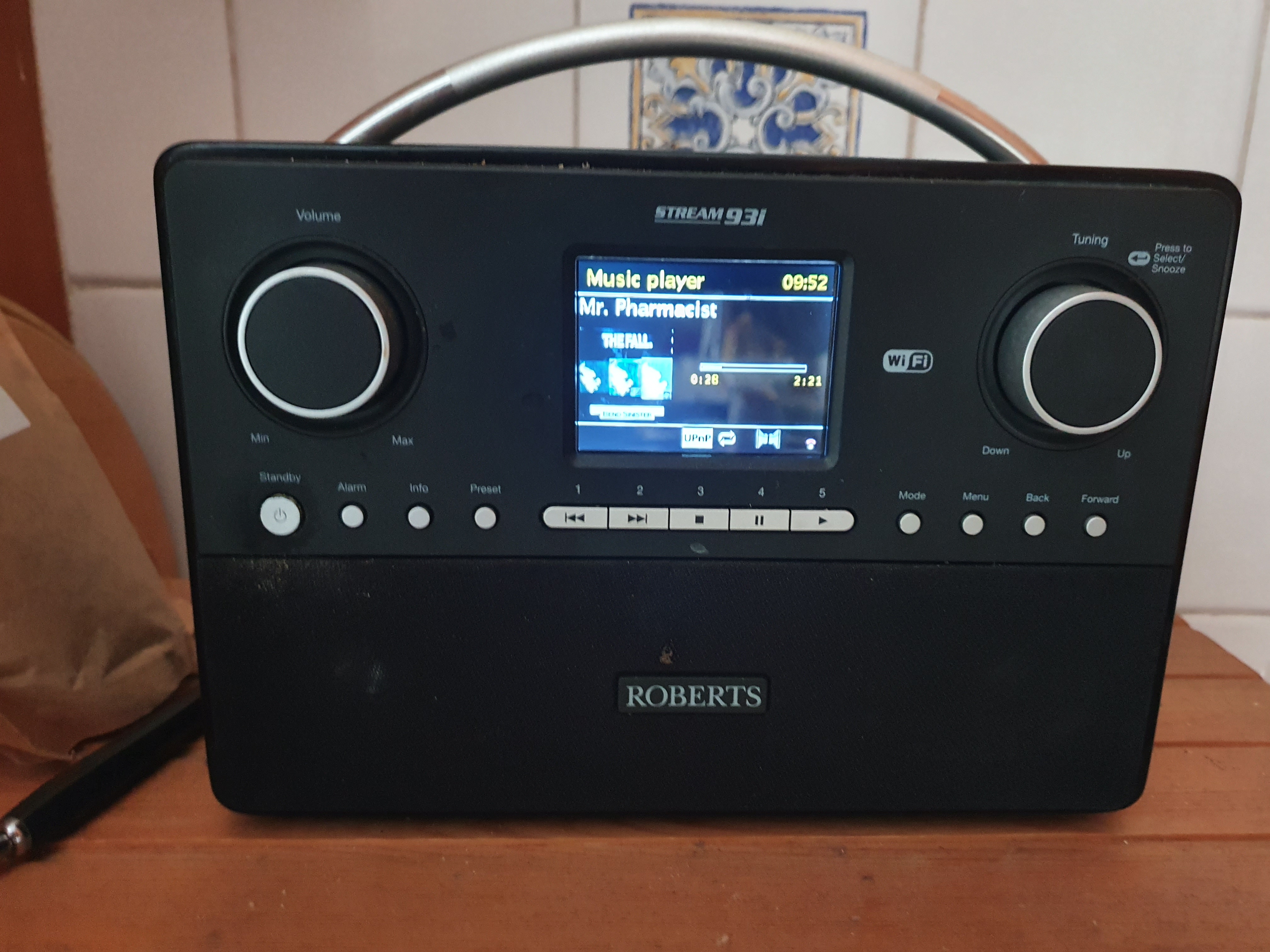
Five years ago, I purchased a Roberts Digital radio for the kitchen. Mainly to listen to the radio but also this device could play music from Spotify, a USB stick or act as a UPNP client.

As I already had the Plex Media Server set up which had a DLNA option, this looked attractive. The setup worked pretty well apart from one minor glitch.

And, like a dripping water tap, or the endless, harrowing screams of a baby played on a tight loop in an American interrogation facility, any minor technical glitch can't simply be ignored.

The cover art didn't display. I'm not sure why I believed that cover art should be displayed. Maybe it was because it was displayed in other music players or on the glossy Roberts Web site.

I tried everything, well a couple of things, to try to resolve this. I meticulously downloaded cover art for more than 200 albums and uploaded them to the appropriate directory as 'cover.jpg'. Or maybe it had to be 'folder.jpg'. Or 'Folder.jpg'.

No change. Still no cover art. I researched further on the Plex forums and any other DLNA/UPNP site I could access. I think the only solution I discovered was to embed the cover art image in the FLAC file but that was a lot of work, didn't feel right and would bloat the size of the lossless music files needlessly.

No cover art. After a while, I was forced to let it go. The digital radio played my music, the wife was pleased and that was the main thing.

Until yesterday, when I was busy shaving yet another shaggy haired yak and immersing myself deep down in yet another rat-hole that was actually a million miles removed from the original task in hand - to quickly experiment with the i3 tiling window manager.

I wanted to use a dedicated music player for radio and music rather than use a Web browser. Maybe I could even display 'Now playing' on my i3 status bar. VLC could access my music on the Plex Media Server but Rhythmbox (my preferred media player) couldn't. I played around with Music Player Daemon (MPD) and about 57 different GUI and command line MPC clients. While doing so, I noticed that MPD doesn't necessarily need access to local music files as it has a UPNP plugin.

My joy was short-lived as this didn't work. It could see the Plex Media Server (just to get my hopes up) but couldn't stream any music. Just like Rhythmbox. Which started me thinking. Maybe it was the server software not the client. So, I decided to waste a little more time by installing MiniDLNA (now ReadyMedia) which is a simple, lightweight, OpenSource media server on my FreeNAS.

This software was trivial to install on FreeBSD and I had successfully configured it within five minutes. Finally, I was playing music in Rhythmbox using UPNP. Mission accomplished. Pat yourself on the back and finally put the kettle on.

However, when I was in the kitchen, filling up the kettle, I couldn't resist the temptation and tried the Roberts Radio to see if it also recognised the new UPNP server.

Not only did it recognise it, it also manage to rapidly browse my music by Artist, by Album. Probably confirmation bias, but it seemed quicker than Plex.

More importantly, it actually played music - complete with cover art. Golly, I am so happy I have organised a socially distanced dinner party in the garden.

Of course, we won't be eating anything - just sitting around the table gazing at the unadorned beauty of the Roberts Stream 93i and taking turns to choose a song.

Roberts-Radio.jpg

small changes, big improvement

Sometimes, I spend a lot of time on technical tasks that are of seemingly questionable benefit or limited practical use.

For example, I remember converting the format of my 977 blog posts between markup languages and migrating the content to esoteric blogging platforms (more then once). I also wasted an unbelievable amount of time meticulously editing the meta data (YAML front-matter) and writing scripts simply to preserve Disqus comments after a change to the permalink structure.

All for a personal blog that no-one read but me.

Obviously, I choose to spend time on these tasks because I'm technically minded and like a challenge. There's also a stubborn desire to see something through to the bitter end rather than give up half way through. Also, they're fun little tasks that aren't work related.

However, I don't necessarily see this was wasted time. I often say to my son (who is starting out on a career in IT) that 'knowledge is never wasted'. This has been borne out for him as, when he was interviewing last summer, he was often set technical challenges (coding exercises) as part of the screening process.

Having subsequently secured a permanent role, he remarked last week: 'I solved a tricky problem at work today using Python code from that horse racing simulation'.

Anyway, I have made progress on organising my work. I was aware of the Projectile package for Emacs which is very popular. Originally, I didn't think it would be that useful for me as I don't produce code and work in Git all day.

However, after just two days, Projectile has already proved to be immensely useful for me and the way I work. You can easily create a project which can simply be a collection of notes, source code, PDF's, videos etc. Projectile then allows you to switch between projects and all file and buffer operations (open, latest, search, kill) are narrowed to the context of that project.

That sounds like a trivial, simple change but this has proved unbelievably useful for me as the list of files is automatically shrunk to what you are actually interested in. I was staggered how this simple change had such an impact.

My main problem was (and remains) muscle memory and trying to learn the new, modified key bindings for the Projectile variants of the basic Emacs and dired style commands I have used for years.

Each project I am currently working on is now a Projectile project and so is my orgmode directory which is also very useful.

I then did something I should have done years ago and moved all my orgmode notes from their respective project directories to my dedicated directory in '~/orgmode'. This is much more logical and allows me to use the 'deft' package to search content in all my orgmode files as well as the searching functionality provided by Projectile.

Then it was obvious that I needed to merge and consolidate this large, random and unwieldy collection of orgmode files. For now, I have decided to use the following:-

  • projects.org (currently, active work projects)
  • project_archive.org (completed projects, mainly read only)
  • project_tasks.org

Again, this was hardly any work but offered a significant improvement and somehow just felt right - that I was using Emacs and orgmode more logically, closer to the way it was intended. Like everyone else.

I realised that previously, I was bending the tools to fit my mindset of 'Projects must have a dedicated directory and all information and data on a project must reside in that directory'.

Another useful orgmode package, org-projectile, forced me to rethink this and addressed another of my key requirements perfectly.

I often want to be able to record tasks against a project. Often, I would be working on project A and get an email or phone call requiring me to quickly record a ToDo item for project B.

Previously, I would labouriously navigate to the directory for project B, open up the 'notes.org' file and append the ToDo item at the end. This had several issues; ToDo's scattered in multiple files, scattered in multiple places. Lots of context switching, lots of wasted time. It was impossible to have a coherent, unified list of outstanding tasks. Even worse, the important tasks were duplicated or promoted to Thunderbird.

[ Reading this back, I'm almost embarrassed and ashamed to document how ineffectively I used to work but at least I now understand why promotion keeps passing me by. ]

The org-projectile package is blissfully simple and allows you to create a orgmode task for a given project. You simply create a task and org-projectile prompts you for the project (from Projectile's list of projects) and the orgmode ToDo is added to a file in my 'orgmode' directory which now contains all the tasks for all the projects.

orgmode already has support for creating agendas and unified ToDo's from multiple orgmode files so there isn't necessarily a need to separate personal reminders from work related tasks.

Two Emacs packages, just an hour to install and configure, longer to learn and master perhaps but already very satisfying and relatively, simple, quick changes which have improved my productivity significantly.

Watch Your User

Connor McDonald posts an excellent series of articles about tuning a database application.

This analysis from a end user perspective reminded me of my own experiences when I was a technical consultant helping customers running a large CRM application, typically in call centres scattered across Europe.

I was often summoned onsite and told to solve the problem that 'The application is slow'. Usually, different people were eager to give me their view on the issue:-

  • Oracle DBA's often would be pouring over AWR reports or a monitoring tool and examining wait events in minute detail.'We can see multiple ITL waits over 700 ms. This means we need to increase the FREELISTS for the ORDERS table but the business won't let us have an outage'.

  • The application developers would also proffer their own diagnosis - 'Oh yes, we already know what causes that. It a custom workflow written by the previous integrator. It needs refactoring but it will take 3 months'.

  • The CEO brusquely told me - 'This CRM application isn't fit for purpose. If this isn't resolved by Thursday, we're going to evaluate SAP and Safra will be hearing about this'.

Now, this is all detailed, technical analysis and background providing useful information to be considered but I would often ask to see the problem at first hand by talking to an individual who was using this application all day, every day to see the perspective from his point of view.

This simple request was often met with puzzlement and resistance by the technical team - 'Why do you want to watch a user ? We've already told you what the problem is. This will just waste time'.

Sometimes, this resistance was born out of a concern that the user feedback would unearth different, unrelated functional issues and distract me from the performance problems under investigation. Alternatively, a floor supervisor would air the valid concern that my conversation with an agent would distract him from dealing with the customer call. This was easily overcome by letting the agent handle the call with me simply watching and taking notes. Then, after the call was finished, we'd have our chat.

On one occasion, this approach of listening to the users proved particularly beneficial. The client was a utility company but could have easily been a bank or a telco. The business scenario in the busy call centre was typical. he, Essentially, the customer calls in with a query or complaint which is resolved by the agent.

Some call centres use CTI technology where the application looks up the customer from the inbound telephone number and then presents the customer details to the agent on the screen so he can start the dialogue, typically security checks.

However, this call center didn't use CTI so the agent had to manually search for the customer before the call could commence.

I watched the agent process an entire customer enquiry from start to finish and took notes.

The call started and after the initial exchange, the agent asked for customer's surname and started a search. In this example, the customer was Mr. Johnson. I watched with interest as the agent typed in 'J' into the customer tab and his 'Search'. This operation took a long time. There are 66 million people in the UK and 38 million of them appear in this client's database. Searching a table for all customers with a surname starting with 'J' is expensive performance wise.

The agent didn't seems phased or perturbed or even irritated as the hour glass popped up. He merely continued to clear security with the customer. By the time, this exchange was complete, the search had finally returned.

My eyes widened as the agent then proceeded to sort all these thousands of customers by surname and scrolled down page by page searching for 'Johnson'. Again, sorting a large data set like this is sub-optimal performance wise. This is an online application where users are expecting each button click to return within 3 seconds - not 3 minutes. The solution isn't for the DBA to increase the PGA to allow larger temporary segments to accommodate the massive sort operation. The solution is not to issue the request to sort thousands of records in the first place.

It would have been marvellous if the agent had uttered the immortal words 'Sorry, Mr. Johnson but the system is really slow today'. Unfortunately, he didn't but you can certainly envisage similar scenarios where this excuse is proffered.

When the agent finally identified 'Mr. David Johnson' of '23 New Street, Canterbury, CT2 6AD', the rest of the customer call went pretty quickly. It was either taking a payment, changing a tariff, lodging a complaint, a billing enquiry or a change of personal details and common to most agents working on that floor.

After the call ended, I asked the agent why he used that sequence of searches and scrolling to identify that specific customer. The answer, inevitably, was 'We always do it that way and when I joined, that's what Barry showed me...'

Then we revisited the call using a different technique. This time, I recommended he searched for the complete surname (he has that available as soon as the customer starts talking). When he searched for 'Johnson', the query ran much quicker but there are still probably thousands of people called 'Johnson' in the UK.

Instead of sorting and endlessly scrolling to locate the customer in question, I suggested he simply entered the postcode into the 'Address' section. The postcode is now known after the customer completed the security questions. He could have used customer number but that's a long 12 digit number with scope for error when entering it.

[ Ironically, one of his reasons for typing in 'J' instead of 'Johnson' was that 'Hey - I'm pretty lazy and that's a lot of typing' which resonated with me as that's normally my attitude. ]

The agent just needed to type the first element of the postcode ('CT2') to refine the search further and now we have the customer details on the screen in a fraction of the time it used to take him.

I thanked him for his time and told him it had been a very interesting exercise for me to see the application actually in use. He reciprocated and thanked me. As he went to put his headset back on, he smiled and said:-

'You're not going to tell my Supervisor about what we've just done, are you ?'

'Well, yes I am. Trying to solve these performance issues is why I've been asked to come in. Why do you say that ?'

'If Barry gets to hear about this, our call targets will probably be doubled !'.

He smiled and nodded at the electronic rolling ticker display detailing how many calls have been handled, how many are waiting, average call duration etc.

fixing Dovecot stats writer permissions

I tend to switch Linux distributions quite often. Consequently, I tend to have this process down to a fine art and it doesnt take me that long. The most time consuming element is ensuring the necessary backups are in place.

However, you normally find some package or configuration option you forgot about and my recent switch from Arch Linux to Fedora 29 and back again unearthed a strange problem with the Dovecot IMAP server I hadn't encountered before.

When I accessed my email, my automatic message filtering (using sieve) wasn't working so all messages ended up in INBOX. Worse, on every transfer, the messages were duplicated.

The logging revealed a strange error related to file permissions

$ journalctl | grep dovecot
Nov 29 08:45:32 <host> CROND[3356]: (andy) CMDOUT (msg 53/60 (12176 bytes),
delivery error (command dovecot-lda 3415 wrote to stderr: lda(andy,)
Error: net_connect_unix(/var/run/dovecot/stats-writer) failed:
Permission denied))

The permissions on this socket file were as follows:

$ ls -l /var/run/dovecot/stats-writer
srw-rw---- 1 root dovecot 0 Nov 29 08:52 /var/run/dovecot/stats-writer

Google revealed a couple of fixes. One was to simply change the permissions on the socket file to mode 777 which works for the duration of that session but the problem simply reappears after the next reboot.

Another, more promising avenue was to add a new section to '/etc/dovecot.conf'.

service stats {
   ...
}

I tried a couple of combinations which didn't work but then I went back to basics. I am processing my email as 'andy' but the dovecot processes are running as 'root' and' 'dovecot' (although they could be SETUID executables).

root      8276     1  0 11:45 ?        00:00:00 /usr/bin/dovecot -F
dovecot   8278  8276  0 11:45 ?        00:00:00 dovecot/anvil
root      8279  8276  0 11:45 ?        00:00:00 dovecot/log
root      8280  8276  0 11:45 ?        00:00:00 dovecot/config

However, I wondered if Local Delivery Agent (LDA) was somehow running as 'andy' (the error log implied this) which explained the permissions issue as the Linux user 'andy' isn't able to read that socket file.

Sure enough, the fix, inevitably, was a simple one-liner to add user 'andy' to the existing 'dovecot' group.

sudo usermod -a -G dovecot andy

in praise of Silver Searcher

Occasionally, I have to search lots of files for a pattern. It was only recently I discovered the wonderful silver searcher utility which saves me a lot of time.

To install 'ag' on Fedora, use the following (which isn't entirely obvious or intuitive if you're used to typing 'ag').

# sudo dnf install the_silver_searcher

I believe there is an Emacs interface which would save me even more time.

$ time ag 'sql statement execute time' ~

real    0m0.125s
user    0m0.128s
sys     0m0.257s

$ time find ~ -type f -print0 | xargs -0 grep -i 'sql statement execute time'

real    0m23.725s
user    0m7.965s
sys     0m1.618s

Gnus now unbelievably speedy

When I initially revisited Emacs, I used mu4e (instead of Thunderbird) for my email.

I used the wonderful Gmane service to read mailing lists in Gnus and Elfeed to read blogs and RSS feeds within Emacs.

This worked fine but after a while it became a little tiresome having to remember different key bindings to essentially perform the same repetitive tasks; reading messages, navigating (next/previous) messages, moving messages, saving messages, marking messages, deleting messages, searching messages, forwarding messages, replying to messages and occasionally composing brand new messages.

The solution was blindingly obvious. Just use Gnus for everything involving a 'message' instead of three separate packages. One set of key bindings to learn and master and Gnus has comprehensive functionality. Less is more.

Converting all my email processing to Gnus was easy enough to address as I previously used Gnus to handle my email and Gnus natively supports the maildir format.

Accessing mail was fast as I had already invested in establishing a Dovecot mail server and transferred messages from the corporate IMAP server to local Maildir directories (using getmail).

To replace Elfeed for reading RSS subscriptions, Gnus offers a nnrss back end but it was so slow and sequential, it was virtually unusable. Investigations revealed another option. Lars doesn't like anything that is slow and sequential so years ago, he created the Gwene (Gnus Web to Newsgroups) service which took any RSS or Atom feed and converted it to a pseudo newsgroup on the Gwene news server.

Gwene already carries a lot of popular blogs and feeds and if your esoteric favourite blog isn't present, you can simply add it and the content appears immediately.

I was about to celebrate and put the kettle on when, suddenly, unexpectedly and rather inconveniently, Lars decided to shutdown the freely available Gmane (and Gwene) services for understandable reasons (idiots launching DDOS attacks on the servers, threat of legal action).

I then researched alternative methods and experimented with a number of RSS to mail gateways. The best one was rss2leafnode which takes a list of blog subscriptions and periodically fed the content into a local NNTP news server - leafnode.

This solution worked well as I was now using Gnus to read email, mailing lists, newsgroups, blogs and RSS feeds.

Perfect - well almost. One of the advantages of mu4e (and notmuch) is the lightning fast search and powerful abilities. In Gnus, you are able to limit lists of articles by author, subject and marks and use IMAP search functionality.

However, I regularly used combinations of search terms and full text search on the message body. For example, display all messages from Peter to the 'Footy' mailing list in 2016 where he mentions 'Basingstoke'. In mu4e, this search is done using a query

'from:peter to:footy date:20160101..20161231 basingstoke'

I have always tended to use hierarchical directories and mail folders so my mail is archived by year. Gnus could also limit a search by author and full text search can be done using the 'nnir' engine so this type of search is possible in Gnus but unwieldly.

Combinations of multiple search terms were slightly more problematic but as I was already running a local mail server (Dovecot), I decided to use Solr to implement more flexible searching in my mail folders.

Occasionally, I want to search for a message and I have no clue who sent it or when so I need to search all email messages in all folders for 'cobain conspiracy'. This is easy in Thunderbird and I found the best way to achieve this was to create Dovecot virtual folders for 'All Mail' and 'Sent Mail' that spanned all messages regrdless of date. Virtual folders can also be used to implement mu4e's builtin queries for 'Last 90 days'.

Why is Gnus unbelievably speedy ? Everything is local.

  • No need for a direct IMAP connection.
  • All email periodically delivered to local folders accessed via Dovecot.
  • Message filtering and spam handling performed by Dovecot/Sieve prior to delivery.
  • Solr maintains search indexes of email transparently.
  • Mailing lists and RSS feeds updated automatically by Gmane/Gwene.
  • Virtual folders automatically maintained by Dovecot.
  • Gnus is simply the most fantastic piece of software.

My only reservations were that the number of Linux packages to be installed, configured and updated but thankfully, in September 2016, new owners stepped forward to resurrect the invaluable Gmane and Gwene services so I was able to dispense with Leafnode.

The only prolonged, expensive network access involved here is fetching articles from the Gmane and Gwene servers but this has proved so fast and reliable that I didn't need to pursue the option of mirroring this small number of feeds locally in leafnode (although, undoubtedly, that would have been an interesting and fun exercise).