Posts in category "software"

life with Emacs

birth

At the tantalising climax of the last episode, I was invited by Steve for a whistle-stop tour of Emacs.

Steve explained that the main reason he used Emacs was pure laziness. Naturally, this immediately got my attention. He explained:

'I'm lazy. It's not a fault. It's a fact. Most decent programmers are lazy. You're lazy'.

'Hang on, just a minute ! What do you mean - I'm lazy ?'

'Andy - you alias 'cd ..' to 'up' and 'l' to 'ls -ltr'. Just to save five characters typing. So don't tell me you're not lazy. Anyway, it's not a criticism'.

'I used to work just like you. xterm open. Edit some C code. Compile the code. Fix the compilation errors. Repeat. Or search for a string a set of files using grep. Identify the file of interest. Goto line 723. Edit the file. That's what most programmers do. But when you think about it, it's a very inefficient process. All that typing, all that mouse movement, all that context switching. You may think having multiple xterm windows open solves it but it doesn't'.

'In Emacs, we can do all of that processing within Emacs. Look.'

Steve then showed me the edit-compile-fix cycle in Emacs. This was fantastic. Edit the source code. Invoke make using 'M-x compile'. Review the errors in a separate buffer. Hit the compilation error and you're immediately positioned on the offending line in the source file.

Similarly, for grep. Invoke search for 'parser' within all C and header files within Emacs. Then select the occurrence of interest and you're immediately taken to the source file at the right place. No more 'grep -n' and jotting down the line number.

The other biggest advantage Steve showed me was perhaps more basic and fundamental; simply the use of multiple buffers and 'C-x C-b' to manage the buffer list.

Previously, I would use multiple 'vi' sessions or ':n' to edit the next file in the list or toggle between two files using ':e #'. Worse, I thought that was advanced wizardry.

Steve also showed me the Emacs directory editor (dired) whch was impressive and a very quick way of navigating around the Unix file system.

childhood

And thus, my life using Emacs started in 1992. Initially, I was delighted enough with just this basic Emacs functionality as a great improvement over my previous approach.

However, I wasn't converted into an evangelist preacher from day one. I still used the 'elm' email client in a terminal window and 'rn' to read Usenet.

Also, I can admit this now. I would frequently fire up 'vi'; specifically for any global search and replace operations as it was just simpler and quicker than me trying to learn and master the Emacs equivalent.

Then I got moved to an OS/2 project but, Emacs was available for that now dead IBM platform so I copied my .emacs file and was happy.

Once, I got sent to Boston (America not Lincolnshire) to fix a tricky, long-standing problem. I was instructed to take the source code with me, given an open return ticket and was told to stay onsite until it was resolved. Fortunately, it transpired to be a one-liner involving a subtle race condition. Unfortunately, I fixed it on a Saturday and it was a public holiday weekend which meant I now had a lot of free time on my hands.

I remember sitting in the client's empty offices, revisiting the Emacs tutorial and really taking the time to read and understand it fully. I spent a lot of time experimenting and trying out all the features including stuff I never used, failed to understand or had simply forgotten about.

Even now, I still enjoy reading or watching Emacs tutorials to see how other people use it. Or maybe I'm just weird.

teenage years

In 1996, I took a job at Sequent who produced high end, expensive, fast, parallel processing, NUMA based Unix servers. Although I was now working in a Unix environment again, the DYNIX/ptx operating system wasn't the ideal development environment as a lot of my preferred tools, packages and utilities either weren't available or hopelessly out-dated and buggy.

However, the GNU C compiler was available so I embarked on building a lot of the GNU packages. This was a useful and instructive exercise as, occasionally, changes to the source code were needed to build cleanly - normally the addition of a '#ifdef ptx' macro.

Of course, inevitably there was a modicum of yak shaving involved here. For example, I had successfully built Emacs from source but it didn't interact properly with the brain-dead ptx version of 'grep'. So then I had to go and build grep which needed flex which needed...

honeymoon period

During this time, I was being slightly more inquisitive about extending my use of Emacs. I converted to ViewMail (VM) within Emacs to read my email and Gnus for reading Usenet news groups. I remember thinking that VM wasn't too far removed from 'elm' on an xterm.

I liked Gnus. A lot. I simply loved the Gnus manual which is undoubtedly the best software manual ever written. I was using adaptive scoring, threading and marks but still, I suspect I was (and am) merely scratching the surface of what Gnus is capable of.

I used the Insidious Big Brother Database (BBDB) as an address book for both VM and Gnus and I started to realise that 'ange-ftp' was much better than remotely logging into various Unix servers where 'vi' was the only option for editing files.

I discovered XEmacs looked prettier and had more packages available so I turned to that. Plus I liked Jamie Zawinski's style,.

Then I was forced to leave the comfort of my office based job, was given a Windows laptop and told to go and work in London on an Oracle data warehouse project. I might have done something awful or insulted my manager at the Christmas office party. I can't quite recall.

mid-life crisis

Naturally, Emacs on Windows was available but it wasn't like the real thing. Without a Unix environment, even Emacs couldn't mask the many deficiencies and limitations of using a Windows laptop as a, err, development environment although I later discovered Cygwin which eased the pain (just a little).

To compound the agony, I was now reading and writing a lot of documents in Microsoft Word and I needed to accept meeting invitations in Microsoft Outlook.

It was now 1999 and the dot com boom was well underway so I decided to join a small startup as an Oracle DBA/developer. This was a slightly unusual environment; well, in fact, there was no development environment. It was my job to create one without spending any money (if possible). That was great so we soon had Oracle databases running on Linux servers which doubled as our development machines.

This happy state of affairs lasted for four years until I moved on to a technical consultancy where I enjoyed some challenging work, troubleshooting tricky (and some trivial) problems at call centres located across Europe. My modus operandi now was (don't laugh here) was to make copious jottings in Notepad during meetings, phone calls and while I worked. When I returned home, I collated the notes into a lengthy Word document.

During this period, I talked to a lot of taxi drivers, visited a lot of sports bars and sat in countless anonymous airport lounges but I didn't even install Emacs, let alone celebrate of the arrival of a long-awaited package manager.

rejuvenation

In 2011, after some enforced sick leave, I returned to work and transferred to a role in product development. This was great because my enlightened employer allows me to use Linux on my work computer. OK - it's Oracle Linux and you may scoff - but it's Linux and I can run the latest version of Gnome, the email client of my choice and am able to install all my favourite packages. And still get support from IT.

Why - now I've got WebEx working and my enlightened colleagues use Wikis, I don't even have to fire up my contingency Windows Virtual Machine any more.

Bizarrely, history repeated itself and I found myself firing up a lot of terminal windows and multiple 'vi' sessions which was where this story originated.

Funnily enough, when I realised I was spending an increasing amount of time editing source code, I looked at what editors were out there. I looked at Sublime Text (commercial) and then at Atom (GitHub's excellent offering) which included many (over 5,000) plugins to support language formatting, colouring, compilation, search, ssh...

But wait, hang on a minute. I had invested a lot of time and acquired a lot of knowledge about a powerful text editor that could do all of this and more.

That's when I revisited Emacs. This time, I endeavoured to go even further and attempted to use Emacs for everything. Well, everything apart from a Web browser, SQL developer and LibreOffice.

Now I use the Prelude starter kit which is excellent coupled with the stylish monokai theme. I use Gnus and BBDB for email, news and RSS feeds. I use Python and the SQL modes extensively.

However, the biggest and most interesting addition to Emacs since my departure is the much lauded (and deservedly so) org-mode package. After a few false starts, I am now using org-mode for note taking, blogging, managing my calendar and ToDo's (my work and Google calendars are sync'ed using vdirsyncer). I recently ditched Pidgin in favour of the Emacs Jabber package.

Nirvana

Finally, I configured $EDITOR and alias'ed 'vi' as 'emacsclient'.
life before Emacs

the early years

1962

Entered the world as I intend to leave it. Kicking, screaming, naked, held upside down by a nurse slapping me on the backside.

a night at the Lesser Free Trade Hall

1977

Wrote my first basic program in BASIC on a Tandy TRS-80. Editing facilities were fairly limited. I think to modify Line 10, you had to simply re-enter Line 10. In its entirety. This was rather time consuming, tiresome and almost put me off computers for life.

10 PRINT "DR. HANDS IS A RUBBISH TEACHER"
20 GOTO 10

These lunchtime sessions also taught me how to interrupt a BASIC program rapidly. Useful, particularly when the physics teacher, Dr. Hands, made an unexpected return to the lab.

losing my religion

1981

At Warwick University, the Computer Science lab was equipped with green VT-100 terminals hooked up to a PDP-11. Warwick was where I was introduced to C programming and forcibly indoctrinated into the 'vi' text editor. I remember thinking it was handy that Rogue used the same key bindings for 'up', 'down', 'left' and right'.

1984

I left the confines of my room and went on the milk round. Instead of coming back with a pint of silver-top, I somehow managed to land a job with a software house as a 'Junior Programmer' and started work on a Unix project using 'vi' and state of the art amber VT-100's.

a short stay in purgatory

1986

Reallocated to a project on VMS where I was forced to use a bewildering command syntax and a limited, primeval text editor called EDT that made extensive use of the numeric keypad.

Later, I was made aware of an alternative editor called EVE. Better still, EVE was actually built using an extensible TPU (Text Processing Utility) library for VMS. Joyously, I discovered some clever person had built a 'vi' clone using TPU. It took me 3 days and cost me £79 to download the software over a 2400 baud modem but it was worth it.

New Dawn Fades

1988

Left permanent employment and became a freelancer. My nightmares about the DIRECTORY/SIZE command subsided as did my repetitive strain injury. I now found myself porting an Ada compiler from a mainframe system to Unix, reunited with a decent editor, short commands and the joys of pipelining.

the road to salvation and true enlightenment

1992

Started work for a relational database company. On day one, after coffee and introductions, I was offered the choice of a Sun workstation or 'as you've used VMS a lot, you'd probably prefer this DEC Workstation'. I forcefully elected the sensible option, held up a crucifix and threw some garlic cloves in the direction of the VAXStation. I claimed I'd used a Sun workstation for many years (a lie) and had to surreptitiously watch my neighbour to learn how to manage X Windows.

I sensed my colleague was slightly suspicious but he had a beard and a pony-tail and was quiet but helpful. I noticed that while I had my screen divided equally into 6/8/10 equal sections each running an xterm, his large monitor simply displayed had a background of the Monty Python 'dead parrot' sketch and a single application taking up 90% of the monochrome screen estate.

'What is that program you're using to edit files, Steve ?'

The man with the beard and the pony tail swivelled in his chair and uttered the immortal words

'It's called Emacs. Do you want to see how I use it ?'

extending Bash history

I have used the Unix bash shell for many years. As I am incredibly lazy and forgetful, I have become accustomed to using ctrl-r find to find and scroll though the latest find commands I have issued.

Occasionally, I noticed that a lengthy, complex, useful 'find' command' (which I mercilessly plagiarised from a clever person via Google) was no longer in my shell history.

Investigations revealed the default bash history is a paltry 1000 commands so I decided to increase this to 10000 by adding the following line to '~/.bash_profile'.

HISTFILESIZE=10000

After all, disk space is much cheaper than my time.

adventures with FreeNAS

I had been contemplating and researching the purchase of a dedicated Network Attached Storage (NAS) for a long time. Initially, I considered a few different options; an entry level unit like a Synology DiskStation, a small server like the HP Gen 8 Microserver or Dell T20 and installing the disks or even buying the individual components and building the unit myself.

However, I'm pretty useless with hardware and as a NAS should be high quality, reliable and solid, I decided to purchase a ready made unit.

I decided I wanted something that could run FreeNAS with ZFS rather than some proprietary GUI and I found a lot of helpful advice on the FreeNAS forums.

My main requirements were basic and standard for a home user:

  • Automated reliable backup of photographs, music, DVD's, home videos and documents.
  • Ability to run Plex Media Server (2-4 concurrent users with transcoding). This requirement eliminates a lot of the cheaper NAS units with slow processors.
  • Potential to perform backups to cloud storage (Amazon Glacier).

IXsystems sell ready made FreeNAS units but they are relatively expensive and I would have to pay shipping to the UK so I started to look for a UK supplier.

After procrastinating, delaying, repeatedly shelving then resurrecting the idea and trying to justify the cost, not for the first time, my wife tipped me over the edge. She dropped her laptop. Nothing unusual about that. She'd dropped it before and I paid a man with a soldering iron to replace the power supply jack.

This time, she'd broken it completely so it was (almost) cheaper to replace the laptop than fix it. Like many personal users, my backup strategy wasn't exactly non-existent but certainly sub-optimal. I had photos burned to miscellaneous CD's, I had various photo albums uploaded to Flickr and Google. Obviously, I had all my work data backed up (CrashPlan at work, external USB drive at home). My entire music collection (ripped to lossless FLAC) was also backed up three times. As for the wife's laptop, well, I had an three month old backup from the last time I restored the laptop coupled with her important documents safely backed up on a USB stick. Which was missing.

I could have probably re-assembled and recovered 98% of everything that was crucial and written off the gaps but for one, important, irritating factor. My wife is studying for a course and she had very recent notes, jottings and drafts of essays on her laptop. Inevitably, none of these were backed up anywhere.

I gave her her 5 year old workhorse laptop back, got her email working, restored her Firefox bookmarks and reassured her I would retrieve last night's draft of her essay, err, shortly.

I had already had to pay computer repairman £50 just to tell me the laptop was beyond economic repair and now my misery was compounded as I had to shell out another £99 for 'data recovery'. I knew this simply meant hooking up the disk drive to another computer and pressing 'Copy' but that's the price you pay for being a idiotic cobbler with holes in his shoes.

Thankfully, he managed to retrieve everything - the media library I already had as well as the important documents for the wife.

This episode gave me the impetus and justification to go ahead and purchase a NAS and get a proper backup strategy in place.

I decided to purchase a Mini FreeNAS from a UK company called Server Case who offered pre-built NAS units meeting all the recommended hardware specifications together with the latest version of FreeNAS (9.10) installed. The basic model came with 4 disk bays and 8GB of ECC RAM so I configured a system with 4 x 3TB WD Red disks and upgraded the memory to 16GB.

The technical support from Server Case was excellent and helped me customise the system and answered all my newbie questions fully and promptly. Each unit is assembled to order and the hardware stress tested but even so, the package was delivered within three days.

I unpacked the large, well packed, cardboard box and although I had measured the dimensions, I was immediately impressed with size and appearance of the unit, the modern, stylish black case and the build quality which seemed very professional and solid.

I powered the unit up and heard the disks spin up and blue lights come on. You are supposed to hook up a monitor during installation but I didn't have a VGA cable handy so I just plugged it into the router and determined the IP address so I could login to the FreeNAS Administration interface and configure the system.

I had already decided to configure the four disks in a RAID-Z2 configuration which meant two redundant disks giving me usable space of 6.1TB. As the sum total of everything I currently own is just over 1TB, this was more than adequate and hopefully future proof.

I found the FreeNAS Web admin interface easy to use and I quickly setup NFS shares and got clients working on my various Linux laptops. I also enabled ssh so I could login remotely to access the FreeBSD command line.

FreeNAS includes a number of plugins for popular packages including Plex but I decided to create a jail manually and install it which worked fine.

Then I configured periodic SMART disk tests to check the integrity of the disks and ZFS filesystem as well as a regular backup of the FreeNAS configuration database.

I migrated all my data simply by rsync'ing to the NFS filesystems over my wireless network. With hindsight, this was not the quickest way to do it - a wired connection directly into the router would have been much quicker but it chugged away, was resumable and did the job.

I then degraded the FreeNAS performance still further by moving the NAS out of the bedroom, away from the router and into a spare bedroom using TP-Link Powerline adapters to simulate a wired connection. [ I relocated the NAS as it was quiet but hummed slightly in our bedroom and the air ventilation wasn't great as it was rather cramped sitting adjacent to the router. ]

Inevitably, I then spent a lot of time playing with my new toy. I experimented with all the available plugins, installed a load of software and I learned a little about FreeBSD and jail management.

For the backups, I decided on a pretty simple strategy. I created hourly cron jobs which executed on the FreeNAS server and pulled files to the FreeNAS using rsync (but didn't sync deleted files). If a client was unavailable, the rsync was skipped.

Then I created ZFS snapshots (hourly snapshots retained for 24 hours, daily snapshots retained for a week, weekly snaps retained for a month, monthly snaps retained for a year).

This was adequate but the spectre of my wife losing 59 minutes of work on her essay still haunted me so I installed DropBox to perform real-time backups to the cloud (aka someone else's server) and after looking at many options installed a wonderful open source backup utility called Syncthing in another dedicated jail.

Syncthing is similar to dropbox but uses a notifier utility to detect changes on the filesystem which trigger an efficient, incremental backup when changes are made rather than polling regularly. Syncthing also supports multiple clients (N-way replication) and can also perform one-way sync (master-slave) which is what I required.

In conclusion, I am very pleased with my purchase and FreeNAS setup now. There's something pleasing about having a home server hidden, out of sight, always on, with an uptime of 67 days 17 hours and 3 minutes.

optimising Emacs and elfeed

I recently had to re-install my work laptop with Oracle Linux 7. With backups, it didnt take too long to reinstall. The most time consuming task was compiling Emacs 24.5 from source. Emacs 24.5 is required for the excellent Prelude starter kit I have recently adopted. There are a lot of pre-requisite packages for Emacs that are available (but not included) in Oracle Linux 7.

As part of the 'Emacs for Everything' experiment, I have also started to use an Emacs package called 'elfeed' to read RSS feeds and while it worked in my new, shiny environment, I noticed it ran much slower then previously. I tracked this degradation to the fact that OL7 ships with a dated version of 'GnuTLS' (3.3.8 released in September 2014) whereas the latest version is 3.4.9 (released in February 2016).

As GnuTLS is a secure transport communications layer, I decided to upgrade it and recompile Emacs including the updated libraries as I'd done before.

Usually, I remove the bundled software package using yum and install the new version from source in '/usr/local'. However, in this case, lots of packages depend on GnuTLS including fundamental ones like Gnome 3 so I had to leave the existing package alone.

Inevitably, since I last built it, the GnuTLS package had been updated and now depended on a crypto package called Nettle that was installed but version 2.x. More yak shaving ensued involving 'pkgconfig' and LD_LIBRARY_PATH but finally I was able to build Emacs using the latest version of GnuTLS.

I was rewarded by 'elfeed' performance reverting to its previous stellar levels. elfeed fetches feeds in parallel and is very fast. It takes less than 20 seconds to update my 150 feeds and the keyboard interface enables me to process feeds very quickly compared with a Web interface like Feedly although the latter does sync between multiple platforms.

how mu4e changed my life

Getting email

No mail. In three whole days. Weird. I wonder if it's Thanksgiving over in the States. Not even any football related banter. Is this thing even on ?

Then I realised precisely why I was sitting alone in an island of blissful isolation, devoid of all email communications and staring at an Inbox in a perpetual state of 'Zero'.

I had forgotten to configure inbound email.

When I was testing, I used mbsync to synchronise emails from my ISP which worked well (fast, reliable, well documented) with bi-directional sync between IMAP and my local Maildir.

Note: For Linux types, the 'mbsync' utility is contained within the 'isync' package.

My needs at work are slightly different though. We use IMAP but are encouraged to download and work locally. This corporate edict is implicitly enforced by configuring users' IMAP folders with a measly 1GB quota.

Using mu4e, I needed to fetch new messages from the IMAP server, transfer them to ~/Maildir and then delete them from the IMAP server. Although mbsync has 'push', 'pull' and 'expunge' options, it wasn't entirely clear (to me) if removal of messages from the server was possible. However, the getmail utility written in Python met the requirements exactly and was easy to configure.

Previously, I used Thunderbird to get new messages from IMAP, filter them at source and transfer them directly to various 'Local Folders'. The filtering was pretty basic - typically mailing lists and routing corporate communications to /dev/null.

I tended to configure mailing list folders with a retention period of 30 days and retain 'Starred' messages for ever. Essentially, this meant mailing list traffic didn't clutter my precious Inbox and would automatically expire. I then had a full month to scan the mailing lists and mark any interesting messages for further reading or more unlikely in my case, action.

Anything left over simply came to Inbox. This was normally email directed (To: or CC:'ed to me) so this system worked pretty well.

Sending email

Sending email is easy - mu4e sensibly uses Gnus message mode to send messages. I also built the latest version of msmtp from source for future flexibility (multiple account support) and it seemed marginally quicker than talking directly to the SMTP server.

Reading email

Initially, I didn't like the mu4e initial screen. Where's my Inbox ? Where's my new messages ? I need to see my new emails and start working, dammit !

Then, to my horror, I realised mu4e doesn't have an Inbox per se - just a list of email messages that sit in ~/Maildir. Unread messages reside in '/new' and read messages live in '/cur'.

I was immediately annoyed at a plethora of irrelevant mailing list messages and corporate communications littering my Inbox - sorry littering my 'List of unread messages'.

God - this is terrible. I can see that the only solution here is for me to shave that yak again and configure procmail or use Sieve and Dovecot merely to mimic what I had working fine in Thunderbird out of the box.

Then I saw a post from Dirk (mu4e's author) on the mu4e mailing list

'mu4e doesn't really have folders - instead "All Mail", "Inbox", "Important", "Sent Mail" etc. are queries - so the same messages can be present in more than one of those'.

Then it struck me like a bolt of lightning. He was absolutely right. I don't need a 'Corporate' folder. I don't need a stupid 'Oracle/MailingLists/dba-wizards' folder with a 3 level hierarchy. I don't even need an 'Inbox'.

What I need is a set of queries to mine the database. Yes - a set of structured text files is in fact a database. mu4e calls these queries 'bookmarks' and provides some useful ones out of the box.

  • bu (unread messages)
  • bw (messages sent in the last week)
  • bp (message with attachments)

Then I would need some ad-hoc or stored queries (e.g. large messages). For example, if I wanted to find that excellent email from Frank about table partitioning he sent out last year:

  • contact:oracle-dba-wizards from:frank date:2015 partitioning

The 'Inbox' processing now changes slightly. I needed to read each unread message and quickly decide what to do with it:

  • Delete it. 'Blue Nova with lights on in car park 710 East'
  • Act on it. Do something. Or reply. Then (optionally) delete it.
  • Mark it for (later) 'Action'. Absolute last resort. Obviously.
  • Archive it. Something potentially interesting but not now.

Then I remembered that this tied in nicely with an post by Ben Maughan on his excellent Pragmatic Emacs blog which made me question the need for a 'ToDo' folder. Or any folders, in fact.

'I also had folders for putting emails in and I would occasionally have a painful cleanout of my towering inbox, agonising over which folder to put an email in, or whether I should create a new folder for it'.

Then something else struck me. Joking aside, it was quite pleasant and liberating when I had no incoming email. The fact I didn't have a cluttered Inbox presented by default, staring me in the face was great. I had to make a conscious effort to get new mail ('U') and I then had to make a conscious effort to read it 'b u').

Initially, I explicitly disabled periodic automatic fetching of new email (as I had configured in Thunderbird) so I could verify getmail was fetching (and deleting) the correct number of messages from the server and attachments were being handled correctly. However, I decided to stick with manual email processing initiated by me when I was ready to process email. Notifications of 'new email' are incredibly hard to ignore and a needless context switch if you are busy concentrating on something else (watching Shetland ponies dancing on YouTube).

Further thoughts

Now I am wondering what the point of all my historic folders are; archives by year, mailing lists, personal, sent etc. Previously, in Thunderbird, they were logical groupings and I viewed annual archives as 'read-only' but now in the new scheme, they are merely entries in a database and strictly speaking every single message belongs in '~/Maildir' for simplicity. With one file per message, there is no longer any advantage in logical folders.

So yes, I must be the only person in the world who intentionally went from 'Inbox Zero' to 'Inbox 47,339' and didn't care.

Also, inevitably, I am now being increasingly tempted by the lure of org-mode. In particular, Ben's quote struck a chord with me.

'your inbox is not a todo list'

This is so true and something I have been abusing for years. An email message doesn't have a start date, an end date, a category, a priority or a current status whereas org-mode supports all of those elements.

In addition, org-mode capture takes this further. You can capture anything from any source; an email message, a Web site, a phone call, an instant message, a news article, a blog post, anything.

Configuration

A lot of people conclude and help the reader by including their 'gnus', 'mu4e', 'msmtp' and 'getmail' configuration files but mine are simply variants on the many excellent, annotated examples out there and I'd only repeat an idiotic mistake and post something crucial and security related in clear text on the Internet.

GIT tutorial for SVN users

I have used CVS and then SVN for version control. As I now use GIT for a couple of projects, I found this set of GIT tutorials very useful as they are well-written, use plenty of examples and outline where and how GIT differs from Subversion.

back to basics

Frustrated at the inability of Google to provide a simple sync process that works for disparate versions of Chrome and Chromium browsers, I decided to adopt a pragmatic approach, return to Victorian values and go back to using a Web based bookmarks service.

Way back, in 2005, I evaluated three different bookmarking services and dismissed Delicious, mainly on the grounds of the user interface design of the home page which, according to me, 'looks like an undergraduate knocked it up during a lunch hour'. This was a little rich from someone with no design experience whatsoever but still.

Seven years have passed though and now my requirements are slightly different. I use three different computers (desktop, work laptop and netbook) and different Web browsers (Firefox and Chromium). In addition, I consume content (Google Reader, Google Plus and identi.ca) on an Android phone so the requirement is for a reliable Chromium extension, Firefox addon and Android application, that simply supports posting and searching, for the bookmarking service.

In the intervening period, I had also played with diigo and this service is still available but leaning towards a Premium model (free basic service with paid for add ons and additional features).

All the cool cats currently tend to favour Pinboard which has a simple business model - a one-off fee that gradually increases as more users join the service. The current fee stands at $9.90 but I can hardly justify that for what is essentially a private dump of bookmarks as I would make limited use of the sharing and discovery elements.

So that was easy - delicious was acquired and subsequently sold by Yahoo! and have thankfully lost the silly del.icio.us name which now simply redirects to delicious.com.

I am using the following delicious tools:

Sorted.

first and last and always - Google Reader

Steve Rubel has resolved to return to feed reading in 2011.

However, I have been using Google Reader since 2007 and use it daily to catch up with the tech and sports news in addition to my favourite blogs. I honestly can't imagine life without it. I was also interested by a recent article (prompted by the demise of delicio.us) that described the use of Google Reader as a bookmarking service.

thoughts on browser usability

Jake Kuramoto from Oracle Apps Lab has a great post about common search terms for the three main search engines and notes that 'facebook.com' (and variants thereof) appear in the lists of most frequently used keywords.

Recently, I have been observing my wife who is a non-technical (Firefox) user although I must admit to a vested interest here. I am keen to understand any areas where Linux Mint is 'worse then Windows'. Over the last few weeks, I have noted the following:

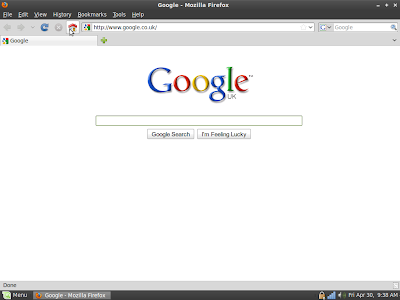
The Web browser is Firefox 3.6 and the starting page is a single tab - Google.com (my choice).

Google

This start page is minimalist in the extreme and dominates the screen. The user is instinctively drawn to this large, central area of the screen. Note to Google designers: This striking, beautiful minimalism is rather spoiled once you use the mouse.

My wife's Web session starts here. It always starts here. She might be searching for 'john lewis', 'maths revision guides', 'how to kill husband and get away with it' or 'weather london'. It is entirely logical that, if she wants to visit Facebook, she will simply hit 'Home' and initiate another 'mini-session by searching for 'facebook' (or some variant).

This may not the the quickest, optimal way of getting the job done but it's quick enough, it works and it is a learned behaviour.

I agree about search being more forgiving than typing raw text into the address bar. Google does the right thing with 'facebok' but the address bar doesn't. Don't try this experiment at work as it's potentially NSFW.

However, I think the key issue here is more about usability. The Google search page dominates the screen and the centrally placed search box dominates the Web page. Her eyes are drawn towards it. It is much harder for the brain to even consider the alternative options of 'address bar' 'search bar' or even 'Bookmarks' because these options are located at the top of the screen and are tiny in comparison - almost inconsequential. Therefore the brain has to do more work - particularly for 'Bookmarks' which nestles between 'History' and 'Tools'.

Coincidentally, I recently exposed the Bookmarks Toolbar with just two sites (Amazon, Facebook). These icons are now relatively large and easily visible and using them to quickly navigate is just a single mouse click but I don't believe she uses them. Old habits die hard perhaps.

This isn't being patronising but I don't believe she knows what the address bar is. Until recently, she didn't know what the search bar was. When I explained that the 'Google' in the bar and the magnifying class icon indicated you could search by typing into this text box, her reaction was 'Oh so it's like the Home page but smaller'. I am sure this mentality isn't unique among novice and non technical users.

She finds it confusing that the address bar takes things like 'amazon.com' (URL's) whereas the search bar takes 'amazon UK books' (search terms) and gets the two confused. Mostly this ambiguity doesn't affect the end result but it's confusing and poor UI design. Chrome addresses this nicely with a single unified bar which is exactly how it should be.

My wife often bookmarks stuff and recently complained that 'Bookmarks don't work. I can never find stuff again.' It transpired that she expected her lengthy list of Bookmarks to be listed in reverse chronological order and was unaware of the 'Recently Bookmarked' submenu. But then again, that's a extra click. Again, more work for the brain and people are lazy.

Although I am not a Web designer, I find usability and user interface design a fascinating area. I would love to conduct detailed interviews with my wife, my kids and my father to compare and contrast their usage of their respective computers.