Posts from 2012

Amazon customer service

I am currently hosting this site on Amazon Simple Storage Service (S3). For the first 12 months I am eligible for the Free Usage Tier pricing.

The Free Tier isn't completely free but includes '5 GB of Amazon S3 standard storage, 20,000 Get Requests, and 2,000 Put Requests'.

Initially, I had to test, review and deploy the entire site a few times before I got things right and Google's crawler was busy re-indexing the site so I wasn't wholly surprised when September's bill was a measly 15 cents.

The breakdown was as follows:

  • S3 storage $0.01
  • GET requests $0.03
  • PUT requests $0.08
  • Tax $0.03

The only element that puzzled me was the S3 storage which is free for up to 5GB. I checked the size of the site which is just 21MB (all images are outsourced to Picasa).

$ du -sh public
21M    public

I sent an email to Amazon customer service asking for clarification - not because I can't afford a penny - but because I would like to understand the pricing structure ready for when the 12 month Free Tier period expires.

In the interim period, I found the answer on the AWS FAQ - the Free Tier assumes Standard S3 Storage will be used and I was using the following 's3cmd' to deploy my site.

    s3cmd sync --acl-public --reduced-redundancy public/* s3://#{s3_bucket}/

The choice of the Reduced Redundancy Storage option makes sense as this normally costs less ($0.093 per GB) than standard storage ($0.125 per GB) and this is a low traffic website (and I have multiple backups).

However, this caveat is actually covered in the last section of the FAQ

Does the AWS free tier include Amazon S3 Reduced Redundancy Storage (RRS)?

No, the AWS free tier does not include Amazon S3 RRS storage. The AWS free tier includes 5 GB of Amazon S3 standard storage, which offers the highest Amazon S3 durability.

A couple of days later I received a response from a Amazon Customer Service rep who confirmed that Reduced Redundancy Storage wasn't covered by the free tier, apologised for the misunderstanding and applied a $5 credit to my AWS account for the 'inconvenience caused'. For me, this will probably equate to 3 years 'free' hosting.

Once again, fantastic customer service from Amazon. I was originally thinking of investigating altenative hosting options when the 12 month period expires but, on reflection, I don't think I will bother.
Octopress versus Drupal performance

One of the main advantages of a statically generated blog (like Octopress) over a blogging platform that uses a database (WordPress, Drupal) is performance.

My humble blog doesn't get enough traffic for performance to be a consideration and I thought I wouldn't be able to discern any improvement.

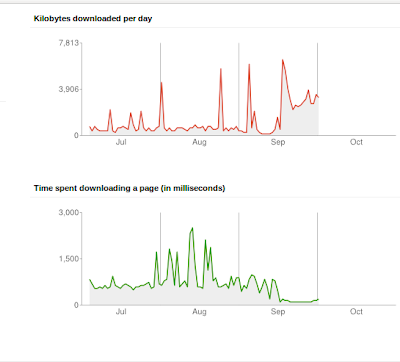
Webmaster Crawl Stats

This graph is from Google Webmaster Tools. Can you guess when the blog migration from Drupal to Octopress was done ? Yes - that's right - the middle of September (17th to be precise).

Undeniably, the performance is much better (fastest response time of 128 milliseconds) and reliable since the move to Octopress. Unfortunately, this 'before' and 'after' comparison isn't ideal. Previously, the blog was running Drupal 7, configured with a small number of modules using MySQL and hosted on cheap ($6 a month) shared hosting with Bluehost.

The performance spikes (high of 2.5 seconds to access a page !) are probably related to high usage of the Linux server my blog was co-hosted on (rather than a specific Drupal performance problem).

When I migrated to Octopress, I also moved the blog to Amazon S3 storage so it's not entirely clear how much S3 has contributed to the relatively stable and fast response times of the blog since mid-September.

With hindsight, I really wish I had phased the migration by deploying Octopress for a month on the same Bluehost hosting (using rsync) and then moved to Amazon S3. Still, it's a but late for that now.

However, it looks like I am ready for the SlashDot effect.

Diamond Geezers audience

Diamond Geezer recently posted his annual analysis of how many blogrolls he appears in. Unsurprisingly, perhaps, the number is steadily declining and he finds it harder to find new blogs to add to his list.

I thought it might be interesting to look at the blogging platforms used by the 98 blogs listed. Here are the results:

  • Blogger 60
  • WordPress.com 11
  • WordPress.org 11
  • Typepad 4
  • MovableType 3
  • Livejournal 2
  • Canalblog 1
  • Drupal 1
  • ExpressionEngine 1
  • Nucleus CMS 1
  • Serendipity 1
  • Guardian (journo) 1
  • Custom 1

The dominance of Blogger/Blogspot didn't surprise me that much. I have noticed before that it's very popular amongst UK bloggers; particularly veteran bloggers who maybe had less choice available that the plethora of options available today.

Which blogging platform do you use and why ?

back to basics

Frustrated at the inability of Google to provide a simple sync process that works for disparate versions of Chrome and Chromium browsers, I decided to adopt a pragmatic approach, return to Victorian values and go back to using a Web based bookmarks service.

Way back, in 2005, I evaluated three different bookmarking services and dismissed Delicious, mainly on the grounds of the user interface design of the home page which, according to me, 'looks like an undergraduate knocked it up during a lunch hour'. This was a little rich from someone with no design experience whatsoever but still.

Seven years have passed though and now my requirements are slightly different. I use three different computers (desktop, work laptop and netbook) and different Web browsers (Firefox and Chromium). In addition, I consume content (Google Reader, Google Plus and identi.ca) on an Android phone so the requirement is for a reliable Chromium extension, Firefox addon and Android application, that simply supports posting and searching, for the bookmarking service.

In the intervening period, I had also played with diigo and this service is still available but leaning towards a Premium model (free basic service with paid for add ons and additional features).

All the cool cats currently tend to favour Pinboard which has a simple business model - a one-off fee that gradually increases as more users join the service. The current fee stands at $9.90 but I can hardly justify that for what is essentially a private dump of bookmarks as I would make limited use of the sharing and discovery elements.

So that was easy - delicious was acquired and subsequently sold by Yahoo! and have thankfully lost the silly del.icio.us name which now simply redirects to delicious.com.

I am using the following delicious tools:

Sorted.

speeding up Octopress generation

My site has 966 posts and 70 categories.

By default, Octopress re-generates the entire site - every single post, all the category pages, the archive pages

On my Acer Aspire One (Intel Atom 1.66GHz) netbook, the regeneration takes around 10 minutes.

There are a couple of options that can significantly reduce this time and make the write/preview/edit iterative process more tolerable.

Firstly, you can use 'rake isolate' to move all other posts into a 'stash' directory and simply process the newly created post.

    $ rake isolate['speeding']
    $ ls source/_posts/
    2012-09-20-speeding-up-octopress-generation.markdown

This reduces the generation time significantly to 18 seconds.

    $ time rake generate
    ## Generating Site with Jekyll
    unchanged sass/screen.scss
    Configuration from /home/andy/blog/octopress/_config.yml
    Building site: source -> public
    Successfully generated site: source -> public

    real    0m18.192s
    user    0m14.369s
    sys     0m1.368s

This is helpful for previewing the post as it will work on the site and fixing typos but still the time consuming site generation needs be to done prior to deployment.

    $ rake integrate
    $ rake generate

The second method is to use 'jekyll --limit-posts '. I added a new Rake task as follows:

    desc "Generate jekyll site (last 5 posts)"
    task :fastgen do
      raise "### You haven't set anything up yet. First run `rake install` to set up an Octopress theme." unless File.directory?(source_dir)
      puts "## Generating Site with Jekyll (last 5 posts)"
      system "compass compile --css-dir #{source_dir}/stylesheets"
      system "jekyll --limit_posts 5"
    end

This also significantly reduced the site generation time

    $ time rake fastgen
    ## Generating Site with Jekyll (last 5 posts)
    unchanged sass/screen.scss
    Configuration from /home/andy/blog/octopress/_config.yml
    Building site: source -> public
    Successfully generated site: source -> public

    real    0m59.061s
    user    0m40.995s
    sys     0m6.956s

Out of interest, I converted my content into Hyde (a static site generator written in Python).

Hyde generated the entire site in 9 mins 17 seconds. However, Hyde also supports incremental builds (which took just 34 seconds for a single new post).

I also tried raw Jekyll using the default Tom Preston-Werner theme. This took 2 minutes to generate the site in its entirety.

left back

Is that Evra at left back ?

Yes. Ferguson said he would play his strongest side in Europe after last season. Why are you so surprised ?

'Oh nothing. I just can't believe it's not Buttner'.

migration complete

The last ever migration of this blog is now complete. This blog is now powered by Octopress and is a statically generated site hosted on Amazon S3.

All posts have been migrated from HTML to Markdown and every single permalink (all 954 of them) have been painstakingly checked, rationalised and consolidated.

To achieve this, I simply generated a sitemap of the Drupal site and compared this with a sitemap for a test site using Octopress after the data migration.

This unveiled a few issues that needed to be fixed:

  • Posts with the identical slug had a numeric suffix which was often incorrect or inconsistent after being mangled by various blogging platforms.
  • Some posts had the incorrect publication date (due to timezone shift) so were typically a day out.
  • Some posts were just missing after the 'exitwp' script was used to migrate from WordPress to Hyde a year ago.
  • Hyde uses a slightly different header format from Jekyll but 'sed' was able to fix this.
  • Jekyll uses a trailing slash for each post URL whereas Drupal doesn't.
  • Amazon S3 requires the canonical URL to be www.site.com with a automatic redirect to point site.com to the correct URL with the www prefix. Previously, I favoured the naked URL 'site.com'.

The permalink structure is now 'site.com/yyyy/mm/dd/hello-world/' (with a trailing slash) and will never change. Ever. Again.

I also resurrected some orphan Disqus comments by using the URL mapping tool which works brilliantly and helped identify comments associated with a non-existent URL.

I am generally delighted with Octopress as it bundles so many features I need for a blog (Disqus, Google Analytics etc) and is much easier than using raw Jekyll.

The only vague disappointment is the fact that the entire site is re-published even after a single post has been added. On my Aspire One netbook, a 'rake generate' takes 8 minutes. I might try the same process on my work laptop (faster, newer Lenovo Thinkpad) for comparison purposes.

Inevitably, there is a Jekyll fork that supports incremental deployment but the Octopress author is (understandably) reluctant to base Octopress on a fork that could quickly become stale.

Publishing the site to Amazon S3 is slightly better but, as Atom feeds get regenerated for categories, this still takes around 4 minutes.

Still, maybe this lengthy publishing process will encourage me to properly preview and get my posts perfect before publishing.

I am not sure about having all 954 posts stored in a single directory; I would rather have a sub-directory for each year but then again, being able to quickly search all posts for a keyword using 'grep' is useful.

I decided to keep the Feedburner integration for now (to avoid losing my two readers).

The use of a statically generated site also killed one of my favourite features - my legendary and award winning rotating tagline. Oh well.

Blogging like a hacker but publishing like a snail with a heavy weight strapped to his back.

the awkward second post

Octopress is great

  • Uses Google to provide site search
  • Archives builtin
  • Tag support
  • Draft posts
  • Local preview
  • Markdown markup
  • Google+, Disqus, Google Analytics support
  • Incremental deployment
  • Deployment to Amazon S3
  • Fast as lightning

Wish I'd bitten the bullet earlier.

Hello World

This is my first post in Octopress.

The text uses Markdown which is marvellous.

My favourite blogging platforms are:

  • Octopress
  • Habari
  • Drupal
  • WordPress

The BBC is a popular Web site.

End of message.

migration plan

Loose thoughts on the plan of attack for the blog migration:

  1. Install Octopress locally
  2. Configure S3 and install a dummy Web site.
  3. Use's3cmd' to upload test site to Amazon S3
  4. Test incremental uploads. This is a firm requirement.
  5. Full database backup of existing Drupal blog
  6. Take backup of Drupal installation (additional modules, scripts).
  7. Install vanilla Drupal 7 locally.
  8. Install copy of the existing Dupal blog in local version (overwrite database ?).
  9. Use the Drupal to Octopress migration script. This extracts nodes from the database and creates Markdown files for each post, This script is probably for Drupal 6 so some tweaks (major rewrite) may be needed for bleeding edge Drupal 7. URL aliasing is supposedly supported.
  10. Test the various elements in the checklist. Disqus comments need the correct domain name so will have to come last.
  11. Configure a redirect from 'nbrightside.com' to the Amazon URL. I can see trouble and lots of Googl'ing here.
  12. Place source code (Markdown posts) into GitHub repository.
  13. Put kettle on.