Posts in category "google"

+1

Seasoned bloggers knows people are rarely moved to comment on a blog post. Especially, one hit wonders sent from Google, who were simply looking for Train times between Clapham and Norbiton and instead see some commuter rant aimed at South West Trains.

However, microblogging has taught us that people are slightly more likely to grudgingly acknowledge an amusing one-liner with a 'Like' or a 'Fave'. Clicking a button is quick and easy - even for lazy people.

The recently launched Google Plus also uses '+1' both for posts and - probably the single feature I like most of all in Google Plus - the ability to add '+1' on individual comments.

I always equate this with a knowing smile across a crowded room - just to say "I saw what you did there. It made me smile but it's not worthy of a reply to say 'Hey - that clever bit of word play made me smile' but have a 'Like'".

As Drupal 7 has a Google +1 module available and Google Webmaster Tools includes reports to track this metric, I thought I'd add a '+1' button to every single post on this blog.

Now - you know what you have to do. Even if you were just hunting for train times.

Google Music - available by 2017

A few weeks ago, I signed up for a invitation to Google Music. The service is only available in the US but, by a lucky chance of fate, I just happened to be connected to my corporate VPN so I was successful and an invitation duly arrived in my Inbox.

Initially, the Google Music Manager software didn't support Linux. Nor was the Ogg Vorbis audio format supported so I didn't pursue it any further as both of these were show stoppers for me. I don't intend re-ripping my entire music collection to MP3 format.

However, last week, Google released a Linux version of Music Manager and added 'support' for Ogg format audio files. The 'support' for the Ogg format is slightly strange - Ogg audio files will be transcoded back to 320kps MP3 files which represents a conversion from one lossy format to another lossy format. Hopefully, in the longer term, there will be true native support for Ogg.

Anyway, I downloaded the Music Manager software and started uploading my music collection mainly so I could listen to music on my netbook which currently runs Chromium OS.

I started the upload 2 days ago and it's been running during the day. So far, it has managed to upload 505 songs out of a total 1,880 so it's not exactly a speedy process.

wheres your Google Shared Items ?

I have followed the development of Google Reader since it was launched in 2005.

Having used Thunderbird and then NetVibes, I have used Google Reader for the last two years to read blogs. The main reason I like Reader are the UI, the keyboard shortcuts for quick navigation and the fact I can also use it on mobile devices and multiple computers.

During that period, I have sporadically marked articles that interest, amuse or shock me on my 'Shared Items' feed and Google recently added improved support for the sharing of 'Shared Items'.

I normally try to use 'Share With Note' and annotate the entry as to why I found it noteworthy and I also mark items with a 'Star' as a private bookmark; normally as 'To read later' or 'Possible input for blog'.

Google have recently improved the sharing of 'Shared Items'. Happily for Google, the timing of these new these features just happened to coincide with FriendFeed's acquisition by FaceBook which prompted much fear, uncertainty and doubt amongst the FriendFeed community, some of whom are looking for viable alternatives if FriendFeed development comes to a halt (or worse, the service closes).

Louis Gray and Rob Diana have both adopted Google Reader which has helped to spark interest in the service and Google is already making additional tweaks and improvements in response to user feedback.

Personally, I have started to develop (yet another) network of people sharing content of interest and already I can see a change in the way I consume content in Google Reader. Firstly, I scan the 'Shared Items' of my group and I tend to find that, by the time, I get to my conventional list of feeds, most of the articles of interest have already been brought to my attention earlier by the 'Shared Items'.

However, there is a problem with de-duplicated posts and even with 50 'Friends' managing the signal to noise ratio promises to be an issue. The social features are relatively new and there are a few rough edges in Google Reader (people keep getting dropped from 'Groups, people can't comment on an article without being a member of a group) but for me, Google Reader has the potential to supplant FriendFeed as it focuses on the content (news, blogs etc) that interests me (rather than LOLcat pictures).

I also believe annotated shared items are much more valuable and than a plain, old, tired, outdated blogroll.

Here's my feed of 'Shared Items'. If you use Google Reader, it would great if you could share your 'Shared Items' feed in the comments below as I would be genuinely interested in seeing what you're currently reading and enjoying.

the resurrection of Google Reader

Google have recently added some social features to Google Reader which enables much improved sharing of peoples Shared Items.

The features have re-energised my use of Reader as these were features I have wanted for a long time.

Gmail on the up down under

Although its very cool to post on the corporate message board: Hey - why dont we save the company millions of dollars by using Linux, Gmail and OpenOffice ?, there are obvious barriers (security and Excel Luddites to name but two) to large corporations adopting server based software.

However, I always thought Google Mail would be an obvious fit for academic institutions to reduce the costs of software licenses and IT management. Adoption of such 'software as a service' would make sense as although some students are 'late risers', the majority could also be classified as 'early adopters' who are comfortable with the technology.

This recent announcement that the Department of Education in New South Wales will roll out (a customised version of ) Google Mail to 1.5 million students is an interesting development.

The cost of the new system will be $9.5 million as opposed to the $33 million for the previous Exchange/Outlook based solution with students getting an increased quota of 6GB (previously a miserly 35MB).

Although the initial contract is purely for email services for students only (no Google Talk), the obvious extension is to include Google Docs and Spreadsheets to displace Microsoft Office.

SEO wars Google versus Yahoo!

When I moved this blog from hosted Wordpress , I submitted the site to Google and Yahoo! After that, I noted the respective crawlers indexing the blog and thought no more of it.

I subsequently registered the site in Google Webmaster and Yahoo! Site Explorer and added a sitemap to help the robots index my site more efficiently. After a while, it was clear that Google was responsible for the vast majority of traffic to my humble blog. Mainly 'one-hit wonders' but welcome nevertheless.

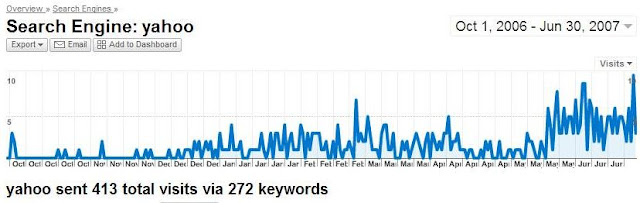
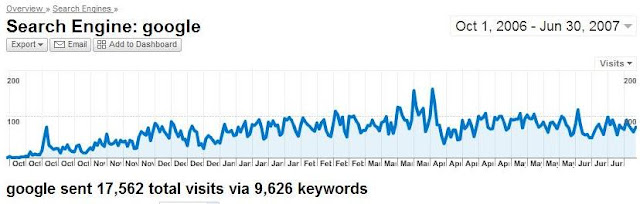
Today, while dabbling with various reports in Google Analytics, I compared the performance of the two major search engines over the past nine months.
Google

Yahoo

The statistics are quite staggering, to me at least. So much so, I have been moved to include inline images (which took me 14 hours and they're still not right) to reinforce the point.

Over a period of nine months, Google (17,562) absolutely hammers Yahoo! (413) into the ground.

So then I started to get curious. Why does Google do such a better job of indexing my blog ?

The standard test I use is to search for a set of keywords from a recent blog entry and see whether it appears on page 1.

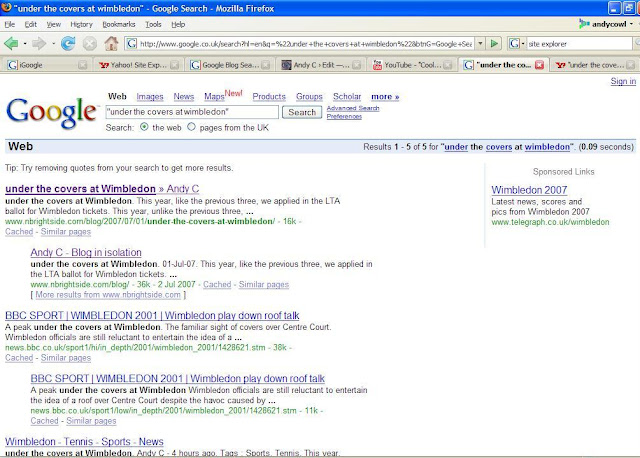
For this test, I used "under the covers at Wimbledon' from a post made last Sunday. On Google, this appeared as the first post in the first page. I already know that Google is very timely at indexing my blog. If I post an blog article with an internal link (pingback), my RSS feed of Google inbound links notifies me instantly.

Here are the Google results. The blog article is the first entry displayed on the front page.
Google Search

OK. So now for Yahoo!

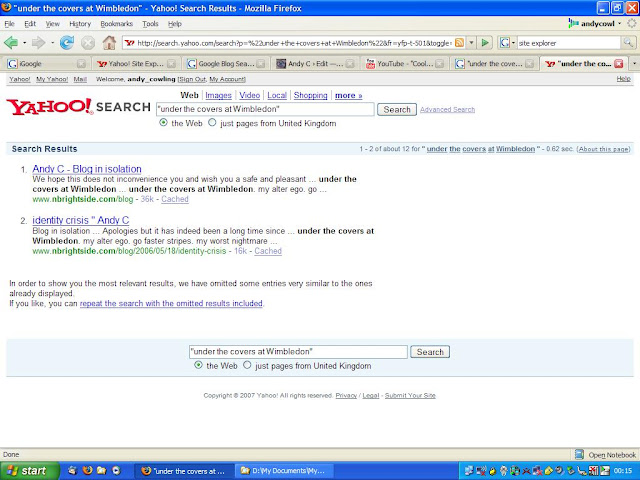
Here is the Yahoo! equivalent. Nothing for the actual blog article on page 1. However, the main blog page is listed which happens to contain a snapshot reference to the article title.
Yahoo Search

Which is more relevant ? Which looks a better match for the actual search terms ? Which one would you be tempted to click on ? Which site would you advertise on ?

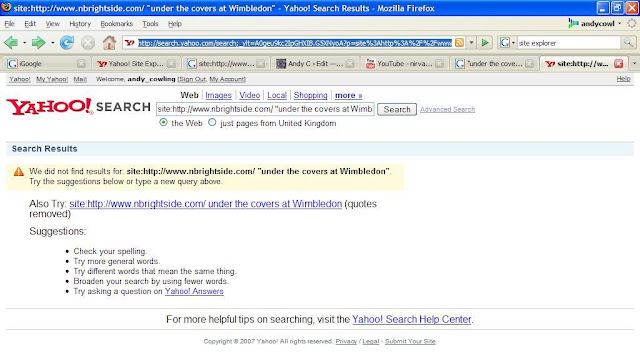
Next, I went to Yahoo! Site Explorer to see whether the actual blog article was indexed yet.
Yahoo Missing

No it wasn't. So, an interesting experiment and I am sure SEO magicians in white hats will arrive promptly to point out the error of my ways.

A footnote : The Yahoo! chart does appear to shows worrying signs of life from mid-May. The number of daily referrals jump from almost zero to almost a whole 10 visitors in a single day !

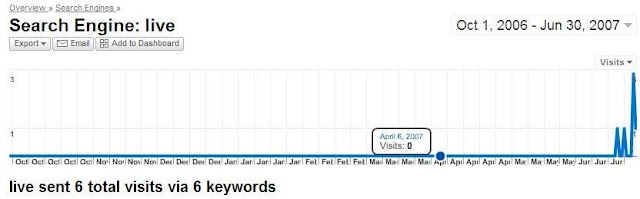
Come to think of it, Live.com (previously known as Dead.com) has also recently sparked into life, rising from the floor to reach the dizzy heights of a spike of 3 daily visitors.
Live Search

Google beware !

the only search engine in town

John Chow notes the vast majority of traffic to his blog from search engines comes from Google. I see a similar pattern for this humble blog with over 95% of search engine traffic arriving from Google despite the fact that the blog has been indexed by the major players.

Although I use Firefox (where the default search engine is Google) and I hardly ever use any other search engine, I was surprised that the number of visitors from Yahoo was a paltry 2%. I also thought more people using Internet Explorer would get directed from MSN/Live as the breakdown of browsers visiting this blog is split evenly between Firefox and Internet Explorer.

As for ask.com, I mistakenly thought this search engine ceased to exist when they recently killed off the English butler Jeeves. I actually had to go and check the logs to see whether the Ask crawler had even indexed the pages.

Google Docs and Spreadsheets

Google have announced Docs & Spreadsheets which is an overhaul of the original Writely interface and integration with Google Spreadsheets. I must admit I prefer the Google Docs interface and was interested to see that Docs can still publish to a blog (just like Writely).

The documentation suggests that tagging the article with keywords will be mapped to matching blog categories and that the document title will indeed be preserved in the blog entry. However, a simple test confirms that neither of these two features work as advertised (on WordPress at least). Sigh.

Google Reader gets revamp

Apart from the vi shortcuts, I was slightly underwhelmed by Google Reader when it was released last year.

Imagine my surprise, when I just used Google Reader to quickly check that I had reinstated full text feeds for this blog. Unless I see it with my own eyes, I just don't believe it.

Google Reader launches with a modest splash screen with some exciting announcement (which I immediately skipped) and I was greeted by some unexpected and welcome changes to the interface.

All my feeds appear in a hierarchy grouped by 'label'. However, I must admit I am confused. They used to be 'labels'. Now it appears 'labels' are dead and my categories are 'folders' or 'tags' depending on the context.

Google has also added:

  • Shared articles (but not grouped feeds)
  • Reading feeds via bookmarks which is an interesting idea
  • Integration with Google Homepage
  • Quick subscribe
  • Support for mobile phones (err, no thanks)

Even more strange is the fact I have happened upon something brand new all by myself.

Nothing on the blogs which I just scanned a minute ago. Nothing on Technorati. Nothing from Robert Scoble. Nothing on the RSS related blogs. No text message from the wife. Nothing on the Google blog. No IM from my son. Nothing on the Google Reader blog. Nothing on digg. Nothing on reddit. Nothing on del.ici.ous.

This is it. I am finally going be famous. My 15 minutes is here. I am going to be dugg and the WordPress servers will creak under the strain.

Apart from the fact it took me 7 minutes to compose these words, by which time this exciting Web 2.0 development will be yesterday's vinegar stained fish'n'chip paper.

Googles approach to software development

Rakesh Agrawal presents an interesting summary of a talk by Carl Sjogreen describing Googles approach to the software development process.

  • Google Calendar was a relatively small project (3 engineers, 1 product manager).
  • Google talk to real users ('Grandma in NYC') not techy geeks to find what users really want.
  • Google 'eat their own dog food'. Lots of internal testing prior to public launch.
  • Gap in the market. Lots of calendar products out there but none do what people want. Typical Google opportunity.
  • Paper based calendars are the real competition.