Posts in category "blogging"

the joy of Markdown

For many years, I have flitted between a plethora of different blogging platforms mainly out of curiosity, boredom, frustration or occasionally sheer bloody mindedness.

I have lost draft posts in WordPress, Tumblr, Posterous and Habari due to network glitches, browser crashes, my own stupidity and a broken AutoSave plugin.

One night in a lonely hotel room, the realisation suddenly dawned on me that my frustration with all of these blogging platforms was that I spent a lot of time in the post editor and none of the post editors did what I wanted.

Whether you use Tumblr, Posterous, WordPress, Habari, Drupal, Movable Type, Django-Mingus or another esoteric blog platform, you normally find yourself composing content in a Web browser within a blank text box writing raw HTML.

Alternatively, you might be using some WYSIWYG editor that helps you insert the appropriate HTML tags.

There are a few things wrong with this scenario as far as I'm concerned:

  • I don't particularly want or need to learn and remember HTML tags. People ask why there's a HTML reference card in the lavatory.

  • WYSIWYG editors can produce monstrous, bloated, ugly and sometimes, as a bonus, invalid HTML.

  • I don't really want to use a WYSIWYG editor. I have invested time learning to scratch the surface of the functionality provided by the one true editor - Emacs.

After reading, but steadfastly ignoring multiple articles about Markdown for many months and making a mental note to investigate further, I finally set aside 10 minutes to do so.

Without being over dramatic, Markdown has changed my life. For the better.

Markdown is a markup language ('geddit ?') that uses a easy to read notation as shorthand for HTML.

The beauty of the Markdown syntax is that text written in the Markdown format is perfectly readable. This makes reading, scanning, reviewing and editing text much easier and quicker.

I'm a simple man with simple tastes so my blog posts primarily use paragraphs, lists, hyperlinks and the very occasional image.

A hyperlink in Markdown looks like

[Markdown](http://daringfireball.net/projects/markdown/syntax)

A blank line indicates the end of a paragraph. Again, this is how we compose text in emails and is so much more natural than

</p>
<p>

The HTML tags above are a pre-formatted block. In Markdown, this is simply denoted by a 4 character indent.

To emphasise a word, you simply enclose the word in asterisk characters which is what a lot of Luddite, bearded Unix geeks tend to do anyway. Using two asterisk characters will result in bold text.

Similarly, if you want to force a line break you simply append two blank spaces to the end of a line.

Code blocks are enclosed by backquotes.

printf("Hello World\n");

Bulleted lists are introduced by a hyphen or asterisk character so a list of my favourite fruits would be written as:

* Apples
* Oranges
* Pears
* Bananas

Ordered lists use numbers and look like, well, ordered lists.

1. Giggs
2. Scholes
3. Cantona

Quotes are also easy and intuitive introduced by the '>' character.

Are you still doing what you did 5 years ago ? Yeah ? Well don't make a career out of it. Mark E. Smith (The Fall)

Most blogging platforms either provides native Markdown support or has plugins available to provide such functionality.

However, the real beauty of Markdown for me is that Emacs inevitably has a powerful Markdown mode that provides font colouring, additional menu shortcuts for the common constructs and a feature to examine the generated HTML in an Emacs buffer or preview the results in a Web browser.
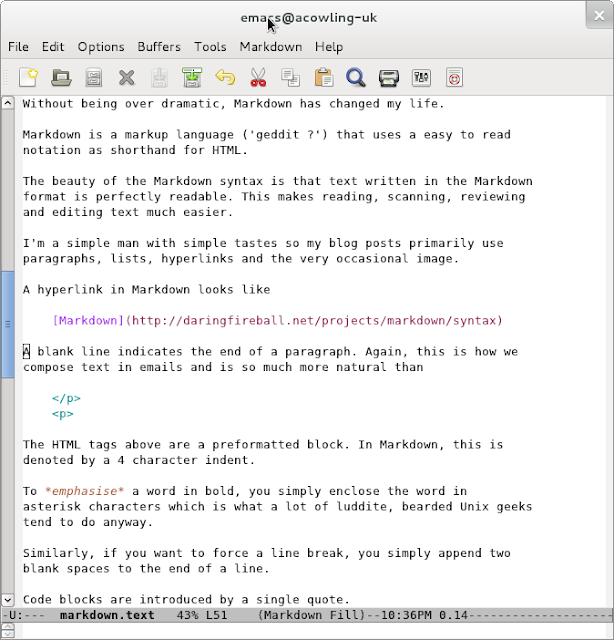
Markdown-Emacs

This is incredibly useful for me as I can quickly check the generated HTML and even validate my blog posts. Validating my posts wasn't easy before as the addition of the Disqus Javascript code generates a number of warnings from the W3C validator.
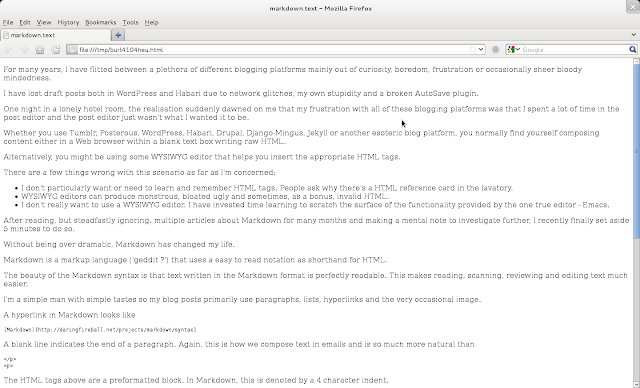
Markdown Preview

Drupal 7 released

This blog and the handful of modules I use has been upgraded to the final version of Drupal 7.0 which was released today.

I was quite pleased that I used Drupal 7 from the early beta versions and then tracked the D7 release candidates as this gave me valuable experience in upgrading Drupal 7 relatively quickly while preserving my additional modules without losing all my data which always helps. It's worth noting that although I barely scratch the surface of Drupal 7's wide range of functionality, the quality, reliability and performance of Drupal 7 was perfectly fine for this blog.

Personally (and rather selfishly), I hope that the formal release of Drupal 7.0 will encourage more developers to upgrade which, in turn, which provide impetus for more Drupal modules (and themes) to be ported and made available for Drupal 7.

Dries Buytaert, the founder of Drupal, posted a interesting set of reviews looking back on 2010 with his hopes and predictions for the coming year for:

  • Drupal - the open source content management system.
  • Mollom - comment spam service with commercial pricing for larger sites.
  • Acquia - Dries' startup offering Drupal based services including hosted Drupal sites
  • Drupal Gardens.

to markdown or not to markdown

Steve Rubel sings the praises of Markdown and good old fashioned text editors.

I agree and for a long time have dithered over whether to write all of my blog posts in Markdown. This makes sense as it simplifies the syntax and theoretically should make writing content easier and quicker. I was particularly struck by Caius Durling's use of Markdown on his Habari blog and the use of the plaintext plugin to reveal the raw Markdown.

However, despite experimenting with both the Markdown plugin for Habari and later the Markdown filter module for Drupal, I have actually never taken the plunge.

I think the subconscious reasons behind for my reluctance to bite the bullet and fully embrace Markdown are:

  1. Knowing the subset of HTML tags I commonly use, I am finally relatively comfortable composing posts in raw HTML.

  2. Although Markdown uses a simple, easy to learn syntax (which is rather the whole point after all), the Markdown markup would be a slightly different syntax to learn and master.

  3. I am (justifiably in my case) worried that I would constantly produce incorrect Markdown syntax and hence generate flawed HTML so I would be forever reviewing the generated HTML which again would be time consuming and self-defeating. A side by side split, live screen Markdown/HTML preview would be really useful.I have just discovered the Live module which looks like it could be used in conjunction with the Markdown filter to create similar functionality (but only when this module is ported to Drupal 7).

  4. Sometimes I embed images from Picasweb or YouTube and I'm not sure how these HTML embeds would work in Markdown or whether the Markdown processor will accept raw HTML for these occasional exceptions.

  5. Drupal supports different filter types on a per post basis but I have concerns about attempting to migrate a blog containing a mixture of HTML and Markdown posts to different blog platforms and I'm hardly likely to convert 1,000 historic posts to Markdown. However, if the Markdown is processed and the generated HTML is stored in the database, this may not be a problem. Another obvious solution is trying to curb this constant urge to tinker with the underlying technology powering this blog but that is unlikely to happen.

Anyway, time to stop procrastinating. I have managed to write this post in Markdown and already I like the modified, simpler syntax, so I will endeavour to follow Steve Rubel's advice and join the ranks of the 'modern communicators'.

essential modules for your new Drupal 7 site

People never ask me Hey Norman - what modules have you installed thus far on this wonderful Drupal 7 powered blog ?

  • Archive - monthly archives.

  • Disqus - although I had some problems with this module so I am currently using a simple Disqus block.

  • Global Redirect - ensures that 'node/1234' is redirected to '2010/21/22/blog-post'.

  • Google Analytics - mandatory to torment myself over visitors statistics using GA.

  • Markdown Filter - although I haven't fully embraced this yet. Old (raw HTML) habits die hard.

  • Mollom - Disqus provides built-in spam protection but I use Mollom to guard the user registration and contact forms which is very effective.

  • Pathauto - to map Drupal nodes to my date based permalink structure.

  • Token - required by Pathauto

  • Tagadelic - marvellous, configurable, graphic 'Tags' page to aid Bill's navigation of this site.

  • Wysiwyg - evaluating various options but not found nirvana as yet.

  • XML sitemap - produces search engine friendly sitemap.

I also modified the 'page.tpl.php' template to reinstate my wonderful, award winning rotating tagline (or slogan in Drupal terminology).

Curiously, I haven't enabled the D7 core 'blog' module as I don't need multi-user blogs. Each post is simply an 'Article'.

marketing plan for Drupal 7 launch

The date for the long awaited Drupal 7 release has been announced as 5 January 2011.

Dries should just play this video. Then he should simply read the following and leave the stage.

Straight as an arrow\ Defect defect\ Not straight, not so straight\ Reject reject\ Towards anti-social\ Solo solo

Standing on the stairs\ Cold, cold morning\ Ghostly image of fear\ Mayday, mayday\ Gonna leave this region\ They'll take me with them

Drupal 7\ Drupal 7\ Drupal 7\ Drupal 7\ Drupal 7\ Drupal 7\ Drupal 7\ Drupal 7

CRM for bloggers

Theres a common saying in Customer Relationship Management (CRM) circles along the lines of:

It takes 10,000 times more time/money/effort to acquire a new customer than it takes to retain an existing customer.

Evidence of this is commonplace; introductory offers, improved interest rates, free Parker pen and pencil gift set and enticements for new customers for which existing customers are ineligible.

Now I occasionally claim that I am writing this blog purely for me, myself and I. What I mean by that is that I tend to write what I want when I want and don't feel pressured to produce content on a regular ongoing basis. However, that's not entirely true; if it was I could equally well write this stream of consciousness into a A5 notebook locked in my top drawer where no-one would ever see it.

Let's be honest - people are blogging to get noticed and everyone likes feedback (even if it's negative feedback) and it's fantastic if, just occasionally, someone says 'God - that post about LinkedIn and pole dancing made me laugh'.

A recent comment by Bill (which I will reproduce here) rather took me by surprise and made me pause for thought

I like your blog, but just one thing about it frustrates me - you “tag” posts, but I can't seem to find an index of these tags. (?) For example, I like to read your comments on emacs - but without such an index, I am forced to use Google to search your site.

Now here was a potential customer (an interested like-minded reader or even hopefully, that rare animal, a brand new subscriber) for my business (my humble blog) and what was I doing to welcome him, to encourage him, to help him find his way around my blog ? Nothing. Absolutely nothing.

After giving this some thought, I decided to take prompt and decisive action:

Many thanks for popping by and bothering to leave some constructive criticism about the lack of decent navigation options on this blog. There's a couple of reasons for this:

  1. I recently moved this blog to Drupal 7 and I didn't actually know how to add tag clouds, archive pages, previous/next post, related posts or search functionality.

  2. In the past, I have played with all of the above on both WordPress and Habari in an effort to keep casual readers lingering for longer and my gut feeling was that none of these additions made a blind bit of difference to Pages/Visit and merely cluttered up the blog.

However, prompted by your comment, I have now added 'Tags' together with a search box on the sidebar and an 'Archives' tab allowing you to browse by year or month.

Unfortunately, I never heard from the mysterious Bill ever again. A cautionary tale and a valuable lesson in CRM for all small-time bloggers.

all change please

This blog is now running on Drupal 7 (beta 3).

Currently Disqus comments are absent but I am hoping the Global Redirect module and the Disqus crawler will remedy this given time.

Most of the modules I require are available for Drupal 7 apart from FeedBurner so I have just re-pointed the feed for now.

Let's see if this appears on the other side.

I will probably convert to using MarkDown markup in due course too.

Main reason for ditching Habari was the lack of user forums.

starting from zero

One of my favourite and regular UK bloggers, Jonathan Beckett had gone rather quiet recently so I assumed he must have moved blogging platform the the Nth time, gone on holiday or possibly his feed was screwed without his knowledge so I sent him a polite email asking ‘Dead or just resting ?' and he informed me he'd intentionally changed blog address without telling anyone.

I think this sudden, unannounced, abrupt loss of service is an excellent idea for all bloggers - it's a bit like writing ‘I love small, fresh, juicy satsumas' buried deep in the middle of a technical report to be delivered to a client or pausing for 5 minutes, with your face in your hands, during a presentation at Oracle Open World. It helps to focus the mind and check whether anyone is actually reading or listening.

In fact, this method of social network suicide followed by starting again from zero and organic gardening is a strategy I have used more than once during my blogging lifetime. The only difference is my stats genuinely reverted to zero but I wasn't inundated with curious Tweets, scribbling on my Facebook wall, IM's and concerned email messages enquiring about my state of mind and asking for details of the new blog feed.

I was greeted a wall of silence, pierced only by a solitary email: ‘I simply adore Clementines'.

Habari development roadmap

StatusNet names all releases after R.E.M. songs so heres my idea for future Habari release codenames. Its a well kept secret that all Habari developers and users adore that popular beat combo - The National.

The Habari development roadmap in full

  • 0.7 - October 2010 -Developer Release 1 (‘10/10/10')
  • 0.8 - January 2011 (‘Pay For Me')
  • 0.8.1 - February 2011 (‘Murder me Rachel')
  • 0.9 - June 2011 (‘Lit Up')
  • 0.9.1 - August 2015 (‘Slipping Husband' aka ‘Slipping Release')
  • 0.9.2 - November 2015 (‘Mr. November')
  • 0.9.3 - January 2016 (‘The Geese of Beverley Road')
  • 0.9.3.1 - January 2016 (‘Mistaken for Joomla')
  • 0.9.3.2.1.3(Alpha 3, RC1) - January 2016 (‘Start a War')
  • 0.9.4 - March 2017 (‘Afraid of Everyone')
  • 0.9.5 April 2017 (‘Your Patches Were a Kindness')
  • 0.9.9 - June 2017 (‘Conversation 1,000,016' aka ‘Taxonomy revisited')
  • 1.0 (Final) - Thursday December 25 2019 (‘Bloodbuzz Ohio')

Habari 0.7 developer release

Apart from a short-lived crisis of confidence - after losing a Draft post, I spontaneously migrated this blog to Wordpress as an interim hop before completing 99% of a full blown migration to Django-Mingus which I then immediately discarded - I have used Habari as my preferred blogging platform for two and a half years.

It's been a while since the last major Habari release (0.6) but, because I run the latest 0.7 development code (using SubVersion), the lengthy gap and absence of a formal 0.7 release didn't particularly bother me.

However, the 0.6.4 release is pretty dated now and lots of new features have been added and bugs fixed in the intervening 18 months. Also, I think there are potential developers who are keen to get the latest and greatest version of Habari so I was pleased to see that the Habari project released a '0.7 Developer Release' yesterday.