Posts tagged with "WordPress"

turbulence ahead

I am about to embark on migrating this blog from WordPress to Django-Mingus because I simply can't stand the WordPress Compose Post interface (if you can call it that).

This exciting move comes less than two weeks after I spontaneously decided to ditch Habari after the lack of a functional 'Auto-Save' plugin caused me to lose 17 minutes work.

You may say 'I'm reading this in my preferred RSS reader so please don't bother me with such minutiae'.

However, when I migrated from Habari to WordPress a month ago, I flooded you both with my most recent posts duplicated so this is just prior warning that similar oddness may well occur as I endeavour to hook up the new blog feed to FeedBurner.

This may or may not signal a period of blog hopping and I'd like to say this will may trigger a series of interesting posts about which blogging platforms I considered and discarded and top tips on planning and executing an efficient blog migration.

a lesson in software design

This blog used to run on WordPress but now runs on Habari which is a blogging platform currently being developed by a set of very talented people.

Undoubtedly, the number of developers and users running Habari is far fewer than the massive community using WordPress. Similarly, the number of available themes and plugins available for Habari is relatively small (albeit growing daily) and dwarfed by the vast, almost bewildering wealth of add-ons and the extensive range of themes available for Wordpress.

However, this isn't a bad thing because it forces anyone contemplating a migration to Habari to think carefully about the core plugins that are truly essential to adminster your blog and valuable for your readers.

One such plugin (for me) was an equivalent of the Wordpress sitemaps plugin. Rick Cockrum published a excellent summary of why an automatically generated sitemap is useful.

When I first configured and activated the sitemap plugin for Habari, nothing happened. No sitemap file was generated. Initially, I thought that maybe the sitemap was only generated after a post was published. So I published a new post. Still nothing happened..

I posted a enquiry on the Habari users mailing list. In an effort to 'help' the Habari community, I even opened a ticket (bug request).

Then, I made an amazing discovery when an anonymous author was forced to waste some of his valuable time to close my 'bug report':

The plugin is not intended to generate a file, rather to serve the sitemap xml document when requested.

So, it transpires that the Habari sitemaps plugin doesn't actually generate a file. The sitemap is simply a URL which is dynamically built, on request.

Now I believe this is a much neater solution. No need for the user to specify where the file should be placed. Less work for the plugin to do. Much cleaner. Much simpler. Credit to the author, Andrew da Silva.

The lesson I learned was that just because something has always been done that way doesn't necessarily mean it can only be done that way.

P.S. If you're worried about the performance impact of needlessly rebuilding a sitemap, on the fly for 234,432 entries, don't worry - some clever individual has already implemented a cache for the sitemap data.
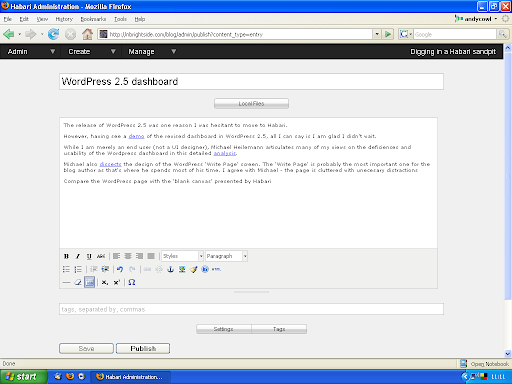
WordPress 2.5 dashboard

The forthcoming release of WordPress 2.5 was one reason I was hesitant to move to Habari.

However, having seen a demo of the revised dashboard in WordPress 2.5, all I can say is I am glad I made the move and didn't wait.

While I am merely an end user (not a UI designer), Michael Heilemann articulates many of my views on the deficiencies and usability of the Wordpress dashboard in this detailed analysis.

Michael also dissects the design of the WordPress 'Write Page' screen. The 'Write Page' is probably the most important one for the blog author as that's where he spends most of his time. I agree with Michael - the page is cluttered with unnecessary distractions

Compare the WordPress page with the 'blank canvas' presented by the article editor in Habari.

Habari Blank Canvas

how to migrate a WordPress blog to Django

There is currently no utility to migrate existing blog content to django.

However, conversion of an existing WordPress blog is pretty straightforward.

Firstly, simply export the following tables from the WordPress database using phpMyAdmin

  • wp_posts
  • wp_comments
  • wp_terms
  • wp_term_taxonomy
  • wp_term_relationships

Import the tables into the django database.

Then run the following SQL statements which migrate posts, comments and categories and assume a WordPress 2.3 schema and a blank django blog. If you have already created content in django, minor changes will be needed. My WordPress blog only uses categories which simply get converted to django tags.

insert into blog_post
(id,
slug,
title,
pubdate,
moddate,
body,
draft,
closed)
select
wp_posts.id,
wp_posts.post_name,
wp_posts.post_title,
wp_posts.post_date_gmt,
wp_posts.post_modified_gmt,
wp_posts.post_content,
0,
0
from wp_posts
and post_type = 'post';

insert into comments_freecomment
(id,
content_type_id,
comment,
object_id,
person_name,
submit_date,
is_public,
ip_address,
approved,
site_id)
select
wp_comments.comment_id,
14,
wp_comments.comment_content,
wp_comments.comment_post_id,
wp_comments.comment_author,
wp_comments.comment_date_gmt,
1,
wp_comments.comment_author_ip,
wp_comments.comment_approved,
1
from wp_comments
where comment_approved = '1';

insert into blog_tag
(slug,
title,
description)
select
wp_terms.slug,
wp_terms.name,
wp_terms.name
from wp_terms;

insert into blog_post_tags
(post_id,
tag_id)
select
wp_term_relationships.object_id,
wp_terms.name
from wp_term_relationships, wp_term_taxonomy, wp_terms
where wp_term_relationships.term_taxonomy_id = wp_term_taxonomy.term_taxonomy_id
and wp_term_taxonomy.term_id = wp_terms.term_id;

Finally, delete the WP_* tables from the django (and not the WordPress) database.

WordPress 2.3 and Typo

I have upgraded this blog to the recently released WordPress 2.3. However, I have deep rooted concerns that the new tagging functionality will simply overload my tiny brain.

The WordPress upgrade went smoothly enough although the editor now reports a missing table (wp_post2cat) which is slightly irritating.

Also, I sense increasing disquiet amongst some long standing, intelligent and loyal WordPress users so I took the precaution of installing YABP (Yet Another Blog Platform). Please put your hands together and welcome Typo (powered by a delightful lady called 'Ruby on Rails').

Update: The Google Sitemap Generator plug-in was causing the error. The problem is resolved in the latest version.

Welcome to WordPress 2.2

I don't know what I did wrong but I just upgraded to WordPress 2.2 and everything still works.

  • Download WordPress 2.2 distribution and read instructions.
  • Upload tar archive to Bluehost using pscp.
  • Run manual database backup using AutoMySQLBackup.
  • Deactivate all plugins.
  • $ cp -rv blog blog-213
  • $ rm -fr blog
  • $ tar zxvf \~/wordpress-2.2.tar.gz
  • $ mv wordpress blog
  • Overlay contents of original wp-content/plugins and wp-content/themes directories.
  • Reactivate all plugins (apart from widgets) which is now in core.
  • Check version number (2.2) from dashboard.
  • Manually delete 143 spam comments that appeared during the 4 minutes Akismet's shields were down.
  • Admire new full screen WYSIWYG preview post.

a triumph for slothful indolence and lethargy

Like most newly born WordPress.com bloggers, I keenly played with all the features and tirelessly experimented with the rich variety of horrendous 1, 2 and 3 column themes.

Then, I left home and bought a domain name from a geezer in the pub. The downward spiral continues into self-hosting and mixing with the wrong crowd. Inevitably, I stayed up late, dabbled in alcohol and drugs while installing every single plugin and widget ever created for WordPress.

You start taking ProPlus, pulling all-nighters and, unbelievably, start hacking PHP code.

Then, I grew up and became a man. I bought some slippers from M&S together with a pipe and grumbled away at the television ('You can't even hear what they are singing').

The stunning Barthelme theme was left unaltered. The platform was stable but you quickly run out of ready-made, cheap blogging material. Apart from a brief dalliance with pMetrics, Google Analytics silently continues to accumulate data, statistics, lies and damned statistics. You start to sleep in the afternoons and go to bed after the News.

Even the recent announcement of a WordPress statistics plugin for self-hosted blogs couldn't rouse me from my blissful slumber. Why bother with all that pesky download, upload, configuration and activation nonsense wasting valuable time and effort when Google Analytics will probably be revamped with colourful dashboards and a usable interface tomorrow ? And so it came pass. Yet another triumph for apathy.

Life was good. And then Scott Wallick had to spoil it by announcing a major overhaul of all his brilliant WordPress themes including V3.0 of the Barthelme theme. As the current version is an embryonic 1.2.2, you can't resist this temptation. After months of inactivity, you now simply have to act.

So you reluctantly risk RSI by typing on a keyboard again. You have to endure the tortuous download, upload and configuration process. Then you have to use the left side of your tiny brain to merge your changes only to discover that the blog looks exactly the same and only a CSS purist could tell the difference.

Everything that is apart from the 'Related Posts' widget which is now completely broken. You hesitate and consider conducting an exhaustive (and exhausting) search for a WordPress alternative that is compatible with Barthelme 3.0.

Then inertia holds sway, so you give up and reinstate the perfectly functional (if outdated and unfashionable) stunning Barthelme 1.2.2 and slump back in your chair.

rolling upgrade

Until 30 minutes ago, this blog was running Wordpress 2.1 courtesy of the Fantastico installation at Bluehost. The blog was fairly stable and worked fine.

However, I was investigating upgrading to WordPress 2.1.2 to plug a security issue. The Fantastico Installer currently only offers an upgrade to the flawed 2.1.1 release.

In any case, the Fantastico installer now refuses to upgrade my WordPress installation because I have installed new themes, configured additional plug-ins and even added database tables to the schema.

So without any prior planning or forethought, I have been forced (by that nagging voice in my head) to spontaneously install a brand new instance of WordPress 2.1.2 and migrate my existing blog.

Consequently, this blog will be completely broken for the foreseeable future. All comments will be lost. RSS feeds will stop refreshing. Most plug-ins will stop working. Any hosted images will return '404 - Not Found'. In fact, with my level of knowledge and incompetence, it is likely that the complete blog will be lost forever.

Worse, my proudest invention, the rotating tagline, doesn't work. This is completely unintentional but at least, it means my tiny brain can easily differentiate between the 'old' and 'new' blogs.

At last, I am now freed from the constraints of Fantastico and as The Clash memorably sang, I now assume 'Complete Control'.