Posts tagged with "Markdown"

Commonmark test

This is the famous ‘Hello world’ program written in Python in colour using Markdown.

#!/usr/bin/env python
import sys

def hello(name='world'):
    greeting = "hello " + name
    print(greeting)

if __name__ == "__main__":
    hello(*sys.argv[1:])

This took me a long time to get working.

The music video for Rihanna’s song American Oxygen depicts various moments from American history, including the inauguration of Barack Obama.

Why, sometimes I’ve believed as many as six impossible things before breakfast.

Everyone must attend the meeting at 5 o’clock today.

I am totally awesome.*

* for certain very small values of awesome

I have eaten\ the plums\ that were in\ the icebox

Chapter 1

Something about the room made him uneasy.

Chapter 2

It's behind you! Hurry before it

After the Big Bang

A brief summary of time

Life on earth

10 billion years

You reading this

13.7 billion years

The quote

Somewhere, something incredible is waiting to be known

has been ascribed to Carl Sagan.

My favourite Miss Manners quotes:

Allowing an unimportant mistake to pass without comment is a wonderful social grace.

Ideological differences are no excuse for rudeness.

  • Flour
  • Cheese
  • Tomatoes

Four steps to better sleep: 1. Stick to a sleep schedule 2. Create a bedtime ritual 3. Get comfortable 4. Manage stress

1986. What a great season. Arguably the finest season in the history of the franchise.

You can do anything at https://html5zombo.com

The University of Rwanda was formed in 2013 through the merger of Rwanda’s seven public institutions of higher education.

Hurricane Erika was the strongest and longest-lasting tropical cyclone in the 1997 Atlantic hurricane season.

Logo

When x = 3, that means x + 2 = 5

Who ate the most donuts this week?

Jeff  15
Sam   11
Robin  6
  • Fruit
  • Apple
  • Orange
  • Banana
  • Dairy
  • Milk
  • Cheese

  • World Cup 2014

  • Germany
  • Argentina
  • Netherlands
  • Rugby World Cup 2015
  • New Zealand
  • Australia
  • South Africa

  • Ingredients

    • spaghetti
    • marinara sauce
    • salt
  • Cooking

Bring water to boil, add a pinch of salt and spaghetti. Cook until pasta is tender.

  1. Serve

Drain the pasta on a plate. Add heated sauce.

No man is lonely eating spaghetti; it requires so much attention.

Bon appetit!

Column LeftColumn RightColumn Centre
row1111
row2222
row3333

Code highlight example

This is the famous Hello world program written in Python in colour using Markdown.

#!/usr/bin/env python
import sys

def hello(name='world'):
    greeting = "hello " + name
    print(greeting)

if __name__ == "__main__":
    hello(*sys.argv[1:])

This took me a long time to get working.

the joy of Markdown

For many years, I have flitted between a plethora of different blogging platforms mainly out of curiosity, boredom, frustration or occasionally sheer bloody mindedness.

I have lost draft posts in WordPress, Tumblr, Posterous and Habari due to network glitches, browser crashes, my own stupidity and a broken AutoSave plugin.

One night in a lonely hotel room, the realisation suddenly dawned on me that my frustration with all of these blogging platforms was that I spent a lot of time in the post editor and none of the post editors did what I wanted.

Whether you use Tumblr, Posterous, WordPress, Habari, Drupal, Movable Type, Django-Mingus or another esoteric blog platform, you normally find yourself composing content in a Web browser within a blank text box writing raw HTML.

Alternatively, you might be using some WYSIWYG editor that helps you insert the appropriate HTML tags.

There are a few things wrong with this scenario as far as I'm concerned:

  • I don't particularly want or need to learn and remember HTML tags. People ask why there's a HTML reference card in the lavatory.

  • WYSIWYG editors can produce monstrous, bloated, ugly and sometimes, as a bonus, invalid HTML.

  • I don't really want to use a WYSIWYG editor. I have invested time learning to scratch the surface of the functionality provided by the one true editor - Emacs.

After reading, but steadfastly ignoring multiple articles about Markdown for many months and making a mental note to investigate further, I finally set aside 10 minutes to do so.

Without being over dramatic, Markdown has changed my life. For the better.

Markdown is a markup language ('geddit ?') that uses a easy to read notation as shorthand for HTML.

The beauty of the Markdown syntax is that text written in the Markdown format is perfectly readable. This makes reading, scanning, reviewing and editing text much easier and quicker.

I'm a simple man with simple tastes so my blog posts primarily use paragraphs, lists, hyperlinks and the very occasional image.

A hyperlink in Markdown looks like

[Markdown](http://daringfireball.net/projects/markdown/syntax)

A blank line indicates the end of a paragraph. Again, this is how we compose text in emails and is so much more natural than

</p>
<p>

The HTML tags above are a pre-formatted block. In Markdown, this is simply denoted by a 4 character indent.

To emphasise a word, you simply enclose the word in asterisk characters which is what a lot of Luddite, bearded Unix geeks tend to do anyway. Using two asterisk characters will result in bold text.

Similarly, if you want to force a line break you simply append two blank spaces to the end of a line.

Code blocks are enclosed by backquotes.

printf("Hello World\n");

Bulleted lists are introduced by a hyphen or asterisk character so a list of my favourite fruits would be written as:

* Apples
* Oranges
* Pears
* Bananas

Ordered lists use numbers and look like, well, ordered lists.

1. Giggs
2. Scholes
3. Cantona

Quotes are also easy and intuitive introduced by the '>' character.

> Are you still doing what you did 5 years ago ?
> Yeah ? Well don't make a career out of it.
> Mark E. Smith (The Fall)

Most blogging platforms either provides native Markdown support or has plugins available to provide such functionality.

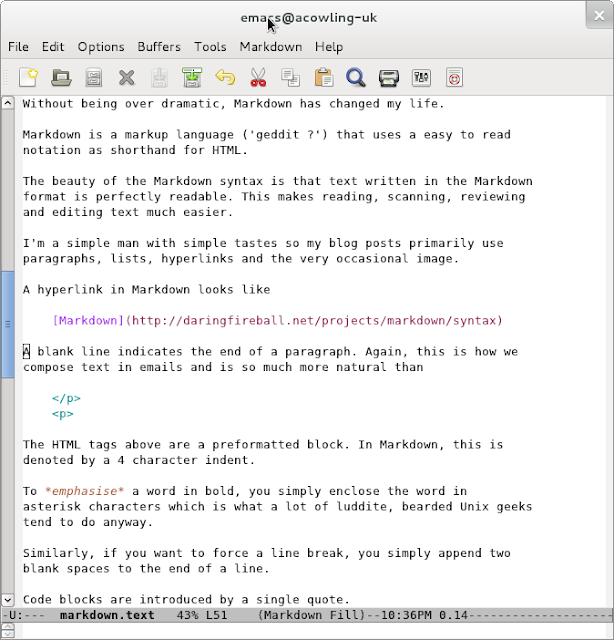
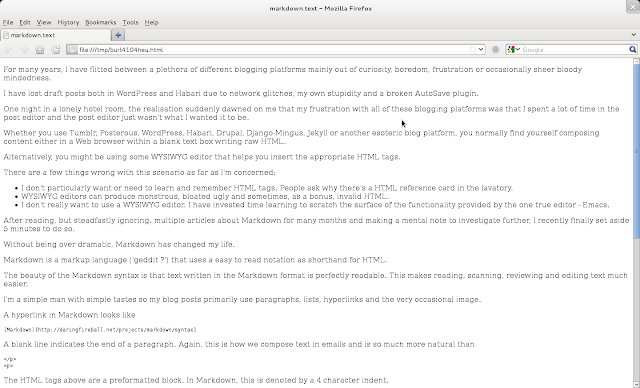
However, the real beauty of Markdown for me is that Emacs inevitably has a powerful Markdown mode that provides font colouring, additional menu shortcuts for the common constructs and a feature to examine the generated HTML in an Emacs buffer or preview the results in a Web browser.

Markdown-Emacs

This is incredibly useful for me as I can quickly check the generated HTML and even validate my blog posts. Validating my posts wasn't easy before as the addition of the Disqus Javascript code generates a number of warnings from the W3C validator.

Markdown Preview

to markdown or not to markdown

Steve Rubel sings the praises of Markdown and good old fashioned text editors.

I agree and for a long time have dithered over whether to write all of my blog posts in Markdown. This makes sense as it simplifies the syntax and theoretically should make writing content easier and quicker. I was particularly struck by Caius Durling's use of Markdown on his Habari blog and the use of the plaintext plugin to reveal the raw Markdown.

However, despite experimenting with both the Markdown plugin for Habari and later the Markdown filter module for Drupal, I have actually never taken the plunge.

I think the subconscious reasons behind for my reluctance to bite the bullet and fully embrace Markdown are:

  1. Knowing the subset of HTML tags I commonly use, I am finally relatively comfortable composing posts in raw HTML.

  2. Although Markdown uses a simple, easy to learn syntax (which is rather the whole point after all), the Markdown markup would be a slightly different syntax to learn and master.

  3. I am (justifiably in my case) worried that I would constantly produce incorrect Markdown syntax and hence generate flawed HTML so I would be forever reviewing the generated HTML which again would be time consuming and self-defeating. A side by side split, live screen Markdown/HTML preview would be really useful.I have just discovered the Live module which looks like it could be used in conjunction with the Markdown filter to create similar functionality (but only when this module is ported to Drupal 7).

  4. Sometimes I embed images from Picasweb or YouTube and I'm not sure how these HTML embeds would work in Markdown or whether the Markdown processor will accept raw HTML for these occasional exceptions.

  5. Drupal supports different filter types on a per post basis but I have concerns about attempting to migrate a blog containing a mixture of HTML and Markdown posts to different blog platforms and I'm hardly likely to convert 1,000 historic posts to Markdown. However, if the Markdown is processed and the generated HTML is stored in the database, this may not be a problem. Another obvious solution is trying to curb this constant urge to tinker with the underlying technology powering this blog but that is unlikely to happen.

Anyway, time to stop procrastinating. I have managed to write this post in Markdown and already I like the modified, simpler syntax, so I will endeavour to follow Steve Rubel's advice and join the ranks of the 'modern communicators'.