Posts tagged with "Habari"

blog maintenance

Time to upgrade Drupal again. Yesterday version 7.12 was released and this blog is currently running a very outdated (and probably insecure) 7.4. Although Drupal 7 included automatic update for modules and themes, updating the core Drupal software still needs manual intervention and takes time.

Over the years, the main self-hosted blog platforms I have used are:

  • WordPress - one-click updates. Quick and easy. By far the best and most robust solution. Never let me down.
  • Habari - Official Habari releases were fairly infrequent so I chose to I track the latest development version so upgrade was manual but as simple as typing '$ svn update'. Rolling back was needed on a couple of occasions but possible simply by reverting to the previous SVN version ($ svn update -r <nnn>).
  • Drupal - manual update. Involves taking the site offline, copying files, thinking, run 'update.php', copying files back again, bringing the site back online and a little time. Slightly tedious as Drupal tend to to release a new version of the core software every month or so with a nagging email reminder to do the right thing.

I have also noticed that my sitemap hasn't been generated in 6 months and doesn't include the most recent entries. In addition, some (old) posts have been marked as 'Never Update' but after some housekeeping to modify some permalinks to fix various '404 - Not found' errors, these old entries now need to be regenerated.

to markdown or not to markdown

Steve Rubel sings the praises of Markdown and good old fashioned text editors.

I agree and for a long time have dithered over whether to write all of my blog posts in Markdown. This makes sense as it simplifies the syntax and theoretically should make writing content easier and quicker. I was particularly struck by Caius Durling's use of Markdown on his Habari blog and the use of the plaintext plugin to reveal the raw Markdown.

However, despite experimenting with both the Markdown plugin for Habari and later the Markdown filter module for Drupal, I have actually never taken the plunge.

I think the subconscious reasons behind for my reluctance to bite the bullet and fully embrace Markdown are:

  1. Knowing the subset of HTML tags I commonly use, I am finally relatively comfortable composing posts in raw HTML.
  2. Although Markdown uses a simple, easy to learn syntax (which is rather the whole point after all), the Markdown markup would be a slightly different syntax to learn and master.
  3. I am (justifiably in my case) worried that I would constantly produce incorrect Markdown syntax and hence generate flawed HTML so I would be forever reviewing the generated HTML which again would be time consuming and self-defeating. A side by side split, live screen Markdown/HTML preview would be really useful.I have just discovered the Live module which looks like it could be used in conjunction with the Markdown filter to create similar functionality (but only when this module is ported to Drupal 7).
  4. Sometimes I embed images from Picasweb or YouTube and I'm not sure how these HTML embeds would work in Markdown or whether the Markdown processor will accept raw HTML for these occasional exceptions.
  5. Drupal supports different filter types on a per post basis but I have concerns about attempting to migrate a blog containing a mixture of HTML and Markdown posts to different blog platforms and I'm hardly likely to convert 1,000 historic posts to Markdown. However, if the Markdown is processed and the generated HTML is stored in the database, this may not be a problem. Another obvious solution is trying to curb this constant urge to tinker with the underlying technology powering this blog but that is unlikely to happen.

Anyway, time to stop procrastinating. I have managed to write this post in Markdown and already I like the modified, simpler syntax, so I will endeavour to follow Steve Rubel's advice and join the ranks of the 'modern communicators'.

Habari development roadmap

StatusNet names all releases after R.E.M. songs so heres my idea for future Habari release codenames. Its a well kept secret that all Habari developers and users adore that popular beat combo - The National.

The Habari development roadmap in full

  • 0.7 - October 2010 -Developer Release 1 (‘10/10/10')
  • 0.8 - January 2011 (‘Pay For Me')
  • 0.8.1 - February 2011 (‘Murder me Rachel')
  • 0.9 - June 2011 (‘Lit Up')
  • 0.9.1 - August 2015 (‘Slipping Husband' aka ‘Slipping Release')
  • 0.9.2 - November 2015 (‘Mr. November')
  • 0.9.3 - January 2016 (‘The Geese of Beverley Road')
  • 0.9.3.1 - January 2016 (‘Mistaken for Joomla')
  • 0.9.3.2.1.3(Alpha 3, RC1) - January 2016 (‘Start a War')
  • 0.9.4 - March 2017 (‘Afraid of Everyone')
  • 0.9.5 April 2017 (‘Your Patches Were a Kindness')
  • 0.9.9 - June 2017 (‘Conversation 1,000,016' aka ‘Taxonomy revisited')
  • 1.0 (Final) - Thursday December 25 2019 (‘Bloodbuzz Ohio')

Habari 0.7 developer release

Apart from a short-lived crisis of confidence - after losing a Draft post, I spontaneously migrated this blog to Wordpress as an interim hop before completing 99% of a full blown migration to Django-Mingus which I then immediately discarded - I have used Habari as my preferred blogging platform for two and a half years.

It's been a while since the last major Habari release (0.6) but, because I run the latest 0.7 development code (using SubVersion), the lengthy gap and absence of a formal 0.7 release didn't particularly bother me.

However, the 0.6.4 release is pretty dated now and lots of new features have been added and bugs fixed in the intervening 18 months. Also, I think there are potential developers who are keen to get the latest and greatest version of Habari so I was pleased to see that the Habari project released a '0.7 Developer Release' yesterday.

turbulence ahead

I am about to embark on migrating this blog from WordPress to Django-Mingus because I simply can't stand the WordPress Compose Post interface (if you can call it that).

This exciting move comes less than two weeks after I spontaneously decided to ditch Habari after the lack of a functional 'Auto-Save' plugin caused me to lose 17 minutes work.

You may say 'I'm reading this in my preferred RSS reader so please don't bother me with such minutiae'.

However, when I migrated from Habari to WordPress a month ago, I flooded you both with my most recent posts duplicated so this is just prior warning that similar oddness may well occur as I endeavour to hook up the new blog feed to FeedBurner.

This may or may not signal a period of blog hopping and I'd like to say this will may trigger a series of interesting posts about which blogging platforms I considered and discarded and top tips on planning and executing an efficient blog migration.

announcing Minima - an exciting, new minimalist theme for Habari

You see - I'm really wasted in IT. I really should be in pre-sales or on The Apprentice.

I thought I'd return to my minimalist roots and change the theme on this blog.

If you're reading this in an RSS reader, no need to click through and leave a comment telling me 'I use an RSS reader so I don't care about your new theme' because I already know.

If you think 'Hey - this theme is simply a blatant rip off of Russell Beattie's blog, I'm going to run and tell him', don't bother. I already know and so does Russell.

evangelism - Habari style

Dear Prudence

Thats excellent news. I am glad to hear you have managed to get PDO installed and now have Habari up and running on your site.

As for how I happened to stumble across your site, well....

There's an army of committed, passionate Habari enthusiasts who routinely conduct Twitter, Web and blog searches for every single mention of the word 'Habari'.

In addition, one of the primary responsibilities of the mysterious organisation - the Cabal - is to infiltrate Government intelligence agencies worldwide (GCHQ, NSA, Mossad, KGB) and access transcripts of all mobile phone conversations and SMS text messages. Sophisticated AI algorithms (grep with regular expressions) are then used to mine that data, searching for Habari related terms.

Then whenever we identify anyone using Habari, we leave a 'Welcome to Habari. Enjoy the ride' comment on the blog.

If people are having problems, we desperately marshall all available technical resources try to assist and claw them back from the abyss.

And if we discover individuals who have tried, failed, given up in disgust and gone back to Drupal, Joomla or WordPress, well we pay them a personal visit and shoot them :-)

Peace, love, empathy

The Habari Evangelist.

review of Habari 0.5

Introduction

Habari is a blogging platform, created back in January 2007 and in the subsequent 18 months, the software has matured and version 0.5.1 was recently released.

Originally, I downloaded and experimented with Habari late in 2007 but it wasn't until February 2008 that I finally took the plunge and migrated my blog from WordPress.

Installation

Habari requires PHP 5.2 (or higher) and PHP Data Objects (PDO). If your hosting company can't meet these requirements, think about switching to one that can. Habari also supports multiple database types:

Installation is very simple. You simply create the appropriate database, enter the details of the database configuration together with the user credentials for the administration account.
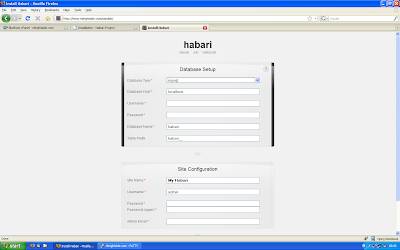
Habari-Install-mySql

Hit 'Submit' and you're finished.

Habari-Success

The Habari interface

Habari has a single menu structure and the main dashboard is fully configurable. For example, if you don't want to see 'Latest Log Activity' simply remove that tab. You can also drag and drop elements to position the various elements of the dashboard to suit yourself.
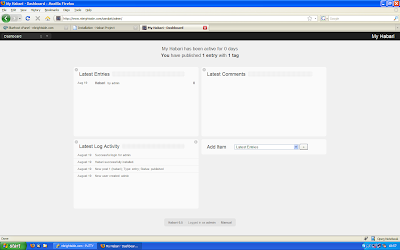
Habari-dashboard

Obviously, bloggers spend most of their time composing posts and the Habari article editor is beautifully simple, clean and uncluttered.
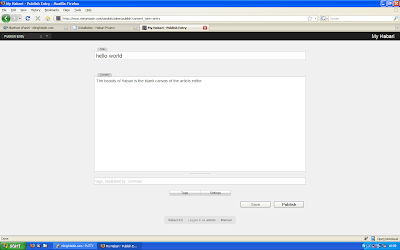
Habari-Editor

There are two separate tabs which expand to reveal the basic configuration options (timestamp, slug, comments) and another to define and add tags to the newly created post.

Searching for content in Habari is also refreshingly different. There is a timeline which can be dragged and resized, for example to focus on all posts made during 2007, supplemented by conventional searching.
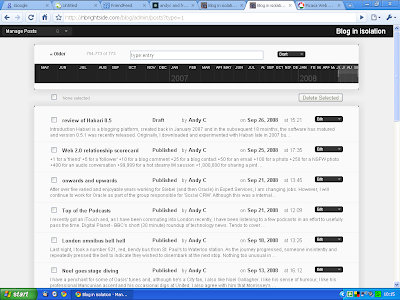
Habari-Timeline

Migration

Importers exist to import WordPress and Serendipity data into Habari. There is no native support for the (non standard) WXR format favoured by WordPress.com but staging the content into a local WordPress installation and then into Habari is possible.
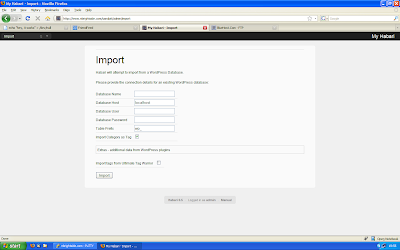
Habari-WP-Import

The WordPress importer is fast and robust. I imported over 700 posts and 1,000 comments without errors in less than 2 minutes. In fact, it was so fast, I had to double-check that the import had actually worked ! All my existing WordPress categories were correctly converted to tags.

Themes

Habari is still a relatively young project (albeit growing rapidly) so the number of themes available for Habari isn't as wide ranging as, say Wordpress. Nor is there a browsable theme directory. However, there is an increasing number of attractive, well designed themes available.
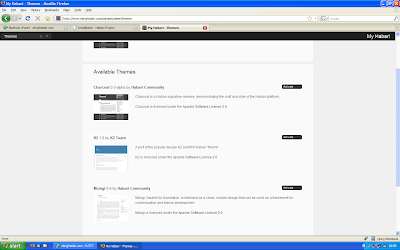
Habari-Themes

Plugins

Plugins are installed by uploading the to server and unpacking in the '/user/plugins' directory. Then the plugin is then activated and configured from the Administration-Plugins screen.
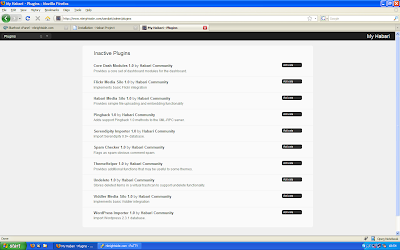
Habari-Plugins

Like themes, the number of plugins available for Habari is nowhere near as vast (or overwhelming) as other longer established blogging platforms. You can review the list of plugins in the Habari-extras repository.

However, the key functionality that most bloggers want and need are all supported. Hardly surprisingly, as all the Habari developers eat their own dog food and maintain Habari powered blogs.

  • metaWeblog - enable blogging clients like ScribeFire
  • Contact form
  • Google Analytics
  • Adsense
  • Feedburner
  • Scheduled posts
  • LiveHelp - easy access to IRC embedded in Habari
  • Defensio - superior anti-spam solution
  • Media silos for Flickr, Viddler and YouTube
  • Sitemaps
  • Podcast
  • Related Posts
  • Plugins to integrate Diigo, Jaiku, Twitter into your blog

There are also a couple of WYSIWYG editors to choose from (NicEdit, jwysiwyg) although I now use the excellent MarkUp plugin which adds shortcuts for common tags to the article editor but leaves you in full control of the HTML.

Documentation

The Habari documentation is available in Wiki format. The release documentation is also distilled into TiddlyWiki and is included with the Habari distribution. This is useful if you are working in a disconnected environment.
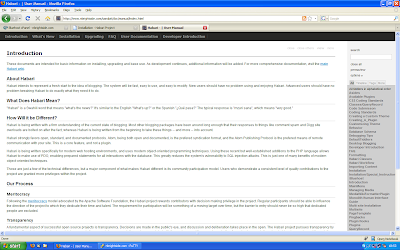
Habari-Manual

Why is Habari different ?

People often ask 'What makes Habari better than XYZ ?' And, of course, that's hard to answer and also very subjective. I always reply; 'Habari isn't better - it's just different'.

Having used the software for six months now, these are a few of the reasons I like Habari:

  • Ease of use.
  • Admin interface.
  • Media silos.
  • Actively developed.
  • The 'community'.
  • The article editor.
  • Ease of use
  • Small, active and responsive developer community.
  • The automatic schema upgrade process works seamlessly.
  • The LiveHelp plugin.
  • Proper timezone support built into core.
  • Minor edits - ability to fix typos without updating the Atom feed.
  • Ease of use.

And finally, and perhaps most importantly - Habari is fun - the project is developing rapidly. It's fun to run the latest SVN code. It's fun to review the latest set of changes in trac. It's exciting to type 'svn update'. It's fun to lurk in the IRC channel and eavesdrop on developer discussions.

Of course, there are some areas of functionality (access control lists) that are incomplete or 'planned' but I can honestly say that the absence of the following features doesn't really affect my normal, daily use of Habari.

  • No Fantastico or SimpleScripts installations available.
  • No centralised theme or plugin repository.
  • No widget support - you currently have to modify PHP templates to modify your sidebar.
  • No automatic upgrade of core software, themes or plugins.
  • Tags are supported but not categories.
  • The plugin configuration forms are pretty basic.
  • Documentation for plugins is sparse.

Community

The word 'community' is used a lot in the Habari community. I think it's because those guys like recursion. Before I got involved, I was fairly sceptical to be honest. However, having lurked, watched from the sidelines and occasionally contributed, I can say that there is a genuine sense of community on the Habari project. Contributions from anyone and everyone are positively welcomed and encouraged. There's a couple of mailing lists, an IRC channel, a Wiki and subversion repository.

As just one example, I was staggered when I was initially playing with Habari and mentioned in passing that the lack of a WYSIWYG editor was an issue. Within 12 hours, Michael Harris had provided me with a TinyMCE plugin !

Although I'm not a expert Web developer - I can't spell PHP or OO - I must say, that everyone has been very helpful. There is no elitist developer clique - Habari is very transparent and open and everyone's contribution (no matter how seemingly small) is welcomed.

Once awake, Habari developers can also move fast. For example, yesterday, the Cisco Web site was hacked and every single occurrence of the letter 't' was lost. By the end of the day, Habari had a hilarious plugin that also filtered every single 't' from a Habari blog.

Summary

Don't take my word for it. Why not download Habari and try it for yourself ? You might be surprised.

a lesson in software design

This blog used to run on WordPress but now runs on Habari which is a blogging platform currently being developed by a set of very talented people.

Undoubtedly, the number of developers and users running Habari is far fewer than the massive community using WordPress. Similarly, the number of available themes and plugins available for Habari is relatively small (albeit growing daily) and dwarfed by the vast, almost bewildering wealth of add-ons and the extensive range of themes available for Wordpress.

However, this isn't a bad thing because it forces anyone contemplating a migration to Habari to think carefully about the core plugins that are truly essential to adminster your blog and valuable for your readers.

One such plugin (for me) was an equivalent of the Wordpress sitemaps plugin. Rick Cockrum published a excellent summary of why an automatically generated sitemap is useful.

When I first configured and activated the sitemap plugin for Habari, nothing happened. No sitemap file was generated. Initially, I thought that maybe the sitemap was only generated after a post was published. So I published a new post. Still nothing happened..

I posted a enquiry on the Habari users mailing list. In an effort to 'help' the Habari community, I even opened a ticket (bug request).

Then, I made an amazing discovery when an anonymous author was forced to waste some of his valuable time to close my 'bug report':

The plugin is not intended to generate a file, rather to serve the sitemap xml document when requested.

So, it transpires that the Habari sitemaps plugin doesn't actually generate a file. The sitemap is simply a URL which is dynamically built, on request.

Now I believe this is a much neater solution. No need for the user to specify where the file should be placed. Less work for the plugin to do. Much cleaner. Much simpler. Credit to the author, Andrew da Silva.

The lesson I learned was that just because something has always been done that way doesn't necessarily mean it can only be done that way.

P.S. If you're worried about the performance impact of needlessly rebuilding a sitemap, on the fly for 234,432 entries, don't worry - some clever individual has already implemented a cache for the sitemap data.

post mortem on the WordPress to Habari migration

Those who forget the past are condemned to relive it.

The migration of this blog from WordPress to Habari is mostly complete.

I had a few unexpected problems with a significant number of comments and a handful of posts that contained mismatched HTML tags and didn't display the corresponding page at all. So I had to painstakingly review every single post with comments and correct the HTML by hand.

Inevitably, I forgot the lesson of my previous migration and didn't give any regular readers advance warning of the impending chaos or any notice of the change in RSS feeds. That's not because I don't care, but rather that I treat this blog as a chance to experiment with the technology.

Worse, I didn't sever the link to Feedburner during the housekeeping so peppered existing readers with duplicate, outdated articles.

So, whether you are a (non-Feedburner) subscriber who is wondering why I have suddenly stopped blogging or an existing reader wondering I am peppering your RSS feed with antiquated articles from yesteryear, I apologise.

If I was embarking on the migration again, I would probably spend a little more time checking the migrated content prior to triumphantly making the switch. However, when you have more then 750 posts and 1100 comments, that's easier said than done.

A useful tip to speed up the import process is to purge all comment spam in WordPress prior to the import. Similarly, disabling the Habari Pingback plugin also speeds up the import considerably.

Habari does not automatically ping Google of new content but Feedburner has equivalent functionality.

Apart from fixing up a few posts containing locally hosted images, the tedious administration tasks should now be complete so I can start to enjoy the various features of Habari.

One example is the media silo with Flickr integration. On WordPress, I often struggled with the seemingly simple task of inserting a photo into a blog post. Initially, I thought I was just stupid but now I know why - the interface was broken.

Owen Winkler created a screencast demonstrating the features of the Habari media silo with easy management of locally stored images as well as seamless integration into media services (Flickr, Viddler).