Posts tagged with "Drupal"

Octopress versus Drupal performance

One of the main advantages of a statically generated blog (like Octopress) over a blogging platform that uses a database (WordPress, Drupal) is performance.

My humble blog doesn't get enough traffic for performance to be a consideration and I thought I wouldn't be able to discern any improvement.
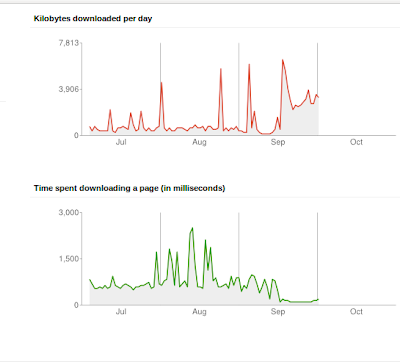
Webmaster Crawl Stats

This graph is from Google Webmaster Tools. Can you guess when the blog migration from Drupal to Octopress was done ? Yes - that's right - the middle of September (17th to be precise).

Undeniably, the performance is much better (fastest response time of 128 milliseconds) and reliable since the move to Octopress. Unfortunately, this 'before' and 'after' comparison isn't ideal. Previously, the blog was running Drupal 7, configured with a small number of modules using MySQL and hosted on cheap ($6 a month) shared hosting with Bluehost.

The performance spikes (high of 2.5 seconds to access a page !) are probably related to high usage of the Linux server my blog was co-hosted on (rather than a specific Drupal performance problem).

When I migrated to Octopress, I also moved the blog to Amazon S3 storage so it's not entirely clear how much S3 has contributed to the relatively stable and fast response times of the blog since mid-September.

With hindsight, I really wish I had phased the migration by deploying Octopress for a month on the same Bluehost hosting (using rsync) and then moved to Amazon S3. Still, it's a but late for that now.

However, it looks like I am ready for the SlashDot effect.

migration complete

The last ever migration of this blog is now complete. This blog is now powered by Octopress and is a statically generated site hosted on Amazon S3.

All posts have been migrated from HTML to Markdown and every single permalink (all 954 of them) have been painstakingly checked, rationalised and consolidated.

To achieve this, I simply generated a sitemap of the Drupal site and compared this with a sitemap for a test site using Octopress after the data migration.

This unveiled a few issues that needed to be fixed:

  • Posts with the identical slug had a numeric suffix which was often incorrect or inconsistent after being mangled by various blogging platforms.
  • Some posts had the incorrect publication date (due to timezone shift) so were typically a day out.
  • Some posts were just missing after the 'exitwp' script was used to migrate from WordPress to Hyde a year ago.
  • Hyde uses a slightly different header format from Jekyll but 'sed' was able to fix this.
  • Jekyll uses a trailing slash for each post URL whereas Drupal doesn't.
  • Amazon S3 requires the canonical URL to be www.site.com with a automatic redirect to point site.com to the correct URL with the www prefix. Previously, I favoured the naked URL 'site.com'.

The permalink structure is now 'site.com/yyyy/mm/dd/hello-world/' (with a trailing slash) and will never change. Ever. Again.

I also resurrected some orphan Disqus comments by using the URL mapping tool which works brilliantly and helped identify comments associated with a non-existent URL.

I am generally delighted with Octopress as it bundles so many features I need for a blog (Disqus, Google Analytics etc) and is much easier than using raw Jekyll.

The only vague disappointment is the fact that the entire site is re-published even after a single post has been added. On my Aspire One netbook, a 'rake generate' takes 8 minutes. I might try the same process on my work laptop (faster, newer Lenovo Thinkpad) for comparison purposes.

Inevitably, there is a Jekyll fork that supports incremental deployment but the Octopress author is (understandably) reluctant to base Octopress on a fork that could quickly become stale.

Publishing the site to Amazon S3 is slightly better but, as Atom feeds get regenerated for categories, this still takes around 4 minutes.

Still, maybe this lengthy publishing process will encourage me to properly preview and get my posts perfect before publishing.

I am not sure about having all 954 posts stored in a single directory; I would rather have a sub-directory for each year but then again, being able to quickly search all posts for a keyword using 'grep' is useful.

I decided to keep the Feedburner integration for now (to avoid losing my two readers).

The use of a statically generated site also killed one of my favourite features - my legendary and award winning rotating tagline. Oh well.

Blogging like a hacker but publishing like a snail with a heavy weight strapped to his back.

migration plan

Loose thoughts on the plan of attack for the blog migration:

  1. Install Octopress locally
  2. Configure S3 and install a dummy Web site.
  3. Use's3cmd' to upload test site to Amazon S3
  4. Test incremental uploads. This is a firm requirement.
  5. Full database backup of existing Drupal blog
  6. Take backup of Drupal installation (additional modules, scripts).
  7. Install vanilla Drupal 7 locally.
  8. Install copy of the existing Dupal blog in local version (overwrite database ?).
  9. Use the Drupal to Octopress migration script. This extracts nodes from the database and creates Markdown files for each post, This script is probably for Drupal 6 so some tweaks (major rewrite) may be needed for bleeding edge Drupal 7. URL aliasing is supposedly supported.
  10. Test the various elements in the checklist. Disqus comments need the correct domain name so will have to come last.
  11. Configure a redirect from 'nbrightside.com' to the Amazon URL. I can see trouble and lots of Googl'ing here.
  12. Place source code (Markdown posts) into GitHub repository.
  13. Put kettle on.

blog maintenance

Time to upgrade Drupal again. Yesterday version 7.12 was released and this blog is currently running a very outdated (and probably insecure) 7.4. Although Drupal 7 included automatic update for modules and themes, updating the core Drupal software still needs manual intervention and takes time.

Over the years, the main self-hosted blog platforms I have used are:

  • WordPress - one-click updates. Quick and easy. By far the best and most robust solution. Never let me down.
  • Habari - Official Habari releases were fairly infrequent so I chose to I track the latest development version so upgrade was manual but as simple as typing '$ svn update'. Rolling back was needed on a couple of occasions but possible simply by reverting to the previous SVN version ($ svn update -r <nnn>).
  • Drupal - manual update. Involves taking the site offline, copying files, thinking, run 'update.php', copying files back again, bringing the site back online and a little time. Slightly tedious as Drupal tend to to release a new version of the core software every month or so with a nagging email reminder to do the right thing.

I have also noticed that my sitemap hasn't been generated in 6 months and doesn't include the most recent entries. In addition, some (old) posts have been marked as 'Never Update' but after some housekeeping to modify some permalinks to fix various '404 - Not found' errors, these old entries now need to be regenerated.

Drupal 7 released

This blog and the handful of modules I use has been upgraded to the final version of Drupal 7.0 which was released today.

I was quite pleased that I used Drupal 7 from the early beta versions and then tracked the D7 release candidates as this gave me valuable experience in upgrading Drupal 7 relatively quickly while preserving my additional modules without losing all my data which always helps. It's worth noting that although I barely scratch the surface of Drupal 7's wide range of functionality, the quality, reliability and performance of Drupal 7 was perfectly fine for this blog.

Personally (and rather selfishly), I hope that the formal release of Drupal 7.0 will encourage more developers to upgrade which, in turn, which provide impetus for more Drupal modules (and themes) to be ported and made available for Drupal 7.

Dries Buytaert, the founder of Drupal, posted a interesting set of reviews looking back on 2010 with his hopes and predictions for the coming year for:

  • Drupal - the open source content management system.
  • Mollom - comment spam service with commercial pricing for larger sites.
  • Acquia - Dries' startup offering Drupal based services including hosted Drupal sites
  • Drupal Gardens.

to markdown or not to markdown

Steve Rubel sings the praises of Markdown and good old fashioned text editors.

I agree and for a long time have dithered over whether to write all of my blog posts in Markdown. This makes sense as it simplifies the syntax and theoretically should make writing content easier and quicker. I was particularly struck by Caius Durling's use of Markdown on his Habari blog and the use of the plaintext plugin to reveal the raw Markdown.

However, despite experimenting with both the Markdown plugin for Habari and later the Markdown filter module for Drupal, I have actually never taken the plunge.

I think the subconscious reasons behind for my reluctance to bite the bullet and fully embrace Markdown are:

  1. Knowing the subset of HTML tags I commonly use, I am finally relatively comfortable composing posts in raw HTML.
  2. Although Markdown uses a simple, easy to learn syntax (which is rather the whole point after all), the Markdown markup would be a slightly different syntax to learn and master.
  3. I am (justifiably in my case) worried that I would constantly produce incorrect Markdown syntax and hence generate flawed HTML so I would be forever reviewing the generated HTML which again would be time consuming and self-defeating. A side by side split, live screen Markdown/HTML preview would be really useful.I have just discovered the Live module which looks like it could be used in conjunction with the Markdown filter to create similar functionality (but only when this module is ported to Drupal 7).
  4. Sometimes I embed images from Picasweb or YouTube and I'm not sure how these HTML embeds would work in Markdown or whether the Markdown processor will accept raw HTML for these occasional exceptions.
  5. Drupal supports different filter types on a per post basis but I have concerns about attempting to migrate a blog containing a mixture of HTML and Markdown posts to different blog platforms and I'm hardly likely to convert 1,000 historic posts to Markdown. However, if the Markdown is processed and the generated HTML is stored in the database, this may not be a problem. Another obvious solution is trying to curb this constant urge to tinker with the underlying technology powering this blog but that is unlikely to happen.

Anyway, time to stop procrastinating. I have managed to write this post in Markdown and already I like the modified, simpler syntax, so I will endeavour to follow Steve Rubel's advice and join the ranks of the 'modern communicators'.

essential modules for your new Drupal 7 site

People never ask me Hey Norman - what modules have you installed thus far on this wonderful Drupal 7 powered blog ?

  • Archive - monthly archives.
  • Disqus - although I had some problems with this module so I am currently using a simple Disqus block.
  • Global Redirect - ensures that 'node/1234' is redirected to '2010/21/22/blog-post'.
  • Google Analytics - mandatory to torment myself over visitors statistics using GA.
  • Markdown Filter - although I haven't fully embraced this yet. Old (raw HTML) habits die hard.
  • Mollom - Disqus provides built-in spam protection but I use Mollom to guard the user registration and contact forms which is very effective.
  • Pathauto - to map Drupal nodes to my date based permalink structure.
  • Token - required by Pathauto
  • Tagadelic - marvellous, configurable, graphic 'Tags' page to aid Bill's navigation of this site.
  • Wysiwyg - evaluating various options but not found nirvana as yet.
  • XML sitemap - produces search engine friendly sitemap.

I also modified the 'page.tpl.php' template to reinstate my wonderful, award winning rotating tagline (or slogan in Drupal terminology).

Curiously, I haven't enabled the D7 core 'blog' module as I don't need multi-user blogs. Each post is simply an 'Article'.

marketing plan for Drupal 7 launch

The date for the long awaited Drupal 7 release has been announced as 5 January 2011.

Dries should just play this video. Then he should simply read the following and leave the stage.

Straight as an arrow
Defect defect
Not straight, not so straight
Reject reject
Towards anti-social
Solo solo

Standing on the stairs
Cold, cold morning
Ghostly image of fear
Mayday, mayday
Gonna leave this region
They'll take me with them

Drupal 7
Drupal 7
Drupal 7
Drupal 7
Drupal 7
Drupal 7
Drupal 7
Drupal 7

all change please

This blog is now running on Drupal 7 (beta 3).

Currently Disqus comments are absent but I am hoping the Global Redirect module and the Disqus crawler will remedy this given time.

Most of the modules I require are available for Drupal 7 apart from FeedBurner so I have just re-pointed the feed for now.

Let's see if this appears on the other side.

I will probably convert to using MarkDown markup in due course too.

Main reason for ditching Habari was the lack of user forums.

Drupal 6 RC2 near miss

Siebel customers (and employees alike) all over the world are busy enjoying Metalink3 which has recently replaced SupportWeb.

Everyone (well me, mainly) is taking great delight in taunting Oracle DBA types with incredulous cries of 'Sorry - did you say you're still on legacy Metalink2 ?'

A number of readers, impressed with this bleeding edge technology and dying for more, have emailed me asking why this humble Siebel blog hasn't yet been updated to Drupal 6.0 RC2.

Consequently, I downloaded the distribution for Drupal 6 Release Candidate #2 and, unusually for me, I even took the time to read 'UPGRADE.txt'. I followed the instructions therein and took the site offline so any visitors receive a configurable, professional looking message: 'This site is being upgraded to bleeding edge CMS technology. Please spread the news and don't forget to taunt any Oracle DBA's.'

After that completely unnecessary configuration change (I have no visitors), I was then unable to login to initiate the upgrade. Sigh. Thankfully, I discovered this article from another early adopter which enabled me to regain control of my original site.

I attempted the upgrade from Drupal 5.3 which failed to modify the database schema and produced a worrying number of SQL errors.

Not to be defeated, I read this helpful article which implied the Drupal 5.x system should be running the latest stable release (5.6) which seemed eminently sensible advice.

I quickly upgraded from Drupal 5.3 to 5.6. Only I couldn't because my site was now inaccessible after the partial, incomplete upgrade so I had to hold my breath while I restored from yesterday's MySQL database backup which worked perfectly.

Then I upgraded Drupal from 5.3 to 5.6, having naively convinced myself this would fix the problem, and duly repeated the upgrade process to 6.0 RC2 which promptly failed with the same dire, database related, results.

Still, this is a beta release after all and sure enough (as always), some other poor soul has already been there and done that.

No fix yet. Roll on RC3.