Recent Posts

self-hosting a GoToSocial instance

I like experimenting with software and technology.

Many years ago, I built a Laconica instance. Not because I needed a Laconica instance but because I was curious and any knowledge gleaned would be useful. Standard LAMP stack. Same as the WordPress blogging software which I had already built.

Plus Laconica releases were named after R.E.M songs by Evan.

Similarly, I got an account on mastodon.sdf.org in preference to Twitter because I favour OpenSource software and the underdog.

When I discovered there were self-hosted alternatives to Mastodon, I simply couldn't resist and acquired a domain name, commodity hosting with Digital Ocean and built a single-user Pleroma instance.

This was an interesting exercise as Pleroma is supposedly less resource heavy than Mastodon and is implemented in Elixir (a programming language unfamiliar to me).

I followed the documentation, installed and configured Pleroma. Then I occasionally monitored the system load and the Postgres database size. Pleroma was rock solid for 18 months. Much to my surprise, I even managed to upgrade the software with no issues.

However, when I discovered that Pleroma was unable to follow my old friend David Marsden's micro.blog using the standard ActivityPub protocol, serious action needed to be taken.

I work for Oracle who offer an AlwaysFree tier which includes an ARM instance (1 CPU, 6GB) running Ubuntu 22.1. I was curious to explore this avenue as, again, knowledge is useful.

Originally, I had lofty ambitions to host a Federated instance aimed at a community of folk interested in football so we could have endless, tedious discussions and banter without pestering everyone else.

The various stories about the moderation commitment and performance and scalability issues for large (or even medium sized) sites slightly made me pause for thought. If you make a commitment, you should honour it.

I use Hugo for this blog which is written in Go and a single executable so GoToSocial piqued my interest as this is a similar architecture. Single Go executable with decent documentation, helpful community and fairly straightforward configuration.

After a few glitches with the Nginx integration and failing to read the documentation carefully enough, I had a GoToSocial instance up and running !

GoToSocial doesn't include a front-end GUI but I soon got used to the Pinafore (clean, single column) interface.

It was a pity that GoToSocial doesn't currently support import of 'Friends'. However, as I was only following 100 people, it was an opportunity to manually review and trim that list.

Please remember that GoToSocial is 'Alpha' software and the current limitations are well documented but the pace of development is rapid.

It's early days but I'm enjoying my first experience of GoToSocial and I like the fact that GoToSocial supports both Postgres and sqlite for the database.

Football Web Pages APEX application

In the last article, we created a simple APEX application fetching data about English football from the Football Web Pages site which provides an authenticated REST API.

However, all I really want to do is to quickly look at Kingstonian's forthcoming fixtures for the next month. Fortunately, there is an FWP API providing that information.

Endpoint: https://football-web-pages1.p.rapidapi.com/fixtures-results.json

  • Matches - The current list of matches for a competition/team
  • The following parameters may be set:
    • comp - The ID of the competition (note: one of "comp" or "team" is required)
    • team - The ID of the team (note: one of "comp" or "team" is required)

We already have created an APEX report listing all the available Competitions (including the numeric ID values) so it would be useful to have a similar report listing all the Teams.

Teams

Endpoint: https://football-web-pages1.p.rapidapi.com/teams.json

  • Teams - A list of the teams covered
  • The following parameters may be set:
    • comp - The ID of the competition

Create a new REST Data Source called 'FWP Teams' with this endpoint using the 'Football Web Pages' authentication method.

Create a new page 'Teams' with an Interactive Report fetching data from this REST Data Source.

Search for 'Kingstonian' to find out the numeric identifier for this club (236)

FWP-APEX-Teams-Kingstonian.png

Fixtures

REST Data Source

The Fixtures API can take a query parameter which is either 'competition' or 'team'.

Thus far, we have only used a 'Header' to supply the credentials to access the API.

API query parameters are name-value pairs introduced by a '?'. This is analogous to database queries which filter the results returned by a SQL query in the 'WHERE' clause.

select *
from emp
where name = 'JONES';

The APEX fixtures page should support both of these API query parameters ('competition' and 'team') and enforce that either one or the other is supplied.

Create a REST Data Source for 'Fixtures'

  • Rest Source Name: FWP-Fixtures
  • Endpoint: https://football-web-pages1.p.rapidapi.com/fixtures-results.json
  • Authentication: Football Web Pages

If you click 'Discover', APEX will return an error

ORA-20987: No data found in uploaded file.

FWP-REST-Error

This is because the REST Data Source is expecting a parameter and we have not specified one. To fix this, click 'Advanced' and add the required parameter.

  • Parameter Type: Query String variable
  • Parameter Name: team
  • Value: 236 (Kingstonian)

FWP-APEX-Fixtures-Rest-Query-Param.png

Leave the HTTP method as the default (GET) and click 'Discover'. APEX should display a list of Kingstonian's results and forthcoming fixtures.

FWP-APEX-Fixtures-REST-Data.png

Add a second query parameter named 'comp' with no value.

FWP-APEX-Fixtures-Query-Params.png

Apply the changes to this REST Data Source.

Fixtures Page

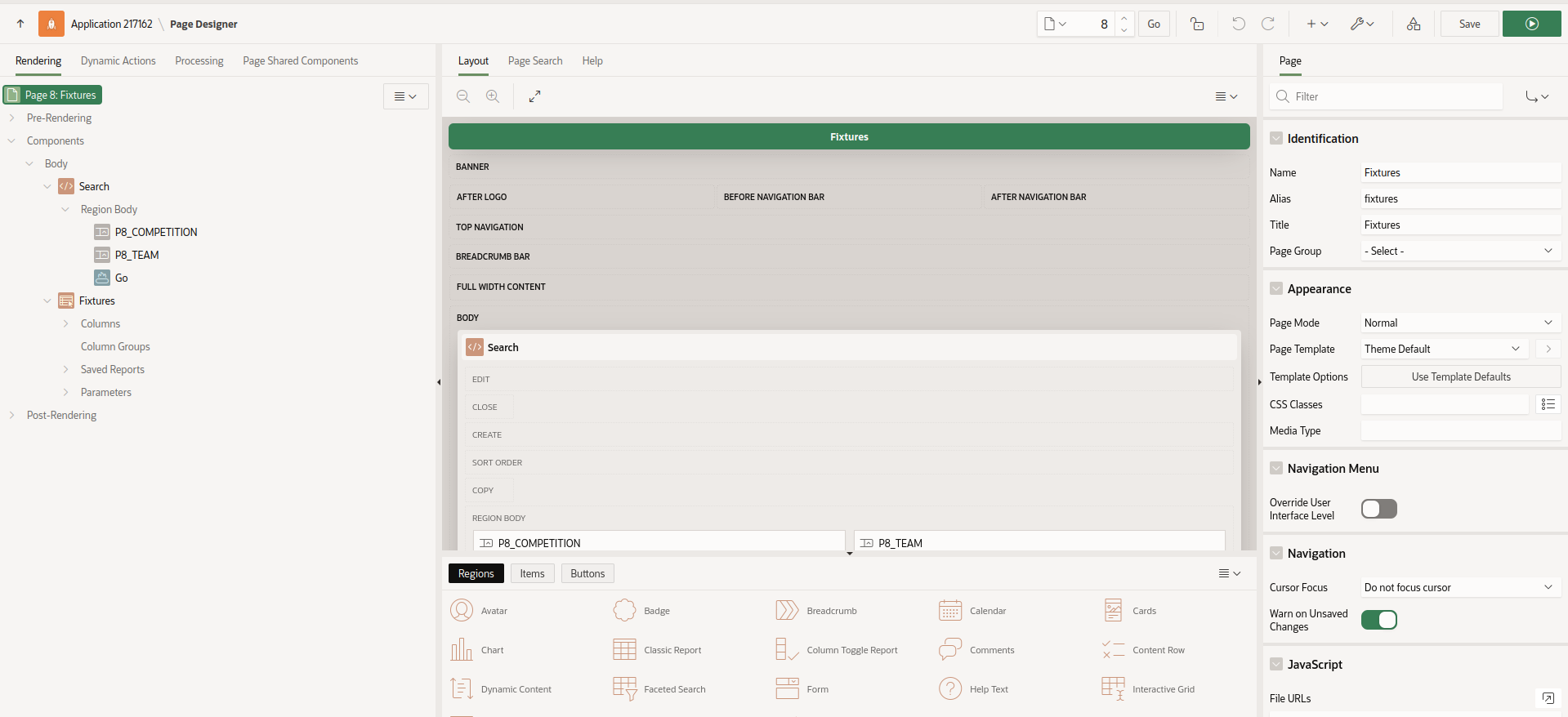
Navigate back to Application Builder and create a blank page called 'Fixtures'.

Search region

Create a region named 'Search'. Change the template of the 'Search' region to 'Collapsible'. The region template is in the 'Appearance' section.

Create two page items on the Search region

  1. Competition
  2. Team (uncheck 'Start New Row')

Create a button named 'Go' with the default action of 'Submit Page'. Check the 'Hot' checkbox under 'Appearance'.

Report region

Create a new region called 'Fixtures'. This is simply an Interactive report based on the REST source 'FWP Fixtures'.

Run the page. Hopefully, your screen should vaguely resemble this.

FWP-APEX-Fixtures-V1.png

Clearly, this is just a checkpoint and not fully functional yet but I like to 'release early and release often' (if only to myself).

Joking apart, this approach is actually useful to demonstrate to an end user what the APEX UI will look like and how you can use standard APEX functionality to search and filter within the Interactive report.

No need to spend days mocking up wire frames of the proposed UI. In APEX, you can present a meaningful prototype using APEX early on.

Plus you can endlessly argue over the title, size, placement and colour of the 'Go' button.

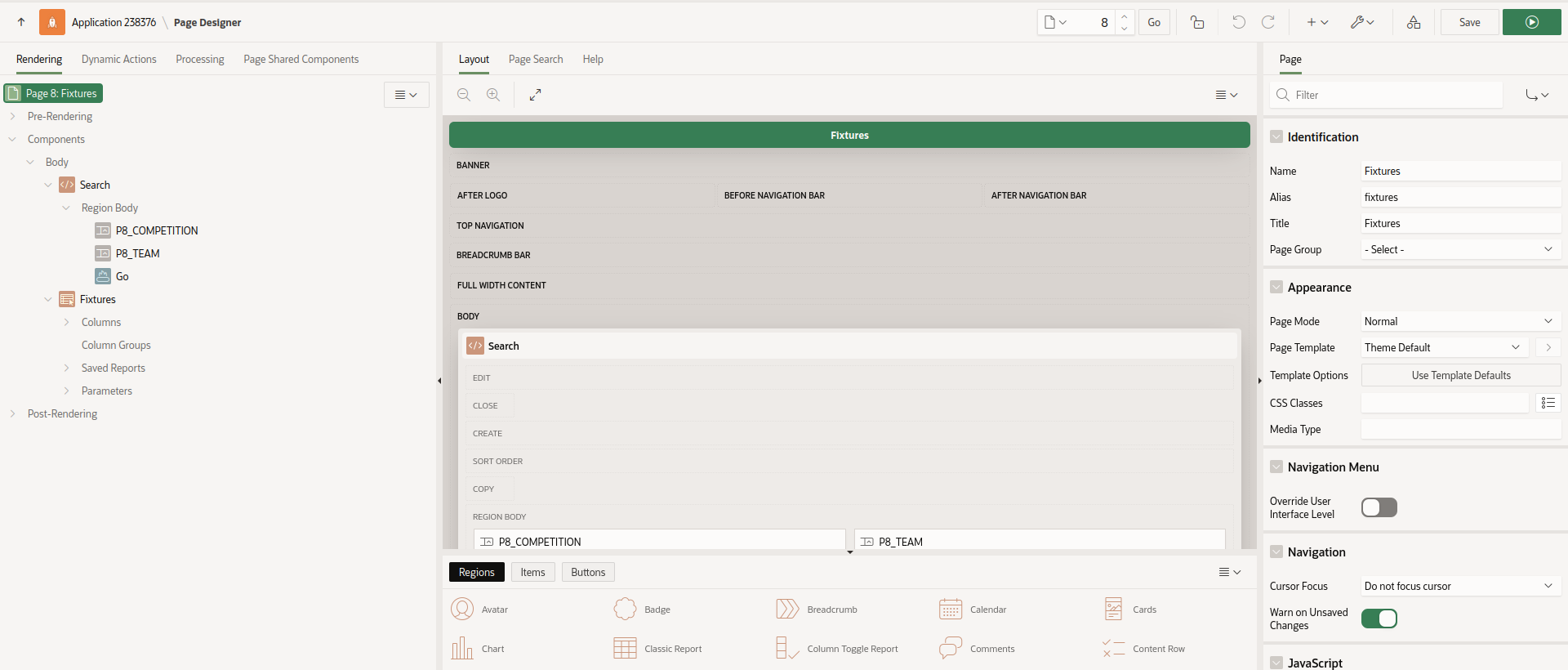
Return to the 'Fixtures' page in Application Builder. Expand the 'Fixtures' region. You will see that APEX has helpfully added a section called 'Parameters'. Expand this and you will see the two query parameters for this REST Data Source exposed here.

FWP-APEX-Fixtures-IR-Params.png

Edit the 'comp' parameter. Under 'Value', change the Type to 'Item' and select 'P4_COMPETITION' from the pop-up menu.

Similarly, change the value for the 'team' parameter to the APEX page item P4_TEAM.

Save and run the page. You get an error but this is expected as we have not supplied any APEX page parameters (yet).

FWP-APEX-Fixtures-IR-Fail.png

Enter '236' into the Search region for 'Team' and click 'Go'. You will see Kingstonian's results and fixtures displayed.

Check this is actually working by changing the team to '1'. This will display results and fixtures for 'Arsenal' in the English Premier League.

FWP-APEX-Fixtures-Arsenal.png

This looks promising. APEX truly is a low code solution.

Now let's look at the 'Competition' parameter.

Enter '2' for 'Competition'. This is for the English Championship (neither Kingstonian nor Arsenal play in this league).

Nullify the 'Team' parameter and click 'Go'.

FWP-APEX-Fixtures-IR-Comp.png

List of Values

This report is improving but needs more work. End users typically don't know that they have to enter '1' to get data for Arsenal. The 'Competition' and 'Team' parameters are clearly List of Values so we will implement that now.

Navigate to 'Shared Components' and add the following List of Values for 'Competitions'

  • Name: Competitions
  • Type: Dynamic
  • Data Source: REST Data Source
  • Rest Data Source: FWP Competitions
  • Return Column: ID
  • Display Column: FULL_NAME
  • Default Sort: ID

Once an APEX application has a REST Data Source available, it is available to all components (LOV's, reports etc) - just like a conventional local database table.

Create a second LOV for 'Teams'

  • Name: Teams
  • Type: Dynamic
  • Data Source: REST Data Source
  • Rest Data Source: FWP Teams
  • Return Column: ID
  • Display Column: FULL_NAME
  • Default Sort: FULL_NAME

Navigate to the 'Fixtures' page and change the page items to use the newly created LOV's.

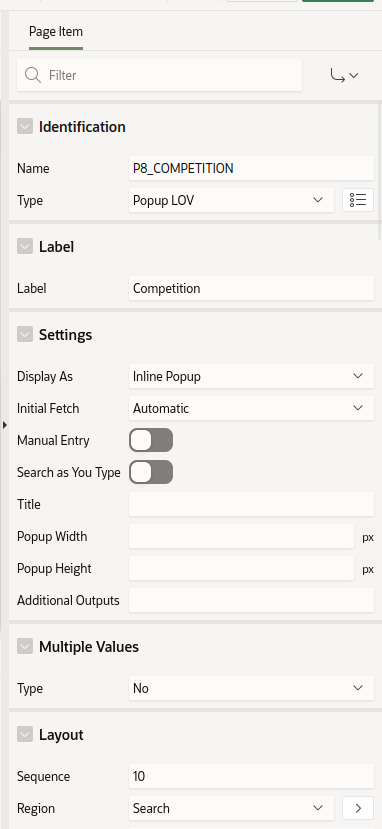
Change the type of P4_COMPETITION to 'Popup Lov'

Under 'List of Values', select

  • Type: Shared Component
  • List of Values: FWP-Competitions
  • Display Extra Values: Unchecked
  • Display Null Value: Checked
  • Null Display Value: - Select -

Repeat this process for the P4_TEAM page item using FWP-TEAMS as the LOV.

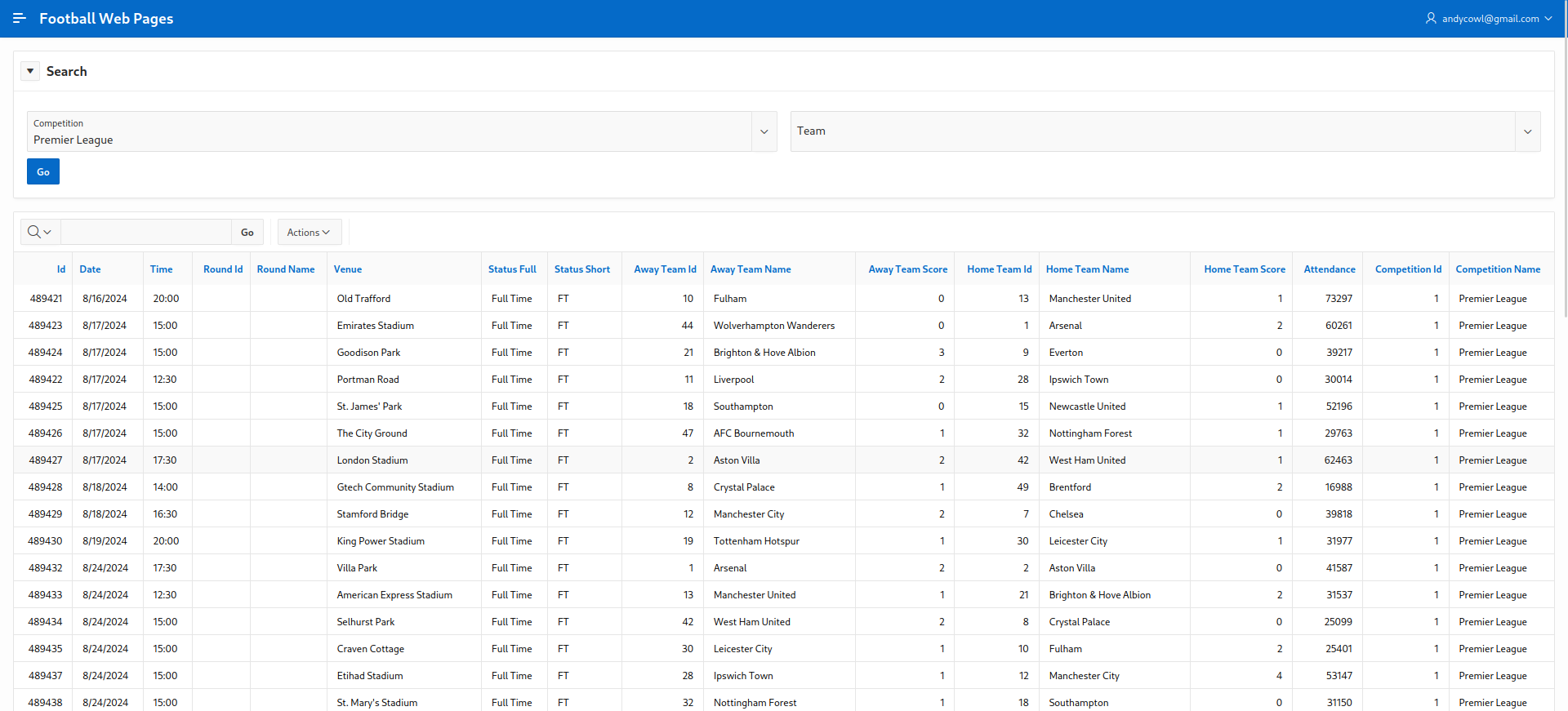
Run the page. This looks better. Now we can select a Competition and a Team correctly.

FWP-APEX-Fixtures-V2.png

You gleefully share your V2 prototype with a colleague for peer code review and her feedback is as follows:

  1. When clicking 'Fixtures', I get 'ORA-20999: REST Data Source returned an HTTP error: HTTP 400: Bad request'
  2. If you enter a Competition only, it works fine.
  3. If you enter a Team only, it works fine.
  4. If you enter both a 'Competition' and 'Team', the results look weird. Should 'Team' be a cascading LOV based on the 'Competition' ?
  5. The column names and labels need tidying up. There are a lot of meaningless ID fields displayed.
  6. It would be nice to have the option to review past results separately from fixtures in the future.
  7. Performance - the Popup LOV's for Competition and Team are sluggish. Why are they so S L O W ?
  8. The navigation menu looks chaotic and ugly.

In the next article, we will try to address this valid feedback.

a simple APEX application using REST API

Introduction

The last article provided a quick introduction to REST APIs. Now we will use a simple REST API to develop an APEX application using a real world example.

Football Web Pages

I enjoy watching football (soccer). My local team are Kingstonian FC, a non-league team in South West London. Kingstonian play in the seventh tier of English football. Kingstonian's players are semi-professional so the players hold down jobs and train and play part-time.

Football Web Pages (FWP) is an excellent site for all things related to football. The site includes news, fixtures, results for all English leagues (including non league) and the European leagues. I recently noticed FWP provides a REST API.

FWP API

Reviewing the FWP API, the first thing to note is whether the API is public (i.e. freely available) which it is and whether it requires authentication (it does).

To access our data you must subscribe to one of our pricing plans (which include a free plan) via Rapid API at the following address:

rapidapi.com/football-web-pages1-football-web-pages-default/api/football-web-pages1

Authentication

When you subscribe via Rapid API you will be given a key, and you must provide this in a header named "X-RapidAPI-Key" with every request.

A lot of API's provided by larger sites offer a facility to issue API calls directly on the site. This enables the developer to examine the specification of the API and experiment with different headers, query parameters and examine the response data in various formats.

FWP doesn't offer this functionality but it's a relatively simple API so we can use Insomnia to experiment with the API.

Normally, I choose the simplest API available - one with no query parameters or headers (other than required for authentication).

For FWP, the 'Competitions' API looks like a decent candidate

Competitions

A list of the competitions covered

The following parameters may be set:

include: One or both of: rounds, teams (default: neither)\ Endpoint: https://football-web-pages1.p.rapidapi.com/competitions.json

I'm lazy and so are you so you just enter this endpoint into Firefox. You are thwarted.

Firefox-Error

The FWP REST API does indeed require authentication so we need Insomnia.

Firstly, we create a folder to store all our FWP API requests. Name the folder 'Football Web Pages'.

Create-Folder

Select the newly created folder and click 'click to add first request'.

Double click on the 'New HTTP Request' on the panel on the LHS. Rename this request to 'Competitions'.

Competitions

Now enter the FWP API endpoint into the GET section in the middle panel. The endpoint (URL) is:

https://football-web-pages1.p.rapidapi.com/competitions.json

Click 'Send'. You get the same authentication error. You feel thwarted and disappointed but this is OK. You haven't provided your credentials yet but the endpoint is correct and the FWP server correctly responded with a '401 - Unauthorized' error.

Unauthorized

This API requires that the API key (password, credentials) are supplied in the 'Header' of the API request.

Click on the 'Header' tab in the middle section

Header

Add 'X-RapidAPI-Key' as the 'New Header'. Then add your private API key as the 'Value'. Remember that API headers are simply Name-Value pairs.

Auth-Header

Click 'Send'. There is no need to explicitly save the changes to the Headers.

Save_Headers

Finally. Success !

Look at the results in the panel on the RHS.

The API request returned a status of '200' (success). The elapsed time for the API request was 213 milliseconds and returned 10KB of data.

FWP APEX application

This demo was created and tested on Oracle's AlwaysFree tier. However, it should also work fine on Oracle's hosted APEX service on apex.oracle.com or a local APEX instance.

Navigate to App Builder

App Builder

  • Click 'Create a new App'
  • Click 'New Application'
  • Name the application 'Football Web Pages'
  • Accept all the default options.

Create App

First, we need to configure the Web credentials in APEX to access the FWP REST API's

In APEX, Web Credentials are shared across the workspace. Click 'App Builder - Workspace Utilities - All Workspace Utilities'

Workspace Utilities

Click 'Web Credentials'

Web Credentials

Click 'Create'

WC Create

Enter the following values for the parameters

  • Name: Football Web Pages
  • Static Identifier: FWP
  • Authentication Type: HTTP header
  • Credential Name: X-RapidAPI-Key
  • Credential Secret: secretapikey
  • Comments - FWP API key added on 16 October 2022

The reason I always add the comments field is that many API keys have a limited lifetime (6 months or a year) for security reasons. Often it is useful to know when the client secret was created.

WC Attributes

Click 'Create' to save the changes

Web Creds Complete

Next, create a REST data source for the FWP REST API

Navigate to 'App Builder' and click 'Shared Components'.

Shared Components

In the bottom left section, click 'REST Data Sources'.

REST Data Sources

Click 'Create'

Select 'From scratch' for 'Create REST Data Source' and click 'Next'

Create REST Data Source

Leave the default of 'Simple HTTP' for the value of 'REST Data Source Type'

Enter 'FWP-Competitions' for the 'Name'.

Enter 'https://football-web-pages1.p.rapidapi.com/competitions.json' for 'URL Endpoint'

Leave the optional parameter 'HTTPS Host Name' blank.

REST Data Source Params

Click 'Next'

Leave 'Create New' for the 'Remote Server' parameter

Accept the values helpfully supplied by APEX for 'Base URL' and 'Service URL Path'.

Click 'Next'

Accept the default of 'No Pagination' for 'Pagination Type'.

REST Data Source Pagination

Click 'Next'

Ensure 'Authentication Required' is checked and select 'Football Web Pages' from the drop-down menu for Credentials.

REST Data Source Auth

Click 'Discover'.

APEX has helpfully sent this API request to the FWP server using the Web credentials and provided us with a preview of the data set returned so we can check it looks correct.

REST Data Source Discovery

Wizards might want to click 'More Detail' but this looks good enough for us to just click 'Create REST Data Source'.

Create REST Data Source

Now we have defined Web credentials and created a REST data source, let's finally create an APEX page displaying the Competitions.

Navigate back to 'App Builder' and select the 'Football Web Pages' application.

Click 'Create Page' and 'Interactive Report' from the Page Wizard.

Create IR

Click 'Next'

Enter 'Competitions' for the name of the new page.

Under 'Data Source', select 'REST Data Source' and select 'FWP Competitions' from the drop-down menu.

IR Params

Click 'Create Page'

IR Page

Run the 'Competitions' page

FWP Competitions

Summary

That took a while but we have created an APEX application that fetches data from a REST Data Source that requires authentication.

These are valuable building blocks to refine and extend this APEX application when we explore a range of different API's.

introduction to REST APIs

Background

REST APIs are a popular means of manipulating data. REST APIs use a client-server model. The server is a web server and the client is a Web application or a Python, Perl, Java, .NET, Node.js or COBOL program.

REST is an abbreviation for 'Representational State transfer' while API is another abbreviation for 'Application Program Interface'.

This all sounds complicated and almost intimidating but it's not. Database developers have been manipulating data using a client (SQL*Plus) from a server (Oracle database) for many years.

A REST API call is simply an HTTP request. This HTTP request normally reads data but can also insert, update and delete data.

REST request

A REST request has four parts

Method

The HTTP method is required and indicates the operation to be performed. The most common types of an HTTP request are:

  • GET (Read)
  • POST (Write)
  • PUT/PATCH (Update)
  • DELETE (Delete)

Endpoint

The endpoint is the full URL sent to the Web server. For example, this endpoint lists all the feeds available on GitHub.

https://api.github.com/feeds

Click on the link. Data is displayed. It's not like a conventional Web site but it's data.

The endpoint is made up of four elements:

  • root-endpoint - https://api.github.com/
  • path - feeds
  • variables - optional variables introduced with a colon (e.g. ':user')
  • query parameters - optional set of name=value pairs separated with a ampersand (e.g. '?query1=value1&query2=value2'). Query parameters are used to filter the data returned by limiting the number of records and/or using search criteria.

Headers

Headers are optional and used to supply additional information (credentials, parameters).

Body

Data in the body section is also optional and normally used for a POST, PUT or DELETE requests to insert, update or delete data.

REST response

A REST request will receive a response. This is the data requested or an error code.

The response is usually a data set in JSON format (but could be XML or even an image).

The elements of the response are:

Response Code

The HTTP status code indicates the success or failure of the request. A non-exhaustive list of common status codes are:

  • HTTP/1.1 200-299 OK - success
    • 200 OK
    • 201 Created
    • 202 Accepted
  • HTTP/1.1 300-399 OK - redirect
    • 301 Moved permanently
    • 302 Moved temporarily
    • 304 Not Modified
  • HTTP/1.1 400-499 client error
    • 400 Bad Request
    • 401 Unauthorized
    • 403 Forbidden
    • 404 Not Found
    • 405 Method Not allowed
  • HTTP/1.1 500-599 server error
    • 500 Internal Server Error
    • 501 Not Implemented
    • 502 Bad Gateway

Content-Type

Indicates the format of the returned data. For example, for JSON data, this is set to

content-type: application/json; charset=utf-8

Content Length

Indicates the size (in bytes) of the returned data.

where to find REST API's

Many sites offers API's to access data. Twitter, GitHub, YouTube, IMDb, Apple Music are popular examples.

These sites often require developers to register and obtain an API key (password) in order to access the service. This is normally free and allows the provider to police the service and guard against denial of service attacks (flooding the server with requests in an effort to bring it down).

Governments and public sector bodies often provide excellent sources of public, freely accessible REST API's. Some of the subject matter may be a little dry; statistics about Coronavirus, trade quotas, water quality, crime.

Programmable Web includes a searchable directory of API's.

RapidAPI also offers pointers to several API's for UK data.

Hello world

The first program I create when learning a new language is always 'Hello World!'. This is useful as it teaches you the basic syntax, how to compile or deploy the program and it is easy to check it works successfully.

The National Health Service (UK) helpfully makes a REST API available that returns 'Hello World!'

This endpoint does not require authentication and simply returns 'Hello World!'.

https://sandbox.api.service.nhs.uk/hello-world/hello/world

There are many REST API clients available and we will use a GUI REST client called Insomnia for this tutorial.

Download and install Insomnia which is available for Linux, Windows and MacOS.

Enter the endpoint into the field labelled 'GET' in the middle panel and click 'Send'.

Insomnia-Hello-World.png

The right hand panel contains the response from this request. The data returned is in JSON format and contains a single entry containing 'Hello World!'

The other important fields are the status code of '200 OK' which is displayed in Green and represents a successful call for the GET request.

The elapsed time for this request is quick (164 ms).

Finally, the size of the returned data is '26B' (26 bytes).

Summary

Congratulations ! You have submitted your first REST API request. It's time to put the kettle on and update your CV.

In the next article, we will build on this knowledge by using REST to create a more useful, real-life scenario.

why Hashnode, why now ?

a brief history of blogging

I have maintained a blog, on and off, for a long time (since 2005). During that time I have used a wide variety of blogging platforms (Blogger, WordPress, Typepad, Drupal, Tumblr, Django, Posterous, Jekyll, Ghost, Nikola, Hugo)

My blog was a personal blog. Looking back, some posts were essentially micro-blogging (trite one-liners), link blogging (interesting, amusing BBC news stories), endless analysis of Manchester United together with some longer form articles.

Hardly any of my content was technical despite the fact I was an IT consultant. With hindsight, there were a few reasons for this:

  • I worked all day staring at a screen working on technical issues. I also travelled a lot in the UK and Europe so when I finally arrived home, my immediate thought wasn't always 'I really need get my laptop out and blog about that database performance issue'.

  • 'Imposter syndrome' - whatever topic I thought of, someone, somewhere at some time would have already blogged about the same topic (normally Tim Hall) - better and more intelligently than I ever could. So who would ever read my post and, moreover, what was the point ?

  • 'Laziness' - I am inherently lazy. I freely admit it. It's not necessarily a bad thing. In fact, I think most developers should be lazy (think scripting, think VM's). A technical post takes time because, to have any value, it has to be accurate. Also, it probably needs to include screenshots. Taking a series of screenshots and posting images to a blog is a very time consuming and tiresome exercise. It will also pose a significant issue for the imminent migration to the next blogging platform. A technical post requires much more time and effort than posting about Manchester United's latest victory or the film I saw at the weekend.

  • Work. To be honest, this was a minor issue but often I had a nagging doubt that if I had some useful technical knowledge to share, then perhaps I should share this with my colleagues who worked on similar technical issues rather than chasing page views on the Internet. There was also the issue of anonymity; obviously I could mask my identity, my employer's name and the customer name but was this ethical ? Did it breach the corporate social media policy' ?

  • Separation - I did occasionally conquer these various self-imposed mental barriers and post a vaguely technical post about Siebel CRM or Oracle. However, while the minuscule element of my readership who were interested might have commented 'At last, a technical post !', I imagined the wider audience (the other six readers) scratching their heads saying 'Well, where's the joke here ? What did he have for breakfast ? Screw that, I'm unsubscribing'.

Hashnode

Clearly, I could have overcome all of these issues by maintaining two separate blogs; a personal blog and a technical blog but, like I said, I'm lazy.

I have a love hate relationship with Twitter. I really dislike the adverts and inserted content and for me, it represents a very dangerous distraction and potential time-sink.

However, a lot of the wonderful APEX community use this platform so I was forced to sign up for the 17th time purely to follow the APEX folks who post valuable content (tagged #orclapex) and freely share their knowledge and expertise.

One of my favourite APEX bloggers, Jon Dixon, indirectly drew my attention to Hashnode.

My private email message to Jon (reproduced here without permission) sums up my initial thoughts on Hashnode

Thanks for inadvertently pointing me at hashnode. I was completely unaware of this platform but I like it as it's Markdown, hooks into GitHub and has a community.

This was useful as I always wanted a technical blog that was separate from my inane stream of consciousness that I post elsewhere.

However, a technical post does take a good deal of time (checking, testing, screenshots, iterating) but ultimately is satisfying I think.

I decided to dip my toe in the water with a post I originally posted on an internal Confluence Wiki.

This was an interesting exercise in itself. My original article was rather rushed and missed out crucial steps (grants on a package).

As I was forced to revisit the original post and review each step from scratch in a clean, vanilla environment, guess what, things didn't work as I described.

Another benefit was that Jon posted a comment saying 'Thanks' which was appreciated and also privately emailed me with a couple of suggestions for minor improvements.

That, to me, is the whole point of a development blog - to hopefully share useful technical knowledge with others but also to have a peer review and learn something new yourself.

Masking sensitive fields in APEX

Data masking with APEX

Background

A common customer requirement is to mask sensitive or personally identifiable data from APEX reports.

Oracle has a 'Data Masking and Subsetting' product that performs this task.

However, for smaller APEX projects, the full blown data masking product might be overkill as it needs familiarity with the product and configuration. This may be time consuming and expensive.

However, we are able to use the PL/SQL package DBMS_REDACT to achieve the same result.

Test Environment

  • APEX 22.1.5 on-premise (September 2022)
  • APEX 22.1.4 (AlwaysFree) (September 2022)

This functionality is available on on-premise APEX environments and the AlwaysFree Oracle Cloud environment.

The data masking functionality is not available on apex.oracle.com as it requires access to the DBMS_REDACT package which is owned by 'SYS'.

User accounts

Create two APEX users called MANAGER and INTERN.

Sample data

Create an employee table with a couple of sensitive fields for the test scenario.

create table gdpr_emp
(id number generated by default on null as identity,
 first_name varchar(100),
 last_name varchar(100),
 ni_number varchar(100),
 salary number,
 email_address varchar(100),
 date_of_birth date,
 country varchar(100),
 credit_card varchar(100)
);

Insert a sample record.

insert into gdpr_emp
(first_name,
 last_name,
 ni_number,
 salary,
 email_address,
 date_of_birth,
 country,
 credit_card)
values
('Norman',
 'Whiteside',
 'NA564635I',
 35275,
 'norman@gmail.com',
 to_date('01-JAN-1970', 'DD-MON-YYYY'),
 'UK',
 '4321123467899876')
;

APEX application

  • Create a APEX application named 'GDPR_DEMO'.

  • Create a page named 'Employees' with an interactive report based on the 'GDPR_EMP' table.

Run the GDPR_DEMO application and login as 'MANAGER' and 'INTERN'. All fields should be visible on the 'Employees' page.

APEX-GDPR-Employees-Mgr.png

Create the redaction policy

The APEX schema needs privileges to access the DBMS_REDACT package. Login as SYS and grant the privileges.

grant execute on sys.dbms_redact to <APEXDEMO>;

Create the redaction policy. The expression parameter defines which user accounts do not have access to the actual values of the redacted columns.

According to this redaction policy, if the user account is 'INTERN', the CREDIT_CARD column value should be redacted. This means the 'INTERN' user will see zeroes in place of the actual values in this column.

begin
  dbms_redact.add_policy(
    object_schema => 'APEXDEMO',
    object_name => 'GDPR_EMP',
    policy_name => 'GDPR Demo',
    expression => 'v(''APP_USER'') = ''INTERN''',
    column_name => 'CREDIT_CARD',
    function_type => dbms_redact.full
   );
end;
/

Add the EMAIL_ADDRESS and SALARY columns by modifying the existing redaction policy.

begin
  dbms_redact.alter_policy(
    object_schema => 'APEXDEMO',
    object_name => 'GDPR_EMP',
    policy_name => 'GDPR Demo',
    action => dbms_redact.add_column,
    column_name => 'EMAIL_ADDRESS',
    function_type => dbms_redact.full
  );

  dbms_redact.alter_policy(
    object_schema => 'APEXDEMO',
    object_name => 'GDPR_EMP',
    policy_name => 'GDPR Demo',
    action => dbms_redact.add_column,
    column_name => 'SALARY',
    function_type => dbms_redact.full
  );
end;
/

You can query the current redaction configuration by querying the REDACTION_COLUMNS, REDACTION_POLICIES and REDACTION_VALUES_FOR_TYPE_FULL views (as 'SYS').

Testing

Now login to the GDPR_DEMO application as 'MANAGER'. You will see the full, unredacted data as normal.

Now login as 'INTERN'. You will note that the email address and credit fields are redacted (spaces are displayed while the 'Salary' field is displayed as 0 (zero).

APEX-GDPR-Employees-Intern.png

Improvements

This is a simple example of data redaction.

Other possible solutions would be to use APEX authorisation schemes to completely hide the sensitive columns from the 'INTERN' user.

This has the advantage of preventing user confusion where the user can see a sensitive field but not the actual value which may be mistaken as a bug.

There could also be finer levels of granularity:

  • SuperUser
  • HR Manager
  • Employee
  • Contractor
  • Intern

Cleanup

To remove the redaction policy

begin
  dbms_redact.drop_policy (
    object_schema => 'APEXDEMO',
    object_name => 'GDPR_EMP',
    policy_name => 'GDPR Demo');
end;
/

Hugo blog now hosted on Netlify

This blog uses Hugo and was previously hosted on Amazon S3 storage. The traffic and hence the costs were minimal (zero).

After recently having to completely re-install Arch Linux after an idiotic mistake, I realised that Hugo was out of date, my Hugo theme was out of date and I'd forgotten precisely how the deployment to S3 actually worked.

I was toying with taking my ball home in a mindless fit of pique, migrating 1,000 posts to Eleventy and I also looked at the Publii static site CMS with interest.

However, that would have been foolish as I already had a Hugo blog that worked fine. The problem was I never actually used it. It's frictionless blogging but you have to actually produce content occasionally. The friction (for me at least) is typing the words in - not building, previewing and publishing the site.

So, in the great blog unification process, I resurrected all my historical blog posts, my very limited content on write.as and deposited the lot into Hugo.

I changed the theme to PaperMod as it was a modern, clean, minimal, single column theme reminiscent of write.as.

The migration was pretty straightforward as all the existing posts were already in Markdown format and the YAML front matter just needed tweaking.

As I had used Hugo and Netlify for a friend's conventional Web site, I took the opportunity to switch the blog from S3 to Netlify which gives me SSL support and is generally a 'one click' operation to push the content to GitHub and then publish on Netlify.

Agile development with Oracle APEX

Tim Hall recently made a wonderful suggestion that the Oracle community remember the much missed Joel Kallman on 11 October 2021.

My contribution doesn't demonstrate APEX technical wizardry. Instead it's a short story from a real-life customer project implemented using APEX. Just to avoid any potential law suits, this post isn't about Agile development either - more how APEX can be used to quickly respond to changing customer requirements.

One particular post from Joel stuck with me about his attitude to customer service which can be encapsulated in a single line:

'Treat the customer (and really everyone) with respect and dignity'.

I work for Oracle in the UK and am currently working on an APEX project for a customer. This APEX application uses corporate single-sign-on (SSO) for authentication and a simple custom authentication scheme that uses group membership to control access to data (only members of the 'Sales' group can see 'Sales' reports).

Monday - 10:40

The program manager (not the project manager) sends me an email that strikes fear deep into my soul:

'Hey Norman, I need a quick Excel spreadsheet summarising the current list of users and their groups'.

A few years ago, I probably would have done this in SQL*Plus or SQL Developer and struggled to massage the output into the desired format. Now my immediate thought was 'This is a simple APEX report with a control break'.

I quickly created a APEX report and clicked 'Actions - Download' to quickly produce the Excel spreadsheet. I then had to waste time transferring the file before finally emailing the spreadsheet to the customer for review.

Joel Membership

I had produced an Excel spreadsheet and it was undeniably 'quick' so I had clearly met both requirements. Time to put the kettle on.

Monday - 11:57

'That's great. Thanks but I also see to see members of the 'Admin' group'.

A trivial addition to the WHERE clause and I was about to repeat the whole tortuous process until I remembered we had already configured the Email Delivery Service on OCI for a different requirement.

I checked the output and again clicked 'Actions - Download' but checked the 'Send as Email' option.

Joel Download Email

As I simply love recursion, I sent the program manager a FAX to expect an automated email from the APEX bot imminently.

A nice feature of 'Send as Email' is that the recipient gets a link to the APEX report in addition to the Excel spreadsheet as a file attachment.

Monday - 15:32

'That's great. Thanks for the prompt turnaround'.

Tuesday - 09:17

'Hey Norman - I shared this Group Membership report with Julie and here's a list of more people who need to be added to the Admin group before the production deployment. Please send Julie and myself a copy of the updated report'.

Again, I added the list of users to the Admin group and sent the email adding Julie on 'Cc:'.

Tuesday - 13:47

'That's fantastic. Julie has now shared the Membership report with Graham from Operational Support and he was wondering whether you can email this report to him daily from now until a month after production deployment'.

Again, APEX provides an out of the box solution for this called 'Report Subscriptions'.

Joel Subscription

Not so much 'low code' as 'no code'. I simply added a 'Subscription' to the 'Membership' report and emailed it to Graham daily starting now and ending on 30 November.

BetFair should really be called BetUnfair

UK

Im not really a betting man. Mainly because Im a scientist.

On Grand National day, we normally nominate two or three horses each and someone wanders to place our bets at the bookies round the corner. My daughter normally wins.

Also, we might cut up the runners from the Daily Mail supplement and do a lucky dip sweepstake.

I also used to routinely bet on the final score and first scorer in the FA Cup Final to add some interest (if United weren't involved).

I don't do 'Accumulators'. I don't do 'in-match betting' (despite the repeated urging from Ray Winstone) aired during every single live football match.

I don't buy scratchcards. I don't do the lottery. I have never visited a casino. I don't play poker.

I prefer to gamble any spare money on the stock market or cryptocurrencies.

However, some years ago, a mate was talking about short-term, real-time, matched betting on the General Election outcome and making some money which piqued my interest.

I opened a BetFair account and placed some long term bets about United and the Premiership. I was interested in the possibility of cashing out before the bet expired.

I won two bets and lost three but using the 'FREE MATCHED BET WHEN YOU OPEN AN ACCOUNT', I came out even and forgot about it.

Today, I received an email from BetFair inviting me to 'Verify my account'. Even though, this account has been dormant for two years, they still had to verify it.

I went to login, not to verify my account but to check the balance was zero and then close it.

I'd forgotten my password. No problem. Click the 'Reset password' link but no joy - 'Your account has been suspended pending Verification'

Go to hunt on the Web site for an email address (which is quite rare these days) or a Contact Form (also quite rare) so had to content myself with 'Online Chat'.

15 minutes before an agent responds due to 'Exceptional demand'.

I explain the Catch-22 situation. I want to verify my account but I can't login to verify my account. I can't reset my password until I verify my account.

The customer service agent (eventually) starts to assist me by asking for 'Proof of address' and 'Proof of identify'. This requires a scan of my driving licence and a water bill.

The driving licence fails 'Validation' - presumably because it's the old style 'Classic' paper driving licence and doesn't contain a photo of me at 22 years old.

So I am forced to upload more personal data - a scan of my passport. This is acceptable. Hurrah !

He then sent me a 'Reset Password' link and I have now regained control of my BetFair account.

As I suspected, the account balance is zero so I can go ahead and close it. Look around for 'Close account'. Nothing. Google tells me that 'Contact customer service if you want to close your BetFair account'.

Thankfully, the chat window is still open so I politely ask the gentleman that, instead of loading my account with £100 to bet on tonight's Europa League fixtures, I just want to close my account.

'Yes. I can help you with this but company policy demands that you provide a reason'.

Well, I initiated this process a full 90 minutes ago so I was a little frustrated but it was a background activity so I just replied:

'Sure. 90 minutes to reset my password. The invasive and unnecessary requirements to share personal data over an insecure channel - simply to verify a dormant account to then close it'.

'Thanks'.

'Oh and also add - The fact you can't close your account from the Web site and customers are are forced to contact Customer Service. Imagine if I was a problem gambler struggling with debt and desperately trying to close all my online betting accounts. BetFair deliberately make this hard for me'.

'I am pleased to confirm your account is now closed'.

And all the online betting companies have the gall to post that 'Gamble Aware' logo on their sites and adverts.

[ This post doesn't contain any affiliate links to BetFair as I truly believe the gambling industry is immoral, insidious, untruthful and responsible for a lot of personal heartache, significant debt and in cases, people being driven to despair and ultimately taking their own lives ]

intelligent people doing stupid things

UK

Saturday 18 July

A beautiful, sunny Saturday morning but instead of sitting in a field in Hook Norton, drinking real ale, laughing, chatting rubbish and analysing the football season with my mates, instead we enjoyed a long overdue visit from my wife's hairdresser. She is self-employed and a mobile hairdresser. We opened up the garage door and prepared chairs, black bin liners (to avoid using her capes) and an extension cable for her hairdryer and clippers.

She looked aghast as she entered:

'I honestly thought Norma was joking when she said 'Use the side entrance'.

As we chatted outside, she said 'It's going to be sweltering out here. Can't we just go into the kitchen ?'

It was 10:00am in the shade and perfectly fine.

She didn't want us to wear masks - 'Well I can't cut your hair if you're wearing a mask, can I ?'

Well, actually, you probably could, if we held our masks on by hand when you needed to access the areas around the ears. Or had given the subject any thought whatsoever.

She also steadfastly refused to don a mask. She did pay us the courtesy of donning gloves however but she always did this as she's handling chemical bleaching agents.

I was relatively straightforward and quick - short back and sides but my wife has her hair coloured which takes longer.

As she finished up and was packing away, she told us that her brother lives in Portugal and she was flying out there this week to visit him.

I asked 'Isn't Portugal on the red list ?'

'No, no. My brother said it'll be fine and, anyway, I've got tickets for free using my vouchers'.

'But won't you be asked to self quarantine for 14 days on your return ?'

'No, no, it's fine now'.

Fair enough. I let it go and assumed the guidance had recently changed. I checked later and it hadn't but that won't bother her as if airlines are flying to Porto, ergo, it must be safe.

After leaving us, she was going to visit a 70 year old lady in her home. She had booked and cancelled on multiple occasions because her son had reservations. I nearly asked for her phone number so I could forewarn her.

Later, as we admired our smart new haircuts, my wife quietly said 'I've known Janet for 18 years and I really like her but, if she doesn't change her working practices or the restrictions aren't relaxed before her next visit, I don't think I'll use her again'.

Same evening, two long-standing friends come over for a barbecue. The lady is a primary school teacher and was telling us about the health precautions and detailed measures in place at her school.

Talk turned to the previous day (Friday) which was the last day of term. As is tradition (apparently), the teachers adjourned to a local pub for a bite to eat and cocktails.

The pub landlord sensibly split the large group of 20 teachers into four separate groups on separate tables outside in the beer garden to comply with the guidelines.

'But it didn't matter, when the staff weren't looking, we rotated tables so we could all spend time with each other'.

Long, deep sigh, Long, deep slug on my Stella.

Inevitably, some teachers wanted another drink and visited a tapas bar at the top of our road. The group couldn't be accommodated outside but the owner kindly (or stupidly) offered to seat them all inside.

An older lady in her 60's said 'I'm not comfortable with this so I'm going home'.

The rest sat down in a single group, indoors and gleefully perused the cocktail menu.

Awkward silence. A furtive glance exchanged with the missus. Another long, deep sigh, Another long, deep slug on my Stella.

When our teacher friend first arrived, she insightfully remarked that some parents 'simply don't get and won't ever get it until their Auntie is hospitalised or dies from Covid'. Obviously, her Auntie is still alive and well.

Then to top it all off, her husband who is an intelligent man, double first from Cambridge, worked as a scientist for Shell for 25 years, a man who can lucidly discuss, argue and offer thought provoking ideas about politics, current affairs and anything else.

I don't know if he was embarrassed or couldn't take his alcohol but he baldly stated:

'Yes - of course it was alright because, essentially, they have formed an extended work related bubble'.

I was so stunned I just sat there in silence. I wish I'd been quick witted enough to say (lifted from Stewart Lee's These Days sketch).

'Sorry, you're saying that it's alright to sit indoors in a restaurant in a group of 20. When did this come in ?'