Posts in category "software"

how I ditched Windows and embraced Gloria

After the Yak was shaved, we suddenly realised we had missed Football Focus and proceeded directly to the casting couch.

I fully appreciate that evaluating a Linux distribution is just 18 minutes and 32 seconds isn't probably sufficient to probably gain a full picture of the capabilities (or otherwise) of any software let alone a full blown operating system.

However, this superficial, high level, cursory review of all the distros below is useful as it solely focuses on the installation process, ease of use - both of which are key for prospective Linux users; particularly those people who might be looking to migrate, as in my case, from Windows.

Ubuntu (Hardy Heron)

As I have installed Ubuntu before, this was fairly straightforward. As I now had the full 80GB disk to play with, I allocated four 20GB partitions (root, home, apps and data).

The installation prompted for my timezone, keyboard type and was pretty quick. Once I rebooted, I was able to configure my Linksys wireless adapter and access the network. As I was using a Ubuntu version that was 12 months old, the system update utility soon notified me that I had over 800MB of available updates which I downloaded.

I was mortified to see the file transfer speeds was variable. Very variable - it ranged between 35-50 KB/sec and I also noticed the strength of the wireless signal was incredibly sporadic. On Windows, I would consistently get a signal strength between 75 and 95%. This computer was in the same room as the router with clear line of sight. I tried browsing the Web - the experience was painful, It was like the bad old days of 56KB dialup modems. I killed the system update which only improved the state of affairs slightly.

I then discovered that there was a Ubuntu mirror hosted by my ISP (Virgin Media) so reconfigured system update appropriately but still - no improvement. A ping to ubuntu.virginmedia.com took 4-5 seconds - yes seconds - not milliseconds. A ping from another Windows PC in the house took 20 ms. This was a major concern and might kill this experiment dead in its tracks with yet another Windows install beckoning.

Another of my concerns about adopting Linux full-time was printer support so I was delighted to see that drivers for my Canon IP4000 inkjet printer were included in a comprehensive list and printed a test page to prove it.

I imported photos, music and documents from my external USB Windows (NTFS) drive (which just needed to be mounted as 'root'). OpenOffice was able to read all my Word 2003 (and 2007) documents, Excel spreadsheets (and PDF's were also accessible using Document Viewer. I could view photos fine and I intended to use F-Spot to manage my photo library.

I was puzzled to see Evolution installed as the default email client so I installed Thunderbird and configured it to access Virgin Media email servers to send and receive email which worked fine.

Mint 5

Next, I installed another year old distribution - Mint 5 with the XFCE desktop interface (as opposed to the more common Gnome desktop which comes with Ubuntu).

Again, I simply reformatted the root partition and left the user data well alone. Mint looked impressive and has a slightly better utility to manage the wireless network. I was offered the chance to install 'Restricted' packages for proprietary software (e.g. the nVidia drivers, Flash). Open source purists may object but I accepted the invitation. I was rewarded by being able to play YouTube videos straight away with no fuss. I recall hunting around on Ubuntu for ages until I discovered the 'Restricted-Extras' package.

My main concern, the performance of the networking seemed unchanged (not wholly surprising as I believe Mint 5 is also based on Hardy Heron).

OpenSUSE

Next up was OpenSUSE which offered a slightly different administration interface and a green theme. This was another old CD and I was gratified and hugely relieved to see that OpenSUSE started loading system updates at a decent speed (500-705KB/sec). If all else failed, I could also revert to this distro although I wasn't entirely comfortable with the Nautilus File Manager after becoming accustomed to Gnome.

CrunchBang

CrunchBang was an interesting distro with a very different interface - Black background, very minimalist with a handy system dashboard (CPU, memory, disk utilisation) with all applications were available from a right-click menu.

I really liked CrunchBang as it appeared to have a small set of carefully selected and useful packages without being overly cluttered with megabytes of additional software. I prefer distros with a compact base where I can then install additional software as required.

If I was the sole user of the computer, I probably would have gone for CrunchBang as the monochrome, minimalist beauty of the desktop was appealing. However I doubted that Norma would be as comfortable with the cut-down interface and funereal colour scheme.

Fedora

I embarked on the now familiar installation process but once Fedora booted, I got a couple of disconcerting kernel diagnostic error messages when using Firefox and the automatic system update failed. There was also a worrying amount of blue - both during the installation process and on the default theme.

Debian

I dearly wanted to love Debian as I get the impression it is the distribution of choice for Linux aficionados and the technically minded crowd. Also, it had lots of red during the installation process which was very promising.

By now, I was getting bored of these time consuming full blown installations onto hard disk so thought I would evaluate the remaining distros simply using the Live CD approach and make allowances for any sluggish performance.

Unfortunately, Debian assume that Debian is the one and only and the best Linux distribution for you so you will obviously be installing the software on to the hard disk. For some reason, (as far as I could see) Debian don't see fit to provide a Live CD so people can choose to evaluate their software so, once again, I found myself performing a full blown installation.

Thus far, every single Linux distro had correctly auto-detected, configured my Linksys wireless adapter and managed to connect to my Linksys Router (running Tomato firmware) which was a pleasant surprise.

But not Debian. Oh no - although the WiFi card was recognised and I could enable wireless networking, see the available networks, enter my WPA credentials, Debian stubbornly refused to connect. There seemed to be a worrying assumption that all wireless networks used WEP and I felt I would have to do some serious digging to fix this and that somehow because I wasn't prepared to do so, I was unworthy to have the privilege of running Debian. Maybe it's some sort of Debian initiation ceremony. In any case, life's too short.

Arch

Arch is an interesting distro - it uses a character based installer. It reminded me of installing SUSE Linux way back in November 1999 when I had to recompile the kernel in order to get the mouse to work. Having been spoiled by all the GUI installers, I was tempted to give up on Arch there and then but proceeded until the partitioning utility decided that I had overlapping partitions (which was odd as every other distribution disagreed) and refused to go any further.

PCLinuxOS

Another short lived experiment - some obtuse failure meant I wasn't able to evaluate this distro.

Mandriva

Finally, I looked at Mandriva which was a great looking distro and very user friendly. I particularly liked the WiFi management utility. It also performed well (even booting off the Live CD).

Ubuntu 9.04

After all this effort, I still had a nagging doubt, that I was using dated versions of Ubuntu and Mint that were more than 12 months old. As there will have been a lot of updates and two full releases during this period, I decided to burned two more CD's for Ubuntu 9.04 (Jaunty) and Mint 7 (Gloria). My main reason was to see if the problems with my wireless Linksys card was resolved in the current stable version of Ubuntu and I also wanted to try the Gnome version of Mint.

Sure enough, support for the wireless USB adapter in Jaunty seemed much, much better and I was able to use the network normally and large downloads were now as quick as with Windows and Open SUSE.

Mint 7 (Gloria)

The Linux Mint distribution is based on Ubuntu which means you can also access the Ubuntu repositories which have a wealth of software packages.

I liked the look and feel of Mint 5 (using the smaller, lightweight XFCE desktop) and was similarly impressed by Mint 7 (using Gnome).

The software update process is slightly more refined on Mint than Ubuntu - updates are classified based on priority.

The clinching factor in Mint's favour was the new Mint Menu introduced in Mint 7 which offered a (I hesitate to say it), a start menu that would be reassuringly familiar to Windows users.

The desktop interface was simple, stylish and uncluttered and I liked the Mint management tools. Also, support for an Ubuntu based distro would be easily available.

So that was it - after a day of evaluating various Linux distributions, I decided to go for Mint 7. Now the boring bit was over with, it was time to sit back and enjoy my new computer.
Yak shaving

How I ditched Windows and embraced Linux - the prequel.

On Saturday morning, I thought it might be fun to install Linux on my home computer. A year ago, I had experimented with a few Live CDs and actually installed Ubuntu (not officially supported) followed by Oracle Enterprise Linux (officially supported) on my work laptop (Thinkpad T61). For various reasons, I subsequently had to reverse that change so I thought it might be worthwhile and interesting to install Ubuntu on my own computer (an ageing but reliable Dell 4500).

There was no problem with the computer, there was no problem with Windows XP. I am not a rabid, freedom loving, Microsoft hating individual. I just wanted to play around with Linux before 'Football Focus'.

As Norma also uses this computer (email, Web, Word documents), I decided to install Ubuntu as a dual-boot option alongside the existing stable Windows environment. This was firstly to evaluate whether Linux supported all my various peripherals and software requirements and secondly, let people continue to use Windows.

I dug out an old Ubuntu (8.04 - Hardy Heron) Live CD and started the installation process. When I came to partition the hard disk, I chose the 'Advanced' option so I could preserve all my existing data with 60GB allocated to Windows with another 20GB for Linux.

The re-partitioning failed; the 'ntfsresize' program helpfully told me with a typically cryptic Unix style error that '1028 is greater than 1024'. No matter - just get a Windows recovery disk and use the 'fdisk' utility to re-partition.

I booted from the Windows recovery CD. After a while I saw 'Files being copied for installation...' and wondered if I had missed the prompt to enter a DOS prompt enabling me to run fdisk. So, I hit 'Control-C' and rebooted. As I expected, my computer was now completely screwed as I had aborted during a full installation.

I sighed inwardly at my impetuousness and stupidity. I also blamed David Marsden who had helped sow this original tiny, little seed in my brain which was now turning into a long running saga and a complete waste of time and effort. Just to get back to where we had started. Almost.

This whole exercise was a classic example of Yak shaving as its finest. I was justifiably proud of myself.

I decided to postpone the Linux experiment to another day and simply re-installed Windows. One hour later, the machine was usable again. All my data was preserved so I took a full backup to an external USB drive. However, although none of my programs were installed and the Windows registry was pure and virginal, the 'Program Files' directory was horrendously cluttered with lots of unused folders.

Now I had a choice; dig out all those drivers and install disks for my Linksys Wireless Adapter, Canon printer, scanner, reinstall and reconfigure all the important software (Picasa, Firefox, Office, Outlook Express) so the machine would actually be usable again. Preferably before Norma got home and asked 'Can I just quickly check my email ?'

Alternatively, now I had a full backup, I could do the right thing, rebuild the computer completely and install Linux. So that's what I did. Only I didn't because I wasn't entirely sure Ubuntu was the best Linux distribution for me. Using the excellent, open source program InfraRecorder. I embarked on burning ISO images for all those distributions I was aware of, have seen recommended or reviewed recently.

I also perused DistroWatch to look for the most popular and used Dan Lynch's excellent, comprehensive, honest, balanced reviews of various Linux distributions.

The cast list, in no particular order:

how I ditched iTunes and started living with Foobar 2000

[Obligatory hat tip to How to stop defragmenting and start living. As an aside, if you're an Oracle DBA and havent read this whitepaper, please do so. Now.]

I have used various devices and software over my 76 years on this planet to listen to music:

  • Record player
  • Cassette player
  • Transistor radio
  • Ears
  • WinAmp
  • SonicStage
  • Windows Media Player

18 months ago, I finally caved in and bought an iTouch which I use a lot; mainly for listening to music and podcasts at airports.

I duly downloaded iTunes in order to get my music library onto the iTouch. I seem to remember that iTunes couldn't play Windows Media Player files which was slightly irritating. In any case, with a sense of a new beginning and a fresh, clean start, I re-ripped all my music CD's into Apple's AAC format, added the missing album artwork and synchronised my music, photos and applications to the iTouch.

Over the last 18 months, Apple proceeded to add more and more 'features' to iTunes which I don't want or need:

  • Tighter integration with the iTunes store
  • Genius - some sort of recommendation engine closely linked to the above
  • Jukebox
  • A default assumption that I also wanted to install additional software packages: QuickTime, Safari and Mobile Me.

When Apple recently released iTunes 9, I suddenly realised I was downloading 98.4MB - just to play music.

It slowly dawned on me that, whenever I started iTunes, my (admittedly ageing PC) was unusable for 40 seconds while iTunes initialised and CPU usage hit the roof.

I also realised that iTunes consumed a staggering 82MB of physical memory while playing a tune and this excessive memory consumption could increase to 134MB after connecting to the iTunes store.

I realised this was madness. Complete madness. Finally, I came to my senses and sought out alternative programs to replace the oversized, obese, bloated, multi-function and very slow iTunes.

I soon discovered Foobar 2000 which is a small, compact, lighweight audio player for Windows. I downloaded the program and was immediately struck by the size of the Foobar2000 distribution - 2,985KB, 2.81MB or 3,056,036 bytes to be precise.

This was already promising so I installed the program. I was pleasantly surprised that Foobar quickly imported my existing iTunes music library in its entirety and I was immediately able to play AAC encoded music. No need for additional plugins or codecs.

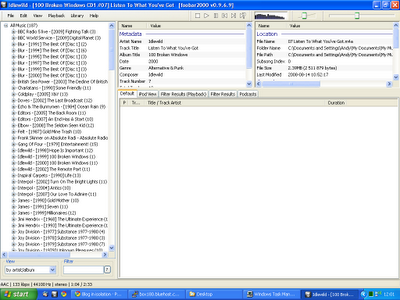
Foobar-Default-Player

I was also pleasantly surprised to see Foobar 2000 start up instantaneously (no delay or hourglass here) and consume a slightly more reeasonable 25,888KB of memory.

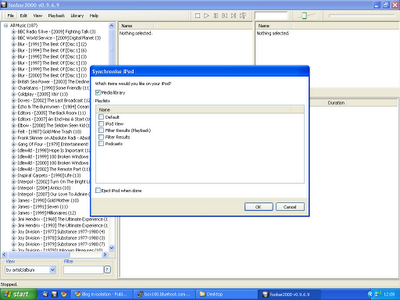
However, all of this was redundant unless I could actually synchronise music to the iTouch as using two completely separate programs to mange my music was self-defeating. So I downloaded a Foobar extension promisingly named 'Ipod Manager' and configured it.

For a complete fresh start, I took the rather brave (or stupid) move of completely resetting the iTouch to the factory settings which deleted all data and promptly hit 'Sync' in Foobar.

Foobar-iPodSync

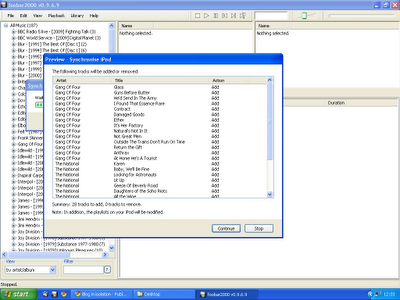
Although it took a while, synchronisation was 100% successful and I even got a 'Preview' of what songs were going to added/removed from the iTouch. This feature was incredibly useful as it gives you a chance to abort if your entire music library is going to be (unexpectedly) deleted.

Foobar-SyncPreview

There were some minor issues - not all album covers were displayed on the iTouch. I discovered that iTunes embeds album artwork in the AAC file. I preferred Foobar's method of adding the album art to the folder as 'Cover.jpg' so you have complete control over the images used. Later on, I actually removed the embedded artwork completely.

What else was missing ? I previously used iTunes to manage podcasts although this was never really satisfactory as iTunes had a weird concept of when the status of a podcast should be modified to 'Listened'. I rather thought listening from start to finish would qualify but Apple obviously disagreed and repeatedly kept sync'ing old content onto the iTouch.

Foobar had another useful extension called 'PodCatcher' which worked brilliantly. It would automatically download new podcasts (in the background) and I was able to easily sync to the iTouch simply by including the new 'Podcasts' category to the synchronisation list.

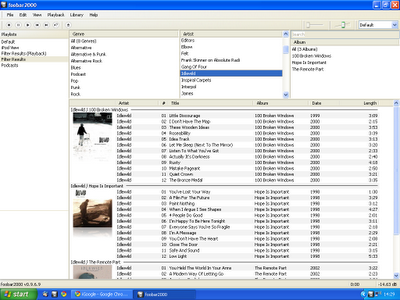
I wasn't completely happy with the default UI of Foobar so I used the Columns UI extension to make it look slightly more usable with the album artwork displayed.

Foobar-ColumnsUI

Foobar 2000 really is the complete music player - once you add the appropriate encoders, it can play virtually music in any format (FLAC, WMA, AAC, WavPack, Ogg Vorbis et al).

One great feature is that Foobar can perform conversion between the various formats. If I can summon up the energy to re-rip all my CD's yet again, I plan to rip all my music to a lossless format (FLAC) and Foobar would dynamically convert to the required lossy, compressed format during the sync to the iTouch.

Another couple of useful extensions for Foobar:

Although I am now blissfully almost iTunes free, I still need to use iTunes to update the software on the iTouch but I am delighted to say that is the sole extent of my iTunes usage. If I need to install any applications on the iTouch, I can do that directly from the iTouch.

It was particularly satisfying to copy my Foobar configuration and music library to my work laptop and completely remove iTunes from that computer.

product minimalism

Garry Tan, a developer for Posterous (a simple but powerful blog platform), wrote a brilliant post about product design.

Are there any questions? I said yes -- one last one: "When do we decide to remove features?"

In a similar vein, Amit Agarwal asks 'What's Common Between an iPod and Google ?' Answer: Simplicity.

If I had a cube, I would print both articles out and pin them up.

weird subliminal messages from Wiki demigods

Recently, I started messing around with DokuWiki as a replacement for Google Notebook (which Google have helpfully decided to ditch) and Diigo (after the well publicised and unfortunate collapse of another cloud bookmarking service - ma.gnolia).

In recent months I have also contributed to the Habari Wiki (MediaWiki), looked briefly at WikkaWiki and read Michael's interesting, thought provoking article about his Wiki nirvana wishlist with interest.

Last night, a throwaway post by Douglass Clem about TiddlyWiki resurrected my interest in my own long neglected, unloved local TiddlyWiki which I then upgraded to the latest version and then pondered consolidating that content into DokuWiki.

Today, a couple of colleagues expressed an interest in a group wiki at work for knowledge management so I have just requested a hosted TWiki (which coincidentally is being upgraded tonight) behind the Oracle corporate firewall. I am curious to see whether it will fare any better then the placeholder, skeleton Siebel page, I carefully seeded when Oracle first launched the official, public Oracle Wiki (Wetpaint) nine months ago.

And now, I discover that today, Wednesday 25 March 2009 is the Wiki's 14th birthday.

You may say 'So what ?' and attribute all of that to pure coincidence.

You may not find that spooky and disconcerting but I do.

identica poised to pounce on Pownce

Pownce (a microblogging service) has been sold to SixApart and decided to close the service on December 15 which is a nice early Christmas present for all their users - both freeloaders (like me) and 'Pro' users who pay $20 per year.

Although I have a dormant Pownce account, I don't actively use the service. However, I find it odd that Pownce have decided to close the service and provide all their users with just two weeks notice to extract all their data and find another home.

The Pownce blog claims that:

'we believe we'll come back with something much better in 2009'

However, that 'belief' must be pretty weak and the date in 2009 must be a long way away. Otherwise, why on earth would Pownce and SixApart force all the existing Pownce users to evaluate and migrate to alternative services if a viable, better alternative was being planned.

Will those users really come running back to SixApart after being kicked out ? When they're already been forced to move once ? After the way they've been treated ?

Surely, it would have been better to do what Google did with Jaiku. Absolutely nothing. Leave the service exactly as it is with no fixes, no improvements, no additional services or functionality. That way, the hardcore, diehard users will remain on Pownce and, at least, you have a hope of getting those users converted onto the new SixApart product (whenever it is available). There are a few obvious choices for Pownce users:

  • Twitter - more stability and increased uptime recently but limited to 140 characters (unlike Pownce) and inferior support for file sharing.
  • Tumblr - probably the closest match in terms of functionality (no 140 character limit, support for media posts (images, links, audio, videos)
  • FriendFeed - includes most of Pownce functionality.
  • identi.ca - micro-blogging service but OpenSource so the opportunity exists to run a separate Laconica instance for Pownce users and potentially support the Pownce API (and hence all existing desktop Pownce clients).
  • Posterous - supports MP3, photos, audio files and posting by email.

In fact, identi.ca have already responded to the imminent demise of Pownce and started work on the ability to import Pownce feeds into identi.ca and are actively looking for developers to assist with providing a Pownce compatible API.

However, I suspect the main issues here for disillusioned Pownce users aren't purely technical and won't necessarily depend on the advantages and disadvantages of the alternative services. The key factor will probably be the 'community' which has now been suddenly and forcibly broken up.

I suspect most Pownce users are on Pownce for a reason - they like the Pownce service and they like the community they have forged on Pownce. Consequently, I suspect a significant number will simply migrate wherever the majority of their friends go to or maintain multiple presences.

I also suspect that most Pownce users may well have already considered (and rejected) alternatives that were around (Twitter, Tumblr, FriendFeed) when they originally chose to sign up with Pownce which may be another positive factor in identi.ca's favour.

has your company got a Community Manager ?

My support for the Disqus commenting system used on this blog is well documented. I have also had great support whenever I have had minor issues with a service I paid precisely nothing for.

Disqus are a small company with less than 10 employees. However, Disqus are not a cottage industry operating out of Daniel Ha's garage. Disqus are funded by venture capital (Union Square and angel investors) and raised $500,000 in the last round of funding (March 2008).

So it's not surprising that Disqus are growing and hiring people. However, what fascinates me is that in addition to hiring talented developers to develop, improve, enhance and fix the product, Disqus have recently appointed Giannii as a 'Community Manager'.

Ignoring the lack of a surname and some of the Web 2.0 terms sprinkled in this introductory post; for example, 'Chief Happiness Engineer' is frankly cringe worthy, it is worth noting that Disqus have many channels available for people to contact them:

  • Twitter
  • Disqus forums
  • Email
  • GetSatisfaction

More importantly, Disqus don't just sit by the computer waiting for people to call in - they proactively monitor all these channels and participate. Moan about a Disqus problem on Twitter and count the seconds until you get a response.

What is interesting about Disqus hiring a 'Community Manager' is not necessarily that a small startup can afford one but Disqus (and presumably the people controlling the purse strings) actually view this role as one of the first ten, and most important, positions to be filled in the company.

So what ? Every company has a 'Community Manager' - they are just called different things 'Sales', 'Marketing', 'Partners', 'Customer Care', 'Public Relations' - every company does this stuff but they don't a) shout about it and b) dress it up in Web 2.0 tinsel.

To pick just one example, Apple are a big, successful company who make clever videos and sell expensive, stylish computers, iPods and iPhones to this type of demographic so surely they must have a 'Community Manager' ?

Surprisingly, they don't. In September, Apple released the 2.1 firmware for the iTouch and this update broke WPA2 wireless connectivity. Having recently acquired an iTouch and been hugely impressed with the device, I was surprised Apple could have introduced such a fundamental bug but I ignored it and waited patiently for a patch.

Unsurprisingly, lots of Apple customers experienced the same issue and multiple threads arose to discuss the issue on Apple's official support forums. The most popular thread now has 36,208 views and 436 replies.

  • How many of the 436 replies came from Apple ? None.
  • Did Apple respond to any of these threads ? No.
  • Did Apple even acknowledge the problem ? No.
  • Do Apple care about their customers ? Not sure.
  • Am I encouraged to give more money to Apple by spending in the iTunes Store ? No.
  • What impression does this give to a recent Apple convert ? Arrogant.
  • When is 2.2 scheduled for release ? Not known.
  • Will 2.2 include a fix for this issue ? Not known.
  • Is a fix even on the horizon ? Originally, I would have bet money on it but, given Apple's lack of response to date, I am now starting to have doubts.

It's obvious that Apple don't have a 'Community Manager'. Does your company ?

5 useful Firefox plugins

For reasons that are too long and tedious to recount here, I have had cause to rebuild my Lenovo T61 laptop many times over the last month, using a bewildering range of operating systems, Linux distributions, live CDs and dual boot configurations.

During this time, gparted and an external USB 500GB disk drive have become very close and reliable friends. In fact, I have only lost data once and, inevitably, that was due to my own stupidity.

Here are the invaluable Firefox plugins that I always install first:

  • DownloadThemAll! - download manager featuring multi-threaded, lightning fast, resumable downloads.
  • is.gd - URL shortener.
  • Diigo - Great bookmarking service.
  • Google Notebook - Useful for random thoughts, reminders, lists of people who have crossed you, transient bookmarks and, well, notes.
  • Firebug - HTML and CSS diagnostics

intelligent automatic follow/block script for Twitter

London, near England - 23 April 2008. For immediate release.

Brightside Software Enterprises are pleased to announce the immediate availability of FriendOrFoe.

Tired of being followed by those mindless idiots on Twitter, not to mention those horrid spammers ?

Tired of having to search out new friends with similar interests, sense of humour and outlook ?

Tired of being a 'soul in isolation' with 0 (zero) friends in the whole wide world ?

'FriendOrFoe' is a simple Twitter utility that will subject all Twitter 'Follow' requests to lengthy and vigorous inspection using sophisticated algorithms, advanced AI techniques together with analysis of 'social graphs' to categorise the prospective follower as:

  • Spammer (Citeh or Liverpool fan filters available soon) - user will be automatically blocked and receive a DM stating 'Don't follow me, follow Jesus'.
  • Friend - automatically follow back, sending a DM to the recipient's mobile, changing the ring-tone to U2's 'I will follow'.
  • Stalker - automatically followed on Twitter, FriendFeed, Ponce, Jaiku, NetVibes and footage of user streamed on live Webcam, right into your bedsit.
  • Anyone, anytime, anywhere (aka 'Promiscuous mode') - all Follow requests are blindly followed with a DM of 'Hey I'm pretty desperate. Fancy a drink ?'

'FriendOrFoe' is freely available now as a set of Greasy scripts written by 1,000 monkeys, bashing away continuously for 8 days, on a Dvorak keyboard.