Posts in category "software"

how mu4e changed my life

Getting email

No mail. In three whole days. Weird. I wonder if it's Thanksgiving over in the States. Not even any football related banter. Is this thing even on ?

Then I realised precisely why I was sitting alone in an island of blissful isolation, devoid of all email communications and staring at an Inbox in a perpetual state of 'Zero'.

I had forgotten to configure inbound email.

When I was testing, I used mbsync to synchronise emails from my ISP which worked well (fast, reliable, well documented) with bi-directional sync between IMAP and my local Maildir.

Note: For Linux types, the 'mbsync' utility is contained within the 'isync' package.

My needs at work are slightly different though. We use IMAP but are encouraged to download and work locally. This corporate edict is implicitly enforced by configuring users' IMAP folders with a measly 1GB quota.

Using mu4e, I needed to fetch new messages from the IMAP server, transfer them to ~/Maildir and then delete them from the IMAP server. Although mbsync has 'push', 'pull' and 'expunge' options, it wasn't entirely clear (to me) if removal of messages from the server was possible. However, the getmail utility written in Python met the requirements exactly and was easy to configure.

Previously, I used Thunderbird to get new messages from IMAP, filter them at source and transfer them directly to various 'Local Folders'. The filtering was pretty basic - typically mailing lists and routing corporate communications to /dev/null.

I tended to configure mailing list folders with a retention period of 30 days and retain 'Starred' messages for ever. Essentially, this meant mailing list traffic didn't clutter my precious Inbox and would automatically expire. I then had a full month to scan the mailing lists and mark any interesting messages for further reading or more unlikely in my case, action.

Anything left over simply came to Inbox. This was normally email directed (To: or CC:'ed to me) so this system worked pretty well.

Sending email

Sending email is easy - mu4e sensibly uses Gnus message mode to send messages. I also built the latest version of msmtp from source for future flexibility (multiple account support) and it seemed marginally quicker than talking directly to the SMTP server.

Reading email

Initially, I didn't like the mu4e initial screen. Where's my Inbox ? Where's my new messages ? I need to see my new emails and start working, dammit !

Then, to my horror, I realised mu4e doesn't have an Inbox per se - just a list of email messages that sit in ~/Maildir. Unread messages reside in '/new' and read messages live in '/cur'.

I was immediately annoyed at a plethora of irrelevant mailing list messages and corporate communications littering my Inbox - sorry littering my 'List of unread messages'.

God - this is terrible. I can see that the only solution here is for me to shave that yak again and configure procmail or use Sieve and Dovecot merely to mimic what I had working fine in Thunderbird out of the box.

Then I saw a post from Dirk (mu4e's author) on the mu4e mailing list.

'mu4e doesn't really have folders - instead "All Mail", "Inbox", "Important", "Sent Mail" etc. are queries - so the same messages can be present in more than one of those'.

Then it struck me like a bolt of lightning. He was absolutely right. I don't need a 'Corporate' folder. I don't need a stupid 'Oracle/MailingLists/dba-wizards' folder with a 3 level hierarchy. I don't even need an 'Inbox'.

What I need is a set of queries to mine the database. Yes - a set of structured text files is in fact a database. mu4e calls these queries 'bookmarks' and provides some useful ones out of the box.

  • bu (unread messages)
  • bw (messages sent in the last week)
  • bp (message with attachments)

Then I would need some ad-hoc or stored queries (e.g. large messages). For example, if I wanted to find that excellent email from Frank about table partitioning he sent out last year:

  • contact:oracle-dba-wizards from:frank date:2015 partitioning

The 'Inbox' processing now changes slightly. I needed to read each unread message and quickly decide what to do with it:

  • Delete it. 'Blue Nova with lights on in car park 710 East'
  • Act on it. Do something. Or reply. Then (optionally) delete it.
  • Mark it for (later) 'Action'. Absolute last resort. Obviously.
  • Archive it. Something potentially interesting but not now.

Then I remembered that this tied in nicely with an post by Ben Maughan on his excellent Pragmatic Emacs blog which made me question the need for a 'ToDo' folder. Or any folders, in fact.

'I also had folders for putting emails in and I would occasionally have a painful cleanout of my towering inbox, agonising over which folder to put an email in, or whether I should create a new folder for it'.

Then something else struck me. Joking aside, it was quite pleasant and liberating when I had no incoming email. The fact I didn't have a cluttered Inbox presented by default, staring me in the face was great. I had to make a conscious effort to get new mail ('U') and I then had to make a conscious effort to read it 'b u').

Initially, I explicitly disabled periodic automatic fetching of new email (as I had configured in Thunderbird) so I could verify getmail was fetching (and deleting) the correct number of messages from the server and attachments were being handled correctly.

However, I decided to stick with manual email processing initiated by me when I was ready to process email. Notifications of 'new email' are incredibly hard to ignore and a needless context switch if you are busy concentrating on something else (watching Shetland ponies dancing on YouTube).

Further thoughts

Now I am wondering what the point of all my historic folders are; archives by year, mailing lists, personal, sent etc. Previously, in Thunderbird, they were logical groupings and I viewed annual archives as 'read-only' but now in the new scheme, they are merely entries in a database and strictly speaking every single message belongs in '~/Maildir' for simplicity. With one file per message, there is no longer any advantage in logical folders.

So yes, I must be the only person in the world who intentionally went from 'Inbox Zero' to 'Inbox 47,339' and didn't care.

Also, inevitably, I am now being increasingly tempted by the lure of org-mode. In particular, Ben's quote struck a chord with me.

'your inbox is not a todo list'

This is so true and something I have been abusing for years. An email message doesn't have a start date, an end date, a category, a priority or a current status whereas org-mode supports all of those elements.

In addition, org-mode capture takes this further. You can capture anything from any source; an email message, a Web site, a phone call, an instant message, a news article, a blog post, anything.

Configuration

A lot of people conclude and help the reader by including their 'gnus', 'mu4e', 'msmtp' and 'getmail' configuration files but mine are simply variants on the many excellent, annotated examples out there and I'd only repeat an idiotic mistake and post something crucial and security related in clear text on the Internet.
GIT tutorial for SVN users

I have used CVS and then SVN for version control. As I now use GIT for a couple of projects, I found this set of GIT tutorials very useful as they are well-written, use plenty of examples and outline where and how GIT differs from Subversion.

back to basics

Frustrated at the inability of Google to provide a simple sync process that works for disparate versions of Chrome and Chromium browsers, I decided to adopt a pragmatic approach, return to Victorian values and go back to using a Web based bookmarks service.

Way back, in 2005, I evaluated three different bookmarking services and dismissed Delicious, mainly on the grounds of the user interface design of the home page which, according to me, 'looks like an undergraduate knocked it up during a lunch hour'. This was a little rich from someone with no design experience whatsoever but still.

Seven years have passed though and now my requirements are slightly different. I use three different computers (desktop, work laptop and netbook) and different Web browsers (Firefox and Chromium). In addition, I consume content (Google Reader, Google Plus and identi.ca) on an Android phone so the requirement is for a reliable Chromium extension, Firefox addon and Android application, that simply supports posting and searching, for the bookmarking service.

In the intervening period, I had also played with diigo and this service is still available but leaning towards a Premium model (free basic service with paid for add ons and additional features).

All the cool cats currently tend to favour Pinboard which has a simple business model - a one-off fee that gradually increases as more users join the service. The current fee stands at $9.90 but I can hardly justify that for what is essentially a private dump of bookmarks as I would make limited use of the sharing and discovery elements.

So that was easy - delicious was acquired and subsequently sold by Yahoo! and have thankfully lost the silly del.icio.us name which now simply redirects to delicious.com.

I am using the following delicious tools:

Sorted.

+1

Seasoned bloggers knows people are rarely moved to comment on a blog post. Especially, one hit wonders sent from Google, who were simply looking for Train times between Clapham and Norbiton and instead see some commuter rant aimed at South West Trains.

However, microblogging has taught us that people are slightly more likely to grudgingly acknowledge an amusing one-liner with a 'Like' or a 'Fave'. Clicking a button is quick and easy - even for lazy people.

The recently launched Google Plus also uses '+1' both for posts and - probably the single feature I like most of all in Google Plus - the ability to add '+1' on individual comments.

I always equate this with a knowing smile across a crowded room - just to say "I saw what you did there. It made me smile but it's not worthy of a reply to say 'Hey - that clever bit of word play made me smile' but have a 'Like'".

As Drupal 7 has a Google +1 module available and Google Webmaster Tools includes reports to track this metric, I thought I'd add a '+1' button to every single post on this blog.

Now - you know what you have to do. Even if you were just hunting for train times.

first and last and always - Google Reader

Steve Rubel has resolved to return to feed reading in 2011.

However, I have been using Google Reader since 2007 and use it daily to catch up with the tech and sports news in addition to my favourite blogs. I honestly can't imagine life without it. I was also interested by a recent article (prompted by the demise of delicio.us) that described the use of Google Reader as a bookmarking service.

thoughts on browser usability

Jake Kuramoto from Oracle Apps Lab has a great post about common search terms for the three main search engines and notes that 'facebook.com' (and variants thereof) appear in the lists of most frequently used keywords.

Recently, I have been observing my wife who is a non-technical (Firefox) user although I must admit to a vested interest here. I am keen to understand any areas where Linux Mint is 'worse then Windows'. Over the last few weeks, I have noted the following:

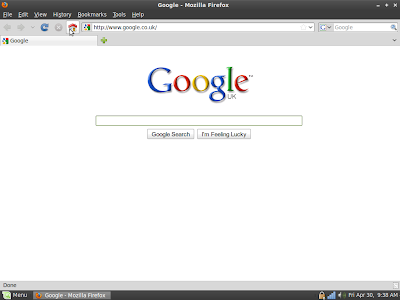
The Web browser is Firefox 3.6 and the starting page is a single tab - Google.com (my choice).

Google

This start page is minimalist in the extreme and dominates the screen. The user is instinctively drawn to this large, central area of the screen. Note to Google designers: This striking, beautiful minimalism is rather spoiled once you use the mouse.

My wife's Web session starts here. It always starts here. She might be searching for 'john lewis', 'maths revision guides', 'how to kill husband and get away with it' or 'weather london'. It is entirely logical that, if she wants to visit Facebook, she will simply hit 'Home' and initiate another 'mini-session by searching for 'facebook' (or some variant).

This may not the the quickest, optimal way of getting the job done but it's quick enough, it works and it is a learned behaviour.

I agree about search being more forgiving than typing raw text into the address bar. Google does the right thing with 'facebok' but the address bar doesn't. Don't try this experiment at work as it's potentially NSFW.

However, I think the key issue here is more about usability. The Google search page dominates the screen and the centrally placed search box dominates the Web page. Her eyes are drawn towards it. It is much harder for the brain to even consider the alternative options of 'address bar' 'search bar' or even 'Bookmarks' because these options are located at the top of the screen and are tiny in comparison - almost inconsequential. Therefore the brain has to do more work - particularly for 'Bookmarks' which nestles between 'History' and 'Tools'.

Coincidentally, I recently exposed the Bookmarks Toolbar with just two sites (Amazon, Facebook). These icons are now relatively large and easily visible and using them to quickly navigate is just a single mouse click but I don't believe she uses them. Old habits die hard perhaps.

This isn't being patronising but I don't believe she knows what the address bar is. Until recently, she didn't know what the search bar was. When I explained that the 'Google' in the bar and the magnifying class icon indicated you could search by typing into this text box, her reaction was 'Oh so it's like the Home page but smaller'. I am sure this mentality isn't unique among novice and non technical users.

She finds it confusing that the address bar takes things like 'amazon.com' (URL's) whereas the search bar takes 'amazon UK books' (search terms) and gets the two confused. Mostly this ambiguity doesn't affect the end result but it's confusing and poor UI design. Chrome addresses this nicely with a single unified bar which is exactly how it should be.

My wife often bookmarks stuff and recently complained that 'Bookmarks don't work. I can never find stuff again.' It transpired that she expected her lengthy list of Bookmarks to be listed in reverse chronological order and was unaware of the 'Recently Bookmarked' submenu. But then again, that's a extra click. Again, more work for the brain and people are lazy.

Although I am not a Web designer, I find usability and user interface design a fascinating area. I would love to conduct detailed interviews with my wife, my kids and my father to compare and contrast their usage of their respective computers.

Steve Jobs on design

‘Make it look good! Thats not what we think design is. Its not just what it looks like and feels like. Design is how it works.” — Steve Jobs

So very true. Via a comment on an interesting blog post comparing Tumblr to Posterous.

Ironically, this short post would have been better suited to a one liner, throwaway post correctly labelled and nicely formatted as a quotation on a service like, well Posterous or err, Tumblr but I am trying to consolidate all my efforts into this blog.

the importance of end users

Cary Millsap posts a brilliant article about his approach to performance troubleshooting that resonated loudly with me.

When I first started working at Siebel, a standard review was a production health check that consisted of meetings with key project staff (Siebel Administrator, DBA, systems and network admins, project manager, developers) coupled with some standard checks on key Web, Siebel and Oracle configuration parameters.

At the tail end of one engagement where I had precious little to note or report on, I asked to meet with an end user for a brief chat. The response was surprising and not dissimilar to the standard retorts Cary describes.

  • 'Talk to a user ? Why on earth would you want to do that ?' (delivered with suspicious frown)

  • 'The user won't understand your questions.' (patronising)

  • 'The users don't understand the business requirements.' (surprising and worrying)

  • 'The users are too busy.' - 'Can't you just talk to a supervisor instead ?'

Of course, most of these responses are instinctive, defensive measures, immediate responses to what is probably a rather unusual request and, to be fair and in the interests of balance, I have been introduced to end users by development staff who do know and obviously have a healthy relationship with the user community.

If and when I succeeded in getting an audience with an actual user, I didn't actually chat at first. Instead I introduced myself and simply asked if I could watch the individual use the system for 10 minutes.

It was often very enlightening just to sit quietly and observe the business process (typically, handling an inbound call at a call centre), the subset of available screens accessed by the agent, typical searches executed to locate data, actions they expected to be slow, actions they needed to be fast, common tasks they did frequently, lengthy interactive queries that were truly batch reports as well as interactions with other applications.

why Linux will never succeed in the mainstream

I have been running Linux Mint for 8 weeks now and I've been delighted with it. My desktop PC is fast and responsive and I am hugely impressed by the sheer amount and quality of software available for Linux. Printing, scanning, wireless networking, audio, DVD writing and all my USB devices just work.

I don't have a virus scanner consuming memory and chewing clock cycles. I am no longer considering a memory upgrade as Linux works fine with my paltry 512MB.

I have all my favourite applications available (Picasa, Chrome, FileZilla, Emacs). Linux is brilliant as a development platform and installing software is easy. The Mint desktop looks great and with the addition of Microsoft TrueType fonts, my display is razor sharp and crystal clear.

Finally, and perhaps, most importantly, my wife has also embraced the change. She now uses Thunderbird instead of Outlook Express, Firefox instead of Internet Explorer, OpenOffice instead of Microsoft Word and Excel and Nautilus instead of Windows Explorer. All of this was fairly transparent and painless.

This fulsome praise all sounds like an advert for the wonders of freedom loving, a precursor for some open source software evangelism and a concerted attempt to convert the great unwashed to Linux. However, there is an elephant sitting in the room. Right there - in the corner.

The Ubuntu and Linux Mint (which is based on Ubuntu) distributions have a 6 month development cycle. This means that a new release will appear twice a year which is great because users know when the next major release is due. In addition, minor fixes, security patches and improvements are continually being pushed out via automatic updates. What is not so good is the actual process of upgrading to a major release which, in my opinion, is relatively complicated and risky for an inexperienced, new user.

To be fair, Linux Mint are upfront and honest and describe the upgrade process fully, the options available and the pros and cons of each approach.

'There is no guarantee that it will work for you. In fact, this [dist upgrade] is quite a risky process. If you're experienced and if you know how to troubleshoot and solve common Linux problems then you're probably OK. If you're a novice user we recommend you perform a fresh installation of Linux Mint 8 instead.'

David Marsden is an experienced Linux user and comments that he is comfortable performing Ubuntu upgrades, quickly and reliably without losing his data. He claims that Ubuntu upgrades are quicker and easier than applying a Windows Service Pack.

Of course, David's absolutely right. Even I managed to upgrade to Linux Mint 8 at the first attempt without losing any of my user data and even managed to preserve the configuration settings for all my favourite applications. In fact, apart from the modified login screen and wallpaper, the four people who use the Linux computer would have struggled to notice the change, it was that transparent.

In fact, all I needed to do was:

  • When originally installing Linux, create dedicated, separate partitions for user home directories and data. I use '/home' (user directories) and '/data' (music, photos, documents).
  • Try to stick to the default Mint (and Ubuntu) software repositories.
  • Note down the additional applications and software packages you have installed.
  • Jot down user and group id's (copy '/etc/passwd' and '/etc/group').
  • Backup the home and data file systems (twice). Check the numbers of files. Check the size of the directories. Check the checksums. Check the backups are readable. Check the hidden directories. Check the backup disk isn't full. Check everything.
  • Burn the Install CD and install the 'upgrade'.
  • Preserve the '/home' and '/data' file systems, leaving all existing data intact. You did remember to jot down that '/home' is '/dev/sda6' and '/data' is '/dev/sda8', didn't you ?
  • Move '/home/user' to '/home/user.backup'. Repeat for each user account. This ensures that Gnome and desktop related settings are re-created.
  • Re-create the necessary user accounts and ensure the user and group identifiers are the same as before.
  • Selectively, copy the various, 'hidden' dot directories for applications (Rhythmbox, Picasa, Pidgin) back into the user directory to preserve the application settings.
  • Reconfigure wireless networking.
  • Reconfigure the printer.
  • Remove the irritating fortune cookie from 'Terminal' (Mint only).

Now I am fairly technical and understand most of this. I have no problem whatsoever doing all of this. David is correct - all of this is common sense, quick to do and the whole process takes less than 2 hours. I don't even mind repeating this process every six months because, as David points out, I have a new, shiny operating system with new features, additional applications, bug fixes and improvements.

What I have a problem with is trying to explain this whole, convoluted process to my father. Or rather, rescuing his system after he has failed to follow this process. Remotely.

Of course, my father has a few options available. If it ain't broke, don't fix it - if Mint Gloria works fine than stick rather than twist. Alternatively, he could use a distribution that automatically performs rolling upgrades so his software is always the latest and greatest.

inside the open source confessional

Dear Father - It is 6 weeks since my last confession. Since then I have...

  • Installed Thunderbird 3 which handles all my work email. This upgrade went smoothly enough although there were some minor glitches with server authentication and message filters. Thunderbird 3 adds tabs, UI enhancements, IMAP synchronisation, much needed improvements to the address book in addition to faster searching.

  • Upgraded my desktop PC to Linux Mint 8. Again, this went smoothly enough, mainly because I did a full blown install while carefully preserving my user data. Until Linux upgrades are 'rolling' and as easy as applying a Windows Service Pack, Linux will never succeed in the mainstream.

  • Installed Google Chrome on Mint 8. This was probably the only software I missed from Windows and God, I had forgotten how much faster Chrome is than Firefox. Chrome is blindingly fast on Linux, staggeringly fast, unbelievably fast.

Playing around with DokuWiki to replace Diigo and Google Notebook in an effort to use more open source software and get more of my data under my control.

  • Installed Laconica 0.8.2 so Billy has his very own sandpit to play with spammers in.

  • Upgraded this blog to the latest bleeding edge of Habari (0.7 alpha) and was relieved to see it still worked.

'Go in peace, my son. Admirable efforts but my sources tell me you are flagrantly continuing to use freedom hating, Microsoft TrueType Fonts to enhance your browsing experience on Linux, so please say three Hail Mary's and an Our Father as penance. Go in peace to love and serve RMS.'