Posts in category "blogging"

resurrection of Performancing Metrics

Just 10 weeks after closing, Performancing Metrics has risen again, phoenix-like, from the ashes.

I didn't use the previous incarnation of this statistics package as I had a hosted WordPress blog which didn't support Javascript. When I migrated to my own WordPress blog, I used Google Analytics which is perfect for my purposes (and free) but I couldn't resist installing the new version of the new statistics package from Performancing Metrics.

The software was really easy to install (two lines of Javascript) in the footer template. I really liked the real-time updates (better than Google Analytics which has a 3 hour lag) which are pretty addictive.

The reporting interface is really smooth and polished (the icons look similar to Netvibes but I presume these are in the public domain).

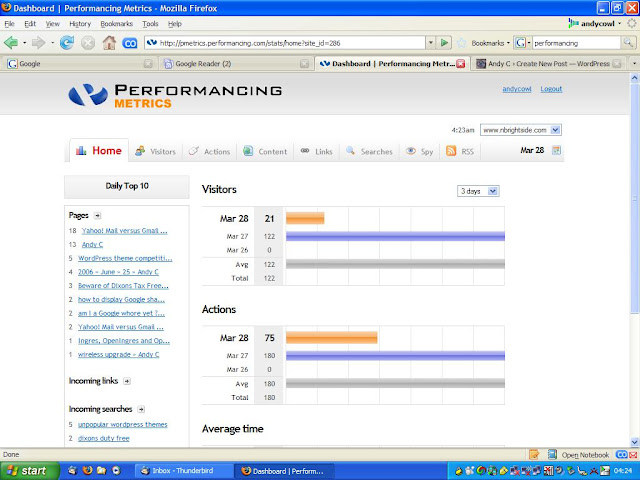
Performancing Metrics Home

I was expecting high demand as people rushed to download the new software on day one and sluggish performance. All the reports were very quick and the system was responsive although with my data volumes maybe that isn't so surprising.

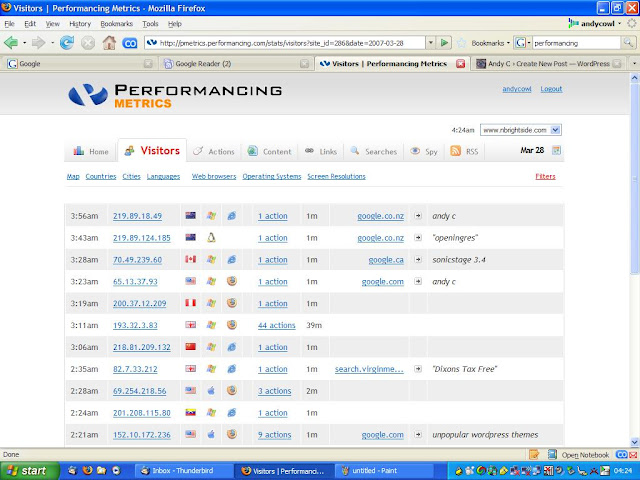
Performancing Metrics Visitors

In addition to the standard tracking metrics (country, browser, platform, referrer, search terms), Performancing Metrics also allows you to analyse the page views, outbound links and path of an individual visitor which is a nice feature.

The geographic distribution report is integrated with Google Maps which is a nice feature.

Google Analytics is a completely free service (loss leader) but as Performancing Metrics only charges for over 1,000 page views per day, this equates to the same thing for my humble blog.

The WordPress plugin for Google Analytics automatically filters all accesses from WordPress Administration screens. This is better than IP filtering as I might use 3 different computers to manage my blog. This would be a neat feature for a future release of Performancing Metrics.

rolling upgrade

Until 30 minutes ago, this blog was running Wordpress 2.1 courtesy of the Fantastico installation at Bluehost. The blog was fairly stable and worked fine.

However, I was investigating upgrading to WordPress 2.1.2 to plug a security issue. The Fantastico Installer currently only offers an upgrade to the flawed 2.1.1 release.

In any case, the Fantastico installer now refuses to upgrade my WordPress installation because I have installed new themes, configured additional plug-ins and even added database tables to the schema.

So without any prior planning or forethought, I have been forced (by that nagging voice in my head) to spontaneously install a brand new instance of WordPress 2.1.2 and migrate my existing blog.

Consequently, this blog will be completely broken for the foreseeable future. All comments will be lost. RSS feeds will stop refreshing. Most plug-ins will stop working. Any hosted images will return '404 - Not Found'. In fact, with my level of knowledge and incompetence, it is likely that the complete blog will be lost forever.

Worse, my proudest invention, the rotating tagline, doesn't work. This is completely unintentional but at least, it means my tiny brain can easily differentiate between the 'old' and 'new' blogs.

At last, I am now freed from the constraints of Fantastico and as The Clash memorably sang, I now assume 'Complete Control'.

dugg, slashdotted and tailranked

Dear Reader

My cruel owner got very excited last night when he went to play with his rotating tagline. Instead of his precious blog, much to his surprise, he was presented with this. His reaction to this mundane error was startling.

At last ! Look, blog, look at this. 18 months and I've finally done it. At last ! We've been dugg ! Why did it take them so long to catch on ? Look blog, look. Finally, we've been Slashdotted ! The poor old servers at Bluehost don't know what's hit them. Thousands of hits per second. Apache is on its knees begging for mercy and more swap space. Why, I bet Matt Eaton will be on the phone any second now. We've done it. Technorati Top 100. Blog, look, just look at that screen !

18 months, 3 different hosting providers, 500 articles, 4 readers, 6 comments and 2 self-inflicted disasters. And now, finally, it is all worthwhile. My life is complete. And you know what - I think it is very interesting how all this happened shortly after my brilliant idea to introduce the rotating tagline.

Of course, you know what this means, blog. We're going to have to move house (again). Prestigious, high traffic sites on the TailRank front page can't live on cheap, 5 dollar a month hosting.

We are going to have to move to MediaTemple with a powerful grid infrastructure. Of course, the hosting will be absolutely free because MediaTemple will be fighting off Google and Microsoft for the privilege of hosting us !

Now I need to go and powder my nose. I'm doing a podcast on the Scoble Show in 10 minutes.

My cruel owner was so excited and happy, I couldn't bear to tell him this was just a temporary glitch on the Bluehost monitoring agent and everything was back to normal now. Yours

The interminable bytestream that is 'Blog in isolation'

how to rotate taglines on your WordPress blog

Another thing on my todo list was to learn PHP and write a WordPress plugin to randomly select quotes stored in the database to rotate the tagline.

An admin interface to create, modify and delete quotes was planned for Version 2.1 (beta) due Q4 2008.

Fortunately for me though, a helpful person called Zombie Robot (pseudonym ?) has already produced wp-quotes (and another kind person tweaked it to work properly for taglines).

All that remains is the interesting part - performance tuning. No - wait. Existing users have already identified this modification as efficiently fetching a single, random record. Horribly database specific of course but worth having when you have 2.4 million quotes.

36c36
< $sql = "select * from " . WP_QUOTES_TABLE . " where visible='yes'
< order by rand() limit 1";
---
> $sql = "select * from " . WP_QUOTES_TABLE . " where visible='yes'";

fun with Habari

There's been a lot of excitement and discussion recently about the emergence of a new blogging platform called Habari.

A brand new blogging platform being created from scratch with more developers than actual blogs.The prospect of my blog being completely broken by the nightly alpha build was an attractive one. A chance to leave the comfort of a stable Wordpress environment with all those themes and plugins. A change to live on the bleeding edge. I desperately tried to resist but the lure was too strong. In the end, I simply couldn't help myself.

The first step was to install subversion (much better name than boring old CVS) on Bluehost following these excellent, idiot-proof instructions.

Then you check out the Habari code. Or rather you don't. You get this error.

svn: PROPFIND request failed on '/svn/trunk'
svn: No transaction named '26572b6d78b0be18? in filesystem 'habari'

No need to give up and commit Hari-Kari just yet. Consult the Habari self-help group to discover there is a known problem with the SVN repository on the Google server. When this problem is resolved, I finally get to download the code. Habari requires PHP5 and PDO (for database access). On Bluehost, the following lines must be added to 'php.ini' to activate the PDO drivers for mySQL.

extension_dir = /usr/lib/php/extensions/no-debug-non-zts-20050922
extension=pdo.so
extension=pdo_mysql.so

I am already hosted on a server running PHP5 but if you don't have PHP5 on your server, open a ticket and Bluehost Technical Support will promptly move you.

Create a(nother) mySQL database and account, edit the database credentials in 'config.php', create an '.htaccess' file to handle redirects and you're away. A simple installation page creates the initial user account, the blog, tagline and the first entry.

Congratulations ! You are now the proud owner of a Habari blog.

Obviously, this is an embryonic product but the Administration page looks great and is fast and responsive. Although I'm not sure I believe the traffic statistics !

The article editor is a little minimalist (especially contrasted with the recently released WordPress 2.1) but perfectly usable.

A special word of praise about the Habari import facility.

This connected directly to my Wordpress database and was blindingly fast (less than 30 seconds) to import my WordPress blog. In fact, it was so fast, I had to check that over 500 articles and 400 comments were indeed correctly imported although I noted that tags weren't preserved.

It is not clear how you might import a hosted Wordpress blog where you don't have access to the database but I am sure other data formats will be added in due course.

Of course, there isn't the rich variety of themes and plugins available for Habari (yet) and, while I will not be jumping ship to Habari from WordPress today, I will certainly continue to follow developments with interest.

Auto-discovery detected the availability RSD and Atom (but not RSS) feeds.

If you're interested, here is my Habari sandpit.
fun with disaster recovery

Sort of.

I decided to remove all posts from my newly created Habari sandbox in case my readership and GoogleBot gets confused. As there was no obvious bulk deletion tool, I simply truncated the `wp_posts` table.

Unfortunately, I truncated the `wp_posts` table from the Wordpress schema instead of the Habari schema.

So, in the space of a mere 24 hours, I had managed to lose my favourite boxer shorts, get a brand new shiny blog and then completely trash my established, trusty, stable blog.

No problem. Earlier today I upgraded to WordPress 2.1 so I can use the backup I carefully took before that upgrade. Only the Bluehost one-click upgrades are so reliable and trouble-free, I got out of the excellent habit of taking my own backup by hand.

No problem. I will just use the backup Bluehost took automatically. Only I can't. That backup is purely of the PHP code (and not the database).

No problem. I will simply use the Bluehost mySQL database backup. Only I can't. Murphy has spoken. The latest daily backup has been made in the last 2 hours and the `wp_posts` table is empty.

No problem. I will go back to the weekly dump, extract the SQL for `wp_posts` in isolation and add the raw data by executing the INSERT statements.

That all works fine. 502 records inserted into `wp_posts`. Triumphantly, I pat myself on the back and check the blog looks OK. There are still no articles. Weird.

I create a test article, which is visible, and compare the 'good' record against the 'bad' record. Quickly track the problem to the 'post_type' column which is NULL on the imported posts and should be 'post'. Issue the necessary UPDATE statement and, magically, all my posts immediately re-appear. Fix the 'About' page which imaginatively has a 'post_type' of 'page'.

All that remains is to fill in the gap between last week's backup by manually pasting in articles from Google Reader and modifying the timestamps. Slightly tedious but much preferable to laboriously typing in 501 articles.

And the moral of this tale. If I ever cross your threshold to be interviewed for that production DBA role for a large Siebel deployment, just thank me and politely show me the door. Quickly.

thin line between truth and humour

Occasionally, I used to wonder what people thought when they were subjected to some of the material on this blog. Andrew Shermans comment questioning whether this story was completely true also resurrected this thought.

Most of the articles, posts, stories on this blog are based on truth. The vast majority are anecdotes recounting real-life events that actually happened to me, that my warped sense of humour finds amusing. Examples in this category:

Other posts are simultaneously technical and non-technical but merely an opportunity for a superb, ambiguous title.

Another category of posts are almost completely true but embellished, to a greater or lesser degree for comic effect, normally for the punchline/conclusion:

Sometimes I massage thoughts and ideas that would be too boring for a conventional blog entry. Imagine the tedium of a blog entry that reads 'I really enjoy the BBC series: Dragon's Den - do you ?'

A relatively small number are (obviously) complete, drug and drink induced, fiction. Normally characterised by silly names.

Single, weak attempt at satire. I always wanted to write for Private Eye.

The biggest compliment anyone has ever paid me was when Doug Burns commented 'You refuse to sign-post things'. In fact, this was merely an observation on my blogging style but I took it as a compliment. In fact, I was so struck by this that I immediately put up a sign-post with this very quote above my desk.

You don't need smiley faces dotted everywhere telling you where to smile or laugh inwardly.

You don't need to understand all of the lyrics.

You need to be left thinking 'What on earth was that all about ?'

traffic report

The year end always sees lots of people post meaningless stats about blog traffic. Unfortunately, I only have tracking data since my move to Bluehost in late September but I am not going to let that stop me. Google Analytics reports:-

  • 4,709 visits
  • 8,036 page views
  • 1.71 pages per visit
  • 3,902 unique visitors

[ Note the almost linear growth in visitors over the three months. It took me ages to get that perfect straight line ] Of course, these traffic numbers are bitterly disappointing so, to cheer myself up, I analyze the AwStats reports for the same period. This makes me feel much better.

  • 13,738 visits
  • 54,266 page views
  • 68,858 hits (even better !)
  • 3.95 pages per visit
  • 6,002 unique visitors

AwStats includes robots, spiders, crawlers and spam automatons whereas Google Analytics only counts human beings (and cats). Worse, Google Analytics filters out my own visits and referrals from the WordPress dashboard (which accounts for 97% of traffic) ! Oh no. What's this ? Feedburner are now offering even more blog tracking statistics and reports.

who wants to be an Adsense millionaire ?

Occasionally, I have been tempted to experiment with Google Adsense on this blog. Not because I think I will get rich and be able to retire but I am curious to see how the technology works. Thankfully, to date, laziness, inertia and minimalist tendencies have prevailed.

So I was very interested to read Guy Kawasaki's 12 month review of his popular blog. 'How To Change The World' received 2.5 million page views (slightly more than my humble blog), 7,000 comments (again, slightly more than my statistics) and 2,000 trackbacks (1,999 more than me) in 2006.

For all this effort, I was staggered to learn that this blog, with 4,217 inbound links, 21,000 subscribers and which consistently features in the Technorati Top 100, earned Guy Kawasaki the princely sum of $3,350.