Wednesday 29 April
I use a Lenovo Thinkcentre M900 desktop computer that runs Arch Linux for work. This PC is a few years old now and has i7-6700 (3.40GHz) CPU (4 cores) and 16GB of memory which is adequate for my purposes.
I used to distro hop (Fedora, Linux Mint, Debian, Ubuntu, Solus) quite regularly but haven't done so for a while as Arch meets all my needs (rolling distribution) with almost modern, up-to-date versions of every software package I would ever need.
People may be surprised that Oracle Corporation allow the use of Linux but they do and it's officially supported (as long as you install corporate packages). However, I'm in a small minority but a lot of the hard core, experienced database engineers use Linux but the vast majority of my colleagues use Windows and MacBooks are also popular.
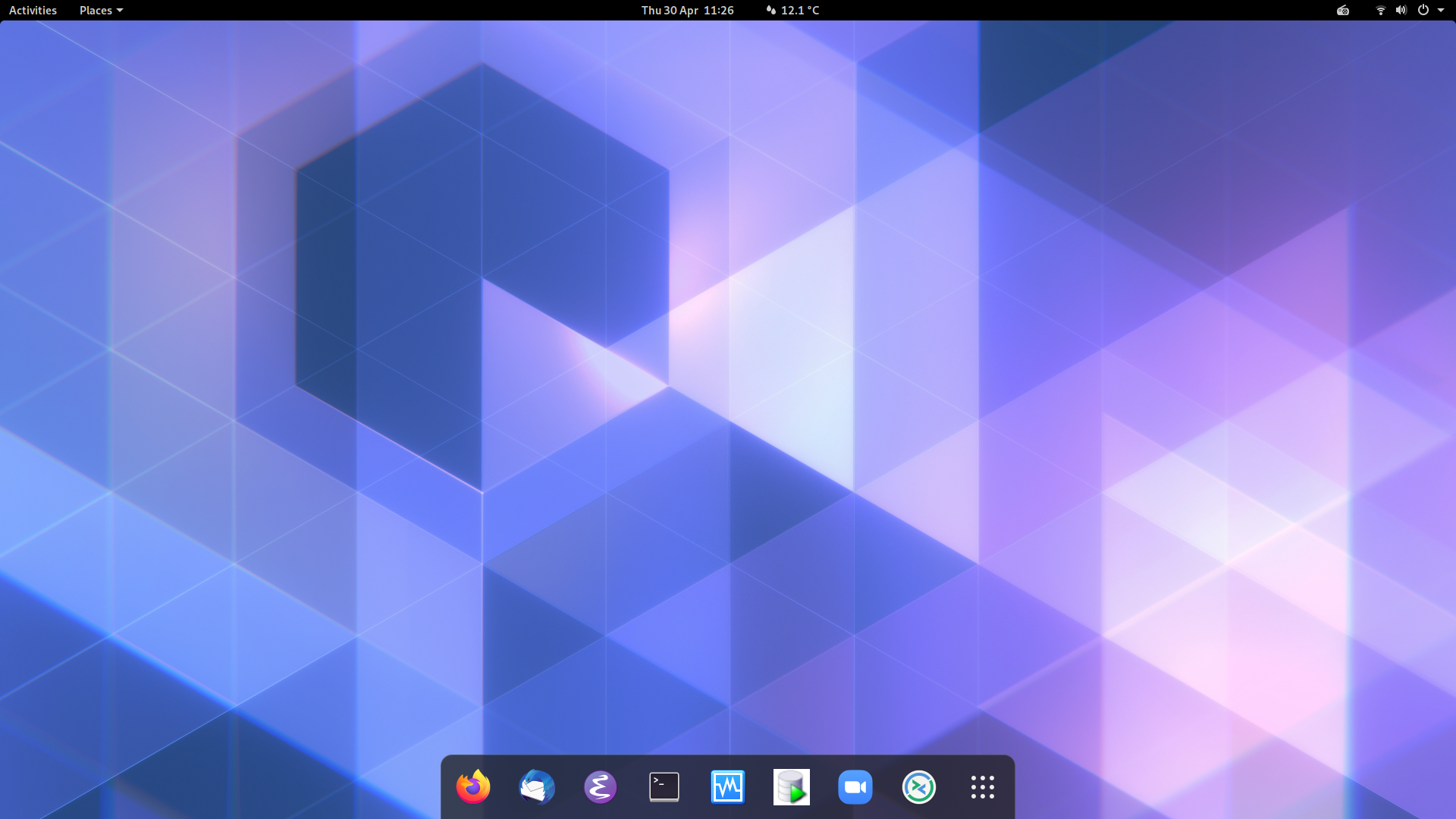
I have used the Gnome desktop for many years as I like the UI design and the minimal look and feel. I don't use workspaces and explicitly disable that feature. My environment is fairly vanilla with the following Gnome extensions:
- OpenWeather
- Dash to Dock
- Internet Radio
- Places Status Indicator
The following applications are available from the Dock which is placed at the bottom of my screen.
1) Firefox
I'm not particularly anti-Google and I previously used Chrome until it span my CPU at 100% playing videos so I switched to Firefox and haven't had a reason to switch back.
Like Gnome, my Firefox is fairly unadorned with extensions but I do use the uBlock Origin, Privacy Badger, Feedbro (RSS reader) and OpenGNOME extensions.
Another extension that has saved my bacon on a few occasions (and I highly recommend) is 'Form History Control' which preserves text after you inadvertently hit 'Back' or are forced to refresh a page (presenting a blank form, losing 24 minutes precious typing).
2) Thunderbird
I really dislike Outlook and the proprietary lock-in. Have you ever tried migrating data out of Outlook ?. Thankfully, my enlightened employer lets me choose any IMAP capable email client.
3) Emacs
I use vi and Emacs almost interchangeably. I use Emacs for my own writing, coding and note taking (orgmode) but often I'm working on remote environments for customers where Emacs isn't available.
At one time, I used mu4e and then Gnus to handle all email completely within Emacs but the Thunderbird/Lightning calendar integration won me over. For now.
4) Terminal
Mainly for running top and yay to update Arch. I do most file access and manipulation using dired in Emacs.
5) VirtualBox
I use VM's quite regularly for development and testing and have access to more powerful database servers for performance and stress testing using larger data volumes.
Unfortunately, I still am compelled to use a Windows VM - solely to accommodate colleagues who still (in 2020) somehow manage to contrive to produce complex Excel spreadsheets, Powerpoint presentations and Word documents that don't render properly in LibreOffice.
6) SQL Developer
Standard Oracle GUI tool which also provides access to other databases (PostgreSQL, MySQL, SQL Server) and products (APEX, ORDS, OEM) and a data modeller tool.
7) Zoom
Previously, we used Cisco WebEx. Thankfully, last summer, we switched to Zoom. I know all about the security and privacy issues. However, as Zoom provides and maintains a native Linux client, they're beyond reproach in my book.
8) Remmina
A useful, integrated desktop client providing SSH, RDP, VNC connections to remote computers.
Obligatory screen shot.