Posts from 2009

dyslexic graffiti

uk

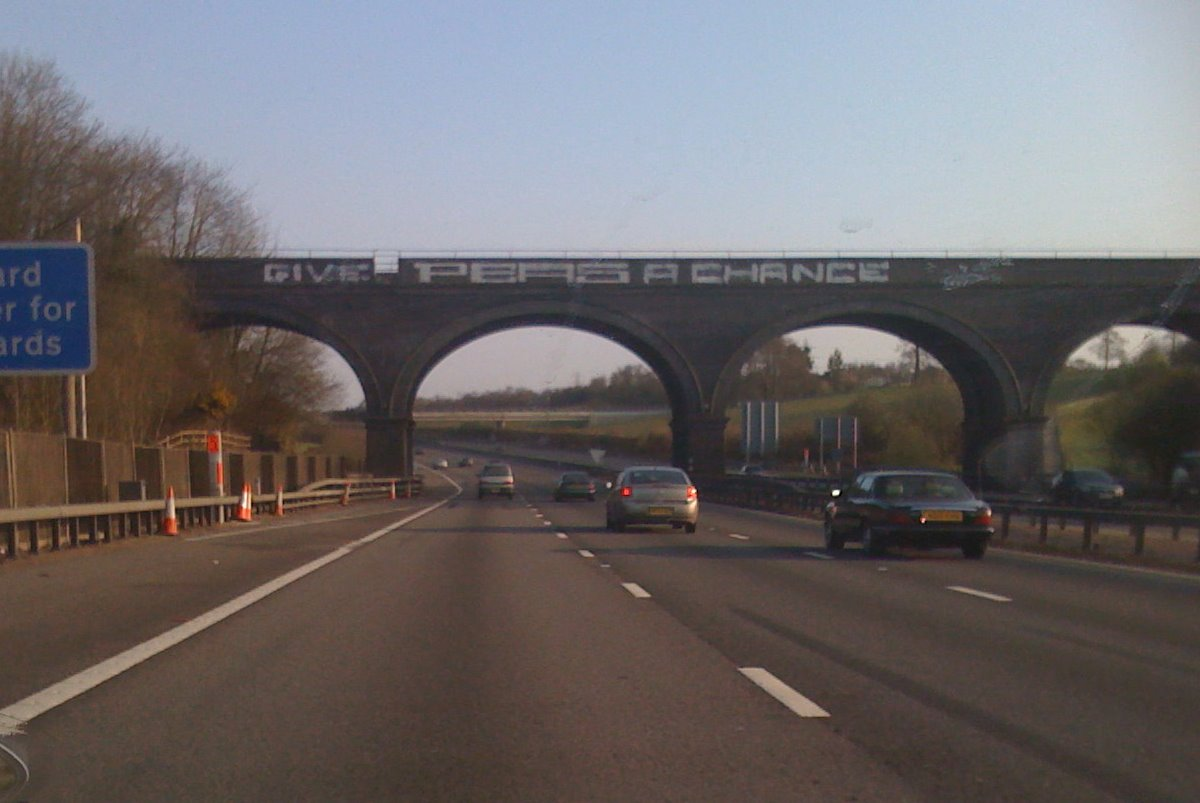
Driving along the M25, my son noticed some large graffiti on a bridge

Give peas a chance

Norman Junior III: 'Hmm - that's interesting 'Give peas a chance' - what does that mean ?'

Me: 'Well these days broccoli and green beans are getting really popular so these people just want us all to give peas a chance.'

17 seconds silence then both of us burst out in uncontrollable laughter.

Update: A picture is worth a thousand words (or peas).

picture

how I ditched Windows and embraced Gloria

After the Yak was shaved, we suddenly realised we had missed Football Focus and proceeded directly to the casting couch.

I fully appreciate that evaluating a Linux distribution is just 18 minutes and 32 seconds isn't probably sufficient to probably gain a full picture of the capabilities (or otherwise) of any software let alone a full blown operating system.

However, this superficial, high level, cursory review of all the distros below is useful as it solely focuses on the installation process, ease of use - both of which are key for prospective Linux users; particularly those people who might be looking to migrate, as in my case, from Windows.

Ubuntu (Hardy Heron)

As I have installed Ubuntu before, this was fairly straightforward. As I now had the full 80GB disk to play with, I allocated four 20GB partitions (root, home, apps and data).

The installation prompted for my timezone, keyboard type and was pretty quick. Once I rebooted, I was able to configure my Linksys wireless adapter and access the network. As I was using a Ubuntu version that was 12 months old, the system update utility soon notified me that I had over 800MB of available updates which I downloaded.

I was mortified to see the file transfer speeds was variable. Very variable - it ranged between 35-50 KB/sec and I also noticed the strength of the wireless signal was incredibly sporadic. On Windows, I would consistently get a signal strength between 75 and 95%. This computer was in the same room as the router with clear line of sight. I tried browsing the Web - the experience was painful, It was like the bad old days of 56KB dialup modems. I killed the system update which only improved the state of affairs slightly.

I then discovered that there was a Ubuntu mirror hosted by my ISP (Virgin Media) so reconfigured system update appropriately but still - no improvement. A ping to ubuntu.virginmedia.com took 4-5 seconds - yes seconds - not milliseconds. A ping from another Windows PC in the house took 20 ms. This was a major concern and might kill this experiment dead in its tracks with yet another Windows install beckoning.

Another of my concerns about adopting Linux full-time was printer support so I was delighted to see that drivers for my Canon IP4000 inkjet printer were included in a comprehensive list and printed a test page to prove it.

I imported photos, music and documents from my external USB Windows (NTFS) drive (which just needed to be mounted as 'root'). OpenOffice was able to read all my Word 2003 (and 2007) documents, Excel spreadsheets (and PDF's were also accessible using Document Viewer. I could view photos fine and I intended to use F-Spot to manage my photo library.

I was puzzled to see Evolution installed as the default email client so I installed Thunderbird and configured it to access Virgin Media email servers to send and receive email which worked fine.

Mint 5

Next, I installed another year old distribution - Mint 5 with the XFCE desktop interface (as opposed to the more common Gnome desktop which comes with Ubuntu).

Again, I simply reformatted the root partition and left the user data well alone. Mint looked impressive and has a slightly better utility to manage the wireless network. I was offered the chance to install 'Restricted' packages for proprietary software (e.g. the nVidia drivers, Flash). Open source purists may object but I accepted the invitation. I was rewarded by being able to play YouTube videos straight away with no fuss. I recall hunting around on Ubuntu for ages until I discovered the 'Restricted-Extras' package.

My main concern, the performance of the networking seemed unchanged (not wholly surprising as I believe Mint 5 is also based on Hardy Heron).

OpenSUSE

Next up was OpenSUSE which offered a slightly different administration interface and a green theme. This was another old CD and I was gratified and hugely relieved to see that OpenSUSE started loading system updates at a decent speed (500-705KB/sec). If all else failed, I could also revert to this distro although I wasn't entirely comfortable with the Nautilus File Manager after becoming accustomed to Gnome.

CrunchBang

CrunchBang was an interesting distro with a very different interface - Black background, very minimalist with a handy system dashboard (CPU, memory, disk utilisation) with all applications were available from a right-click menu.

I really liked CrunchBang as it appeared to have a small set of carefully selected and useful packages without being overly cluttered with megabytes of additional software. I prefer distros with a compact base where I can then install additional software as required.

If I was the sole user of the computer, I probably would have gone for CrunchBang as the monochrome, minimalist beauty of the desktop was appealing. However I doubted that Norma would be as comfortable with the cut-down interface and funereal colour scheme.

Fedora

I embarked on the now familiar installation process but once Fedora booted, I got a couple of disconcerting kernel diagnostic error messages when using Firefox and the automatic system update failed. There was also a worrying amount of blue - both during the installation process and on the default theme.

Debian

I dearly wanted to love Debian as I get the impression it is the distribution of choice for Linux aficionados and the technically minded crowd. Also, it had lots of red during the installation process which was very promising.

By now, I was getting bored of these time consuming full blown installations onto hard disk so thought I would evaluate the remaining distros simply using the Live CD approach and make allowances for any sluggish performance.

Unfortunately, Debian assume that Debian is the one and only and the best Linux distribution for you so you will obviously be installing the software on to the hard disk. For some reason, (as far as I could see) Debian don't see fit to provide a Live CD so people can choose to evaluate their software so, once again, I found myself performing a full blown installation.

Thus far, every single Linux distro had correctly auto-detected, configured my Linksys wireless adapter and managed to connect to my Linksys Router (running Tomato firmware) which was a pleasant surprise.

But not Debian. Oh no - although the WiFi card was recognised and I could enable wireless networking, see the available networks, enter my WPA credentials, Debian stubbornly refused to connect. There seemed to be a worrying assumption that all wireless networks used WEP and I felt I would have to do some serious digging to fix this and that somehow because I wasn't prepared to do so, I was unworthy to have the privilege of running Debian. Maybe it's some sort of Debian initiation ceremony. In any case, life's too short.

Arch

Arch is an interesting distro - it uses a character based installer. It reminded me of installing SUSE Linux way back in November 1999 when I had to recompile the kernel in order to get the mouse to work. Having been spoiled by all the GUI installers, I was tempted to give up on Arch there and then but proceeded until the partitioning utility decided that I had overlapping partitions (which was odd as every other distribution disagreed) and refused to go any further.

PCLinuxOS

Another short lived experiment - some obtuse failure meant I wasn't able to evaluate this distro.

Mandriva

Finally, I looked at Mandriva which was a great looking distro and very user friendly. I particularly liked the WiFi management utility. It also performed well (even booting off the Live CD).

Ubuntu 9.04

After all this effort, I still had a nagging doubt, that I was using dated versions of Ubuntu and Mint that were more than 12 months old. As there will have been a lot of updates and two full releases during this period, I decided to burned two more CD's for Ubuntu 9.04 (Jaunty) and Mint 7 (Gloria). My main reason was to see if the problems with my wireless Linksys card was resolved in the current stable version of Ubuntu and I also wanted to try the Gnome version of Mint.

Sure enough, support for the wireless USB adapter in Jaunty seemed much, much better and I was able to use the network normally and large downloads were now as quick as with Windows and Open SUSE.

Mint 7 (Gloria)

The Linux Mint distribution is based on Ubuntu which means you can also access the Ubuntu repositories which have a wealth of software packages.

I liked the look and feel of Mint 5 (using the smaller, lightweight XFCE desktop) and was similarly impressed by Mint 7 (using Gnome).

The software update process is slightly more refined on Mint than Ubuntu - updates are classified based on priority.

The clinching factor in Mint's favour was the new Mint Menu introduced in Mint 7 which offered a (I hesitate to say it), a start menu that would be reassuringly familiar to Windows users.

The desktop interface was simple, stylish and uncluttered and I liked the Mint management tools. Also, support for an Ubuntu based distro would be easily available.

So that was it - after a day of evaluating various Linux distributions, I decided to go for Mint 7. Now the boring bit was over with, it was time to sit back and enjoy my new computer.
Yak shaving

How I ditched Windows and embraced Linux - the prequel.

On Saturday morning, I thought it might be fun to install Linux on my home computer. A year ago, I had experimented with a few Live CDs and actually installed Ubuntu (not officially supported) followed by Oracle Enterprise Linux (officially supported) on my work laptop (Thinkpad T61). For various reasons, I subsequently had to reverse that change so I thought it might be worthwhile and interesting to install Ubuntu on my own computer (an ageing but reliable Dell 4500).

There was no problem with the computer, there was no problem with Windows XP. I am not a rabid, freedom loving, Microsoft hating individual. I just wanted to play around with Linux before 'Football Focus'.

As Norma also uses this computer (email, Web, Word documents), I decided to install Ubuntu as a dual-boot option alongside the existing stable Windows environment. This was firstly to evaluate whether Linux supported all my various peripherals and software requirements and secondly, let people continue to use Windows.

I dug out an old Ubuntu (8.04 - Hardy Heron) Live CD and started the installation process. When I came to partition the hard disk, I chose the 'Advanced' option so I could preserve all my existing data with 60GB allocated to Windows with another 20GB for Linux.

The re-partitioning failed; the 'ntfsresize' program helpfully told me with a typically cryptic Unix style error that '1028 is greater than 1024'. No matter - just get a Windows recovery disk and use the 'fdisk' utility to re-partition.

I booted from the Windows recovery CD. After a while I saw 'Files being copied for installation...' and wondered if I had missed the prompt to enter a DOS prompt enabling me to run fdisk. So, I hit 'Control-C' and rebooted. As I expected, my computer was now completely screwed as I had aborted during a full installation.

I sighed inwardly at my impetuousness and stupidity. I also blamed David Marsden who had helped sow this original tiny, little seed in my brain which was now turning into a long running saga and a complete waste of time and effort. Just to get back to where we had started. Almost.

This whole exercise was a classic example of Yak shaving as its finest. I was justifiably proud of myself.

I decided to postpone the Linux experiment to another day and simply re-installed Windows. One hour later, the machine was usable again. All my data was preserved so I took a full backup to an external USB drive. However, although none of my programs were installed and the Windows registry was pure and virginal, the 'Program Files' directory was horrendously cluttered with lots of unused folders.

Now I had a choice; dig out all those drivers and install disks for my Linksys Wireless Adapter, Canon printer, scanner, reinstall and reconfigure all the important software (Picasa, Firefox, Office, Outlook Express) so the machine would actually be usable again. Preferably before Norma got home and asked 'Can I just quickly check my email ?'

Alternatively, now I had a full backup, I could do the right thing, rebuild the computer completely and install Linux. So that's what I did. Only I didn't because I wasn't entirely sure Ubuntu was the best Linux distribution for me. Using the excellent, open source program InfraRecorder. I embarked on burning ISO images for all those distributions I was aware of, have seen recommended or reviewed recently.

I also perused DistroWatch to look for the most popular and used Dan Lynch's excellent, comprehensive, honest, balanced reviews of various Linux distributions.

The cast list, in no particular order:

how I ditched iTunes and started living with Foobar 2000

[Obligatory hat tip to How to stop defragmenting and start living. As an aside, if youre an Oracle DBA and havent read this whitepaper, please do so. Now.]

I have used various devices and software over my 76 years on this planet to listen to music:

  • Record player
  • Cassette player
  • Transistor radio
  • Ears
  • WinAmp
  • SonicStage
  • Windows Media Player

18 months ago, I finally caved in and bought an iTouch which I use a lot; mainly for listening to music and podcasts at airports.

I duly downloaded iTunes in order to get my music library onto the iTouch. I seem to remember that iTunes couldn't play Windows Media Player files which was slightly irritating. In any case, with a sense of a new beginning and a fresh, clean start, I re-ripped all my music CD's into Apple's AAC format, added the missing album artwork and synchronised my music, photos and applications to the iTouch.

Over the last 18 months, Apple proceeded to add more and more 'features' to iTunes which I don't want or need:

  • Tighter integration with the iTunes store
  • Genius - some sort of recommendation engine closely linked to the above
  • Jukebox
  • A default assumption that I also wanted to install additional software packages: QuickTime, Safari and Mobile Me.

When Apple recently released iTunes 9, I suddenly realised I was downloading 98.4MB - just to play music.

It slowly dawned on me that, whenever I started iTunes, my (admittedly ageing PC) was unusable for 40 seconds while iTunes initialised and CPU usage hit the roof.

I also realised that iTunes consumed a staggering 82MB of physical memory while playing a tune and this excessive memory consumption could increase to 134MB after connecting to the iTunes store.

I realised this was madness. Complete madness. Finally, I came to my senses and sought out alternative programs to replace the oversized, obese, bloated, multi-function and very slow iTunes.

I soon discovered Foobar 2000 which is a small, compact, lighweight audio player for Windows. I downloaded the program and was immediately struck by the size of the Foobar2000 distribution - 2,985KB, 2.81MB or 3,056,036 bytes to be precise.

This was already promising so I installed the program. I was pleasantly surprised that Foobar quickly imported my existing iTunes music library in its entirety and I was immediately able to play AAC encoded music. No need for additional plugins or codecs.

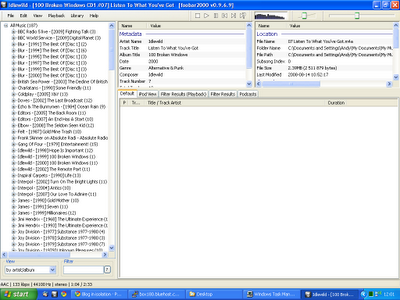
Foobar-Default-Player

I was also pleasantly surprised to see Foobar 2000 start up instantaneously (no delay or hourglass here) and consume a slightly more reeasonable 25,888KB of memory.

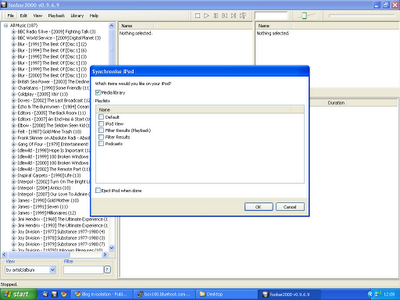
However, all of this was redundant unless I could actually synchronise music to the iTouch as using two completely separate programs to mange my music was self-defeating. So I downloaded a Foobar extension promisingly named 'Ipod Manager' and configured it.

For a complete fresh start, I took the rather brave (or stupid) move of completely resetting the iTouch to the factory settings which deleted all data and promptly hit 'Sync' in Foobar.

Foobar-iPodSync

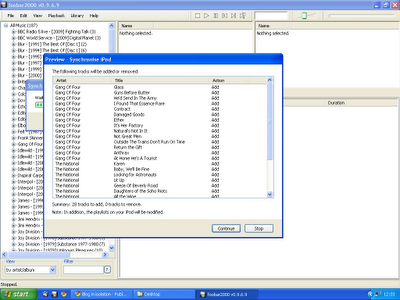
Although it took a while, synchronisation was 100% successful and I even got a 'Preview' of what songs were going to added/removed from the iTouch. This feature was incredibly useful as it gives you a chance to abort if your entire music library is going to be (unexpectedly) deleted.

Foobar-SyncPreview

There were some minor issues - not all album covers were displayed on the iTouch. I discovered that iTunes embeds album artwork in the AAC file. I preferred Foobar's method of adding the album art to the folder as 'Cover.jpg' so you have complete control over the images used. Later on, I actually removed the embedded artwork completely.

What else was missing ? I previously used iTunes to manage podcasts although this was never really satisfactory as iTunes had a weird concept of when the status of a podcast should be modified to 'Listened'. I rather thought listening from start to finish would qualify but Apple obviously disagreed and repeatedly kept sync'ing old content onto the iTouch.

Foobar had another useful extension called 'PodCatcher' which worked brilliantly. It would automatically download new podcasts (in the background) and I was able to easily sync to the iTouch simply by including the new 'Podcasts' category to the synchronisation list.

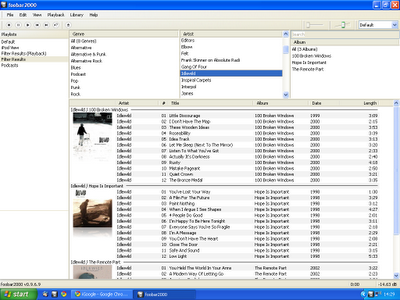
I wasn't completely happy with the default UI of Foobar so I used the Columns UI extension to make it look slightly more usable with the album artwork displayed.

Foobar-ColumnsUI

Foobar 2000 really is the complete music player - once you add the appropriate encoders, it can play virtually music in any format (FLAC, WMA, AAC, WavPack, Ogg Vorbis et al).

One great feature is that Foobar can perform conversion between the various formats. If I can summon up the energy to re-rip all my CD's yet again, I plan to rip all my music to a lossless format (FLAC) and Foobar would dynamically convert to the required lossy, compressed format during the sync to the iTouch.

Another couple of useful extensions for Foobar:

Although I am now blissfully almost iTunes free, I still need to use iTunes to update the software on the iTouch but I am delighted to say that is the sole extent of my iTunes usage. If I need to install any applications on the iTouch, I can do that directly from the iTouch.

It was particularly satisfying to copy my Foobar configuration and music library to my work laptop and completely remove iTunes from that computer.

trainspotting

uk

This morning I commuted, Reggie Perrin style, from my leafy suburb into the heart of London by train. Nothing too unusual about that.

After I paid for my daily travelcard, I took my place on an unusually crowded platform. An unusually crowded platform normally means only one thing. An lengthy delay inevitably followed by an overcrowded, late running train.

Sure enough, I soon gathered that there had been a fatality on this section of the railway line last night which caused major delays and now had a knock-on effect to this morning.

Naturally enough, I didn't hear this update from South West Train staff at the ticket booth or over the loudspeaker system. Instead I heard this important travel status update from a gentleman in a smart, grey suit (and not so smart white trainers) giving a blow by blow account to his secretary, Julie.

The gentleman spoke with such a loud, clear authoritative voice, I took the opportunity to thank him and suggested that he should get a job as a station announcer. Thankfully, the delays didn't inconvenience him that much as his first meeting was only at 10:30a.m - a catch up on the Q3 numbers with Brian and Phil.

A train arrived. It was already overcrowded with standing room only. Everyone attempted to pile on and most of them succeeded. I stood to one side and watched the melee with a few other commuters who didn't fancy standing for half an hour, uncomfortably positioned, face to face, desperately trying to avoid bodily contact with a young lady's breasts or worse, with your head positioned directly under someone's sweaty armpits.

Two minutes later, another train arrived. It was empty. Gleefully, we all boarded and took our choice of seats in the empty carriages.

The train set off - it didn't stop at New Malden and it didn't stop at Raynes Park. Even better, it turns out that we are on a fast service that only stops at Wimbledon, Clapham Junction and Vauxhall. Only this train didn't stop at Wimbledon. Nor did it stop at Earlsfield. It just sailed straight through both stations at great speed.

We also sailed straight past Clapham Junction (the busiest railway station in England) which was a surprise to a couple of people who had got up and stood by the doors, hoping to disembark. I spotted the earlier train packed to the rafters with yet more people trying to board, politely enquiring in a very British way: 'Could you possibly move down inside the carriage - possibly - at all ?'

Back on our train, no-one got off (even if they wanted to), no-one got on and no-one spoiled the blissfully quiet environment with their mobile phones and discarding their copies of 'Metro' so I was able to enjoy my high speed journey, listening to 'Boxer' by The National, in a virtually empty carriage.

As we approached the final destination (Waterloo) I was slightly worried I was sitting on a ghost train with no driver at the controls. Briefly, I wondered whether we were, in fact, even going to stop at Waterloo or simply plough straight on through the buffers into the station concourse, killing 34 people who were staring blankly at the 'Departures' board.

We arrived at Waterloo and thankfully stopped at platform 4. The journey which is normally timetabled to take 29 minutes and normally takes closer to 35 was over. In a new world record of 18 minutes.

three red rings of death

uk

Last Friday, Norman Junior III emerged from his bedroom, looked mournfully at me and pronounced in a quiet voice: Dad - Ive got the three red rings of death.

'Just have an aspirin and sit down quietly for a bit. Your mum will be back soon.'

'No Dad - not me. It's my XBox. It has the dreaded three red rings of death and won't boot.'

And so we embarked on a prolonged saga that involved a fruitless hunt for a two year old receipt that revealed plenty of interesting long lost items but not the actual receipt from Game.

Then I contacted Microsoft about the prospect of repairing a faulty console that was out of warranty and had subsequently fallen by £100 in price.

Much to my surprise, Microsoft told me that, for this specific hardware fault, the warranty had been extended to three years.

Microsoft checked the date of manufacture from the serial number, confirmed the box was eligible for the extended warranty and asked me to courier the faulty console, free of charge, back to their service centre in Frankfurt, near Germany for repair.

Microsoft sent me the necessary paperwork to ship the XBox to Germany using UPS. In turn, UPS sent me a package label, invoice, receipt and an export certificate.

I then booked an appointment with UPS to collect the games console at my convenience.

And all of this was accomplished without speaking to a single human being - except for Norman Junior III who is doing well and making a fine recovery after going 'Cold Turkey' from Call Of Duty.

It all sounds too good to be true...

Posterous leveraging Tumblr themes

I have experimented at various times with both Tumblr and Posterous which are hosted blog services. I tend to view them as useful services for a scrapbook style blog, a linkblog, a lifestream or even a fully fledged blog. If I was starting a blog today, I would probably use one or the other.

Posterous, in particular, has been getting a lot of coverage recently and I like the ease of use, the 'Post by Email' facility and continue to follow developments with interest.

I often describe Posterous as a 'blog for people who don't want a blog'. For example, Uncle Harry doesn't even know what a blog is and certainly doesn't need a blog. However, Uncle Harry is also perfectly capable of attaching photos of his sailing holiday in Greece and emailing them to his daughter, brother, wife, friends and colleagues. He could do this using Posterous and, lo and behold, without even knowing it, he now has a blog.

Posterous is a hosted blog service and until recently, was limited to a single, universal theme. This didn't particularly bother me as I quite liked the plain, minimal looking Posterous design.

I also felt the default Posterous theme actually helped to reinforce the Posterous 'brand'. Whenever you encountered a Posterous blog, you could immediately recognise it as such.

However, custom themes were a frequently requested enhancement by (potential) users so Posterous have finally added support for your own themes including pre-built designs, custom header images, full HTML customisation and interestingly, the use of Tumblr themes.

Now I suspect that supporting 'Tumblr' style themes out of the box was a master stroke. Posterous users immediately have a wealth of pre-built, attractive looking themes available off the shelf, free of charge.

Tumblr have even helpfully created a theme repository for Posterous users. You just find a Tumblr theme you like, copy and paste the HTML, dump it into Posterous and you're done.

You now have a lovely, stylish professional looking Posterous blog that looks identical to a lovely, stylish professional looking Tumblr blog.

I love the way TechCrunch uses the the term 'leverage' to describe the addition of this (almost seamless - some blocks are not supported) integration with the Tumblr theme engine.

Of course, all themes are just HTML and CSS but I can't help wondering whether the Tumblr development team and their own band of loyal and passionate users feel quite the same way about this wonderful, new addition from Posterous.

the curious case of Michael Shields

I believe Michael Shields is guilty of attempted murder by dropping a paving slab on a Bulgarian waiters head, putting him in a coma for 4 days.

I find it worrying and bizarre that Jack Straw sees fit to grant Michael Shields a 'Royal Pardon' in the light of an 'oral confession' made by another individual when Shields' parents just happened to pay him a visit.

Particularly, when Jack Straw was fully aware of this information when Shields returned to serve out the rest of his sentence in England back in 2006 and rejected an appeal as recently at 2 July 2009.

I believe that the Bulgarian authorities correctly discounted the written confession of Graham Sankey, made way back in July 2005 from the safety of England, on the condition that he didn't stand trial.

Michael Shields was involved in football related violence. He should be serving 15 years in jail for a vicious, unprovoked attack. He should not be feted in the press as a gallant returning war hero. He should not be allowed to attend another football match and should be the subject of a banning order that prevents him from travelling abroad.

But he won't. Michael Shields will be leading the team out at Liverpool's next home fixture and leading the singing of 'You'll never walk alone.'

I don't know how the friends and family of Martin Georgiev feel but I feel sick to my stomach and ashamed to be British.